Is your sitemap checker actually finding every broken link?
Most site owners never look twice at their sitemap. That single file guides how search engines crawl a website. A good sitemap checker catches errors before they hurt rankings.
Quick answer: A sitemap checker scans your XML sitemap for broken links, duplicate urls, and missing pages. It reports issues you can fix right away.
Introduction
A reliable sitemap checker saves hours of manual XML review. It scans every url listed in your sitemap file. It flags dead links, wrong formats, and blocked pages.

Search engines rely on sitemaps to discover new content. If your file has errors, crawlers waste time. That directly affects your crawl budget and indexing speed.
This guide walks through checking, validating, and extracting sitemap data. You will learn which tools work best. You will also learn how to fix common problems fast.
By the end, you will have a repeatable process. That process keeps your sitemap clean every month. It also supports stronger crawling and indexing over time.
What Is a Sitemap Checker
A sitemap checker is a tool that reads your XML sitemap file. It confirms every listed url is valid and reachable. It also checks the file follows proper XML structure.
Think of it as a health scan for your sitemap. It catches issues before Google ever sees them. Many teams pair this with a full technical SEO audit checklist. It adds deeper coverage across the whole site.
Without regular checks, sitemaps quietly rot. Pages get deleted but stay listed. New pages launch but never get added. A sitemap xml validator prevents both problems.
Why You Need to Check Your XML Sitemap
Search engines trust your sitemap as a map of your site. When that map is wrong, crawlers get confused. This can slow down how fast new pages get indexed.
Broken Links and Crawl Errors
Broken urls inside a sitemap waste crawler time. Every failed request is a missed opportunity. Running a sitemap checker weekly catches these fast.
Sites with heavy JavaScript SEO setups often generate broken sitemap entries. Rendered pages sometimes never make it into the file. That gap can hide entire sections of a site.
Duplicate URLs Waste Crawl Budget
Duplicate entries confuse search engines about which version matters. This often overlaps with poor canonical tags usage. Fixing both together improves crawl efficiency.
Large ecommerce catalogs are especially prone to duplication. Filtered category pages often get listed twice. A dedicated ecommerce SEO review helps catch this early.
Missing Pages Hurt Rankings
If a page is not in the sitemap, it may get missed. Deep pages, especially on large sites, need this safety net. Blog posts, service pages, and product pages all qualify.

Teams running a content audit often discover missing sitemap entries. Pairing content audits with sitemap checks closes gaps faster.
How a Sitemap XML Validator Works
A sitemap xml validator reads the raw XML code. It checks tags, encoding, and file size limits. Google requires sitemaps to follow a strict structure.
The validator confirms your file uses proper XML tags. It checks the file is not larger than fifty megabytes. It also confirms the file has fewer than fifty thousand urls.
You can view the official specification on the sitemaps protocol page. It lists exact formatting rules. Google also publishes detailed guidance through its own sitemap documentation.
Step by Step Guide to Validate Your Sitemap
Follow these steps for a clean, working sitemap file.
- Locate your sitemap url, usually at yoursite.com/sitemap.xml.
- Open it in a sitemap checker tool.
- Review the error report for broken links.
- Check for duplicate or blocked urls.
- Confirm the file size stays under limits.
- Resubmit the fixed file to Search Console.
This process takes less than twenty minutes for most sites. Larger sites with multiple sitemap files take longer. Enterprise teams often automate this using SEO automation tools.
Best Ways to Check Sitemap Google Indexing
Checking a sitemap checker google style means confirming indexing status directly. Google Search Console shows exactly which urls got indexed. It also flags urls that were submitted but skipped.
Open the Sitemaps report inside Search Console. Look for warnings next to your submitted file. Warnings often point to redirect chains or blocked resources.
Mobile friendliness also affects indexing speed. Sites without proper mobile first indexing setup may see delays. Pair sitemap checks with mobile audits for best results.
How to Use a Sitemap Extractor
A sitemap extractor pulls every url out of the XML file. This creates a clean, readable list. Marketers use this list for content audits and link building.
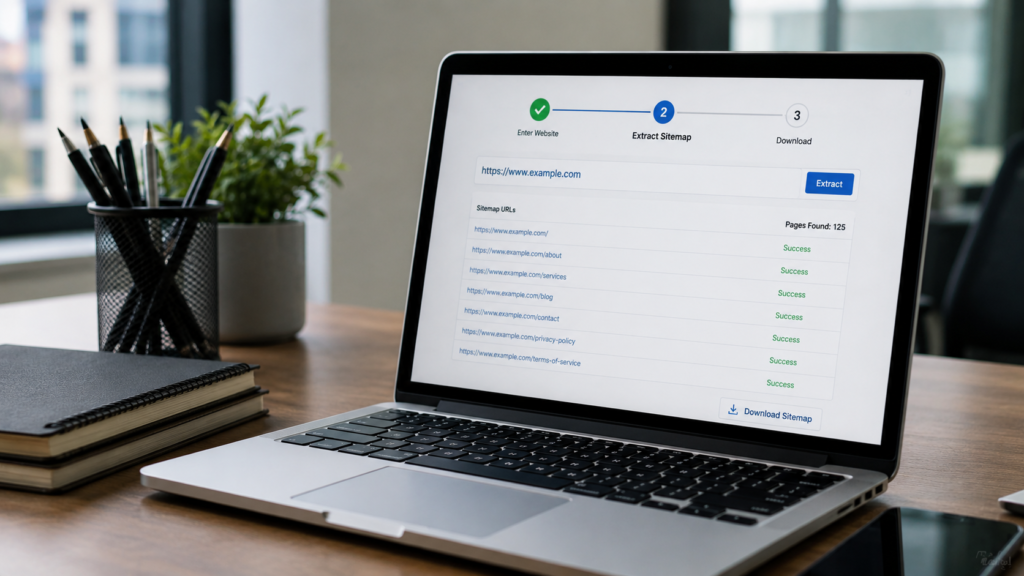
Extraction is useful before a full backlink audit as well. Knowing every live page helps target the right pages for outreach. It also supports smarter anchor text planning.
Why Extraction Helps Content Teams
Content teams often lose track of published pages. A sitemap url extractor solves this instantly. It becomes a master inventory of the entire site.
This inventory feeds directly into a content audit guide process. Teams can then spot thin, outdated, or duplicate pages faster.
Sitemap URL Extractor Tools Worth Trying
Several tools handle sitemap extraction well. Screaming Frog remains a favorite among technical SEO teams. You can explore its features on the Screaming Frog SEO Spider page.
Other lightweight browser tools also work for smaller sites. For larger enterprise sites, custom scripts often work faster. Many agencies build these into their AI SEO workflows.
Sitemap Checker Mistakes to Avoid
Some teams check a sitemap once and forget it. Others check it but never act on results. Both habits lead to slow, quiet ranking losses.
Avoid ignoring small warnings too. A single missing page rarely matters. A pattern of missing pages usually signals a bigger technical problem.
Do not rely on one tool alone. Different checkers catch different issues. Running two tools occasionally gives a more complete picture.
Sitemap Checker Tools Compared Briefly
Different tools suit different site sizes. Small blogs can use free browser based checkers. Enterprise sites need something more robust.
Google’s own Search Console remains the baseline for every site. It confirms exactly what Google sees. Third party tools then add extra detail Google does not show.
Desktop crawlers like the Screaming Frog SEO Spider handle huge sitemaps well. They run locally and process files fast. Cloud based tools work better for teams needing shared reports.
Some teams also reference the W3C XML specification when building custom validation scripts. This ensures full compliance with underlying XML standards.
Building a Sitemap Checking Routine
A one time check is not enough. Sites change constantly, so sitemaps need regular attention. Building a simple routine keeps everything under control.

Start with a monthly calendar reminder. Run your sitemap checker and review the report. Fix critical errors the same day you find them.
After major site changes, always run a fresh check. Launching new pages, migrating platforms, or redesigning navigation all affect sitemaps. Skipping this step often causes indexing gaps later.
Document what you find each time. Tracking recurring errors helps identify root causes. This might point to a broken content management workflow or a plugin conflict.
Assign clear ownership for this task. Someone on your team, whether marketing or development, should own sitemap health. Without ownership, checks often get skipped entirely.
Common Sitemap Errors and How to Fix Them
Most sitemap problems fall into a few categories. Knowing them speeds up your fixing process.
- Broken urls returning a 404 error
- Redirected urls instead of final destinations
- Missing closing XML tags
- Incorrect character encoding
- Urls blocked by robots.txt
- Sitemap file exceeding size limits
Each of these can be caught by a sitemap checker in seconds. Manual review would take hours on large sites.
Fixing Blocked URL Errors
Blocked urls usually come from robots.txt conflicts. Confirm the blocked page should actually be included. Sometimes it should be removed instead of unblocked.
Fixing Redirect Chain Errors
Sitemaps should only list final destination urls. Redirects waste crawl budget and confuse indexing. This connects closely to proper canonical url practices.
Sitemap Finder Tips for Large Websites
Some sites do not clearly link their sitemap location. A sitemap finder helps locate the file quickly. Checking robots.txt is usually the fastest starting point.

Most sitemaps sit at a predictable path. If not listed there, check the robots.txt file directly. It almost always references the sitemap location.
Large sites with pagination SEO challenges often split sitemaps into multiple files. A sitemap index file then links them together. A good sitemap finder handles nested files automatically.
Sitemap Checker vs Manual Review
Manual review means opening the XML file by hand. It works for tiny sites with few pages. It quickly becomes impossible past a few hundred urls.
A sitemap checker automates the entire process. It scans thousands of urls in minutes. It also catches patterns humans easily miss.
Manual review still has a place. It helps confirm automated results make sense. Pairing both methods gives the most reliable outcome.
Reading Your Sitemap Checker Report
Most tools group errors by type and severity. Critical errors need fixing right away. Minor warnings can often wait for the next update.
Look closely at status codes returned for each url. A 200 status means the page loaded fine. A 404 or 500 status needs immediate attention.
Redirect codes like 301 also deserve review. Sitemaps should list final destinations only. Update these entries instead of leaving redirects in place.
How Sitemaps Connect to Robots.txt
Your robots.txt file often references your sitemap location. Search engines check this file first when crawling. A missing reference can slow sitemap discovery.
Make sure robots.txt does not block important pages. Blocked pages should never appear inside your sitemap. This mismatch confuses crawlers and wastes crawl budget.
Reviewing robots.txt alongside your crawl budget strategy improves overall crawl health. Both files should always tell the same story.
Sitemap Errors That Hurt Local and Industry SEO
Local businesses often manage multiple location pages. Each location needs a correct sitemap entry. Missing entries mean missed visibility in local search.

Industry specific sites face similar risks. A logistics and transportation website often has many service area pages. Healthcare sites like those covered in SEO for hospitals face the same challenge.
International sites add another layer of complexity. Language and region variants each need proper listing. An international SEO strategy guide explains how to structure these sitemaps correctly.
Sitemap Checker for Ecommerce and Enterprise Sites
Large catalogs create unique sitemap challenges. Thousands of product pages change daily. Automated checks become essential at this scale.
Enterprise teams often integrate sitemap checks into broader enterprise SEO strategies. This keeps massive product catalogs clean and current.
Multi location businesses face similar challenges. A multi location SEO guide often recommends separate sitemaps per region. This keeps local pages easier to manage and check.
Franchise businesses benefit too. A structured franchise SEO approach often includes sitemap segmentation by location. This prevents one massive, hard to manage file.
Sitemap Checker Frequency and Performance Signals
Site speed and crawl health are closely linked. Slow pages sometimes time out during sitemap crawls. A core web vitals guide can help identify slow pages first.
Regular audits keep everything aligned over time. Combine sitemap checks with a full SEO audit process each quarter. This catches issues before they compound.
On page details matter too. Correct meta title length matters too. So does proper image alt text. Clean sitemaps and clean on page SEO work together.
Tracking results afterward closes the loop. Analytics and reporting dashboards show whether indexing actually improved. This confirms your sitemap fixes made a real difference.
Choosing the Right Sitemap Checker Google Trusts
Not every tool gives accurate results. Choose a sitemap checker that follows the official protocol closely. It should flag every error type listed earlier.

Look for tools that also support schema validation. Structured data increasingly matters for visibility. A schema markup guide can help you understand this connection.
Site speed also plays a role in crawl efficiency. Slow servers can time out during sitemap crawls. A site speed optimization guide helps reduce this risk.
For teams managing everything manually, this gets overwhelming fast. Many businesses turn to professional SEO services instead. Others rely on a full technical SEO partner for ongoing monitoring.
If your site was recently rebuilt, sitemap errors are common. A fresh website design project often needs a new sitemap submission. The same applies after any custom website development project.
WordPress sites have their own quirks too. A WordPress website development team can configure automatic sitemap updates. This removes manual work entirely going forward.
Regularly checking your progress matters just as much as fixing errors. Reviewing how your SEO is working alongside sitemap health gives a complete picture.
FAQs
A sitemap checker scans your XML sitemap for broken links, duplicate urls, missing pages, and formatting errors, then reports the issues you can fix to keep crawling efficient and accurate.
Most sites should run a sitemap checker monthly. Ecommerce or fast changing sites benefit from weekly checks instead. This catches broken product pages and expired listings before search engines notice.
Google does not use sitemaps directly for rankings. It uses them to discover and crawl pages faster. A clean sitemap simply helps important pages get indexed sooner, supporting overall visibility.
Can I extract urls from any sitemap?
Yes, most sitemap extractor tools work on any publicly accessible XML sitemap file. Enter the sitemap url into the tool. It will return a clean, organized list of every page.
Search engines may skip broken urls or waste crawl budget on dead links. Some pages might get indexed slower than expected. Fixing errors keeps your site fully and efficiently crawlable.
Conclusion
A sitemap checker is a small tool with a big impact. It keeps your XML file accurate and crawlable. Regular checks prevent wasted crawl budget and missed pages.
Small errors compound quickly on larger websites. A single broken url can multiply across thousands of pages. Catching these issues early saves time and protects rankings.
Whether you run a small blog or a large enterprise site, validation matters. Extraction tools give you full visibility into every published page. Combine both practices for a healthier, more indexable website.
If sitemap management feels overwhelming, professional help exists. Explore local SEO services for hands on support. A full ecommerce SEO company can help larger catalogs too. You can also browse the full blog for more technical SEO guides.

About the author
Ujjwal Kumawat
I specialize in SEO, website development, Google Ads and online business growth strategies. Through my blogs, I share practical insights, marketing tips and proven strategies to help businesses improve their online visibility, generate more leads and grow faster in the digital space.