Have you ever uploaded a beautiful image to your website and wondered whether Google can truly understand it through the Alt Text on Image?
The answer depends entirely on your alt text. Every image on the web is invisible to search engines without it. Alt text on image is the single most important attribute connecting your visuals to search rankings, accessibility compliance, and user experience.
Whether you manage an eCommerce store, a blog, or a business website, getting image alt text right is non-negotiable for SEO performance in 2026.
What is Image Alt Text?
Alt text on image, short for alternative text, is a written description added to an HTML image tag that tells search engines, screen readers, and browsers what an image contains. When an image fails to load, the alt text appears in its place so users still understand the content.
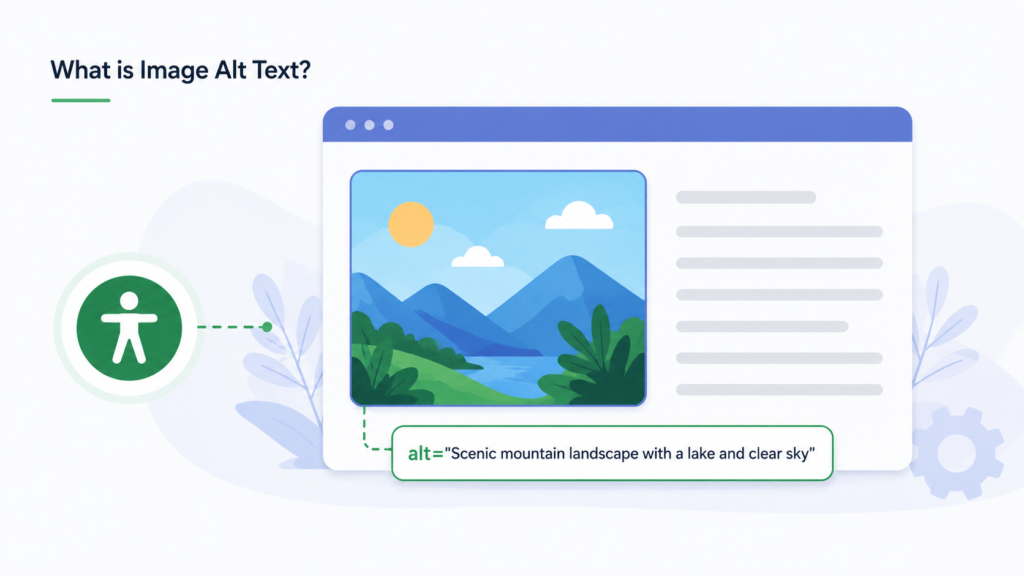
Here is what alt text looks like in HTML using the img tag alt attribute:
html
<img src="red-running-shoes.jpg" alt="Red running shoes for women on white background" />
The alt attribute sits inside the img tag and carries the descriptive text. Without it, an image is completely meaningless to Google, Bing, and any assistive technology a visually impaired user might rely on.
Alt text serves three distinct purposes simultaneously. It provides accessibility for users who cannot see images. It gives search engines the context needed to index and rank images correctly. And it displays as fallback text when images fail to load due to slow connections or broken file paths.
If you are serious about SEO services for your website, treating every image without alt text as a missed ranking opportunity is the right mindset.
The SEO and Accessibility Case for Optimising Your Images
Search engines are text-based systems. They cannot look at a photograph and understand its content the way a human does. Alt text bridges this gap by giving Google a readable description of every image on your page.
When Google indexes a page, it reads the alt attributes of every image alongside the surrounding text content. This means well-written image alt text SEO contributes directly to:
Keyword relevance signals. Alt text containing your target keywords reinforces the topical relevance of the page. According to Google’s image SEO documentation, Google uses it as a signal alongside title tags, headings, and body copy to understand and index images.
Google Image Search rankings. Images with descriptive, keyword-relevant alt text rank in Google Image Search. This is a significant additional traffic source that most websites leave completely untapped.
Core Web Vitals and page experience. Images with defined dimensions and proper alt attributes contribute to a stable layout, supporting your Core Web Vitals scores by reducing Cumulative Layout Shift.
Accessibility and legal compliance. Accessibility and legal compliance. WCAG guidelines require descriptive alt text on meaningful images. Major brands have faced legal action for non-compliance. WCAG 2.2 Success Criterion 1.1.1 (Non-text Content) requires descriptive alt text on meaningful images. In the United States, this requirement is frequently enforced through the Americans with Disabilities Act (ADA); in the European Union, the European Accessibility Act (EAA) introduced similar enforceable requirements. Major brands have faced legal action for non-compliance in both jurisdictions. Accessibility is no longer optional.
AI search visibility. As AI-powered search systems evaluate page quality, accessible and well-structured content, including properly tagged images, receives higher consideration for citation and surfacing.
For any website investing in social media marketing or content-driven growth, every image published without alt text is both a missed SEO opportunity and an accessibility failure.
Understanding the HTML Structure Behind Image Descriptions
The img tag alt attribute is part of the standard HTML specification. Every image element on a webpage can and should carry an alt attribute. The syntax is straightforward:
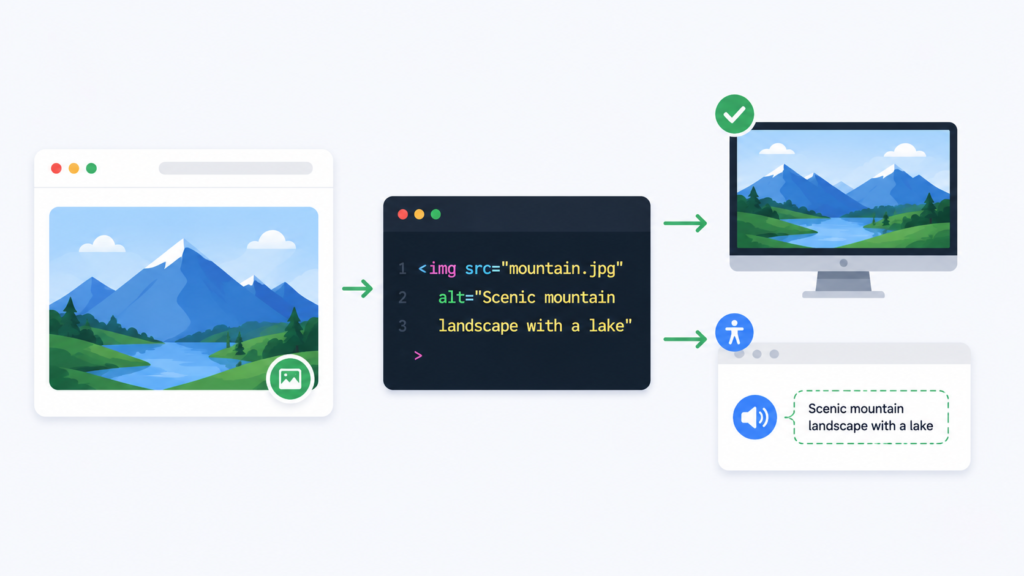
html
<img src="image-filename.jpg" alt="Your descriptive alt text here" />
Key rules for the img tag alt attribute:
The alt attribute must be present on every image element. Leaving it out entirely is an HTML error. If an image is purely decorative and adds no informational value, use an empty alt attribute like alt="" rather than omitting it. This tells screen readers to skip the image without causing an accessibility failure.
For images that carry meaning, the alt text should describe the image content accurately and concisely. It should include relevant keywords where they fit naturally but should never be stuffed with keywords in a way that reads unnaturally.
Alt text has no official character limit, but search engines and screen readers work best with descriptions between 50 and 125 characters. Longer descriptions may be truncated by some assistive technologies.
Image Alt Text SEO Best Practices
Writing effective image alt text is a skill that combines descriptive writing with keyword strategy. These best practices are what separate pages that rank in image search from those that remain invisible.
Be specific and descriptive. Generic alt text like “image” or “photo” tells Google nothing. Describe exactly what the image shows, including relevant details like colour, action, setting, or subject.
Include your target keyword naturally. If the image is on a page targeting a specific keyword, work that keyword into the alt text where it fits naturally. Do not force keywords into alt text that does not contextually match the image content.
Write for humans first. The best image alt text reads naturally when spoken aloud by a screen reader. If it sounds like a list of keywords, rewrite it.
Match alt text to page context. Alt text should reinforce the content of the page it appears on. An image of a laptop on a custom website development page should have alt text referencing web development, not generic computing.
Keep it concise. Aim for one to two clear sentences. Avoid starting with phrases like “image of” or “picture of” since screen readers already announce the element as an image.
Use unique alt text for every image. Just as duplicate page titles hurt SEO, duplicate alt text across multiple images on the same page dilutes its effectiveness.
Never keyword stuff. Writing alt text like “red shoes buy red shoes online cheap red shoes” is a manipulative practice that Google penalises. Write naturally.
These principles apply whether you are optimising a homepage hero image, a product photo, an infographic, or a blog illustration. Every image is an opportunity to reinforce relevance and support rankings.
Image Alt Text Examples: Good vs Bad
Seeing the difference between weak and strong alt text makes the principles concrete.
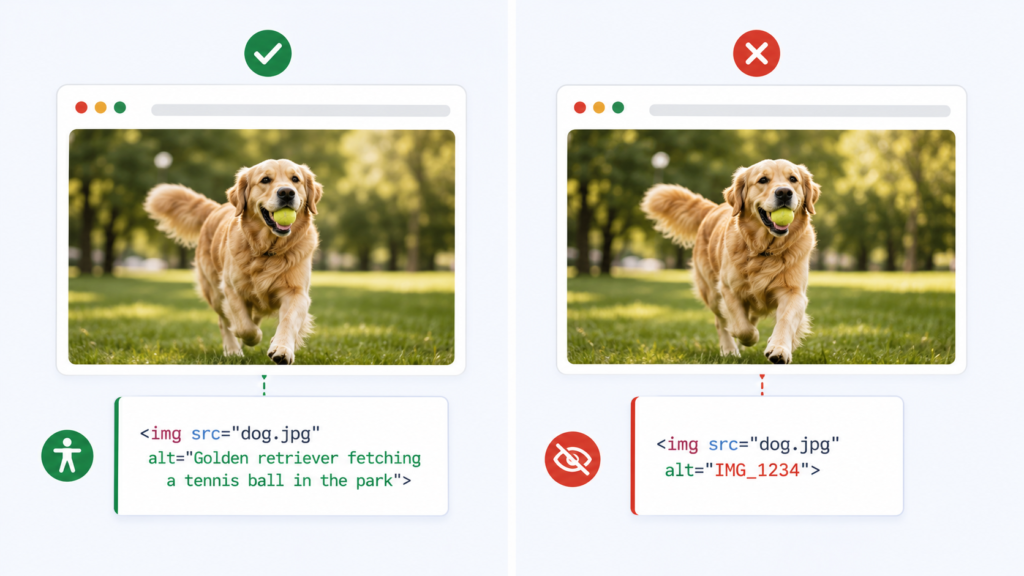
Product image on an eCommerce page:
Bad:
alt="shoes"Good:alt="Women's red leather running shoes with cushioned sole"
Blog post illustration:
Bad:
alt="graph"Good:alt="Bar graph showing 40 percent increase in organic traffic after image alt text optimisation"
Team photo on an About page:
Bad:
alt="team"Good:alt="Adclickr digital marketing team at Jaipur office"
Decorative background image:
Bad:
alt="background"or no alt attribute at all Good:alt=""(empty alt, telling screen readers to skip it)
Infographic:
Bad:
alt="infographic"Good:alt="Step by step infographic showing how to write image alt text for SEO in five steps"
Notice that every strong example is specific, accurate to the image content, and includes relevant descriptive terms without forcing keywords unnaturally. This is the standard every image on your website should meet.
How to Write Alt Text for Different Image Types
Different image types require slightly different approaches to alt text.

Product images should describe the product clearly including colour, material, key features, and any distinguishing characteristics. For eCommerce SEO, product image alt text directly supports both Google Shopping visibility and image search rankings.
Infographics and data visualisations should have alt text summarising the key insight or conclusion the graphic communicates. A long infographic may benefit from supplementary text content on the page since alt text alone cannot convey complex data fully.
Blog and editorial images should describe what the image shows and how it relates to the article topic. If an image illustrates a concept discussed in the text, the alt text should reflect that concept.
Logo images should include the brand or company name. The alt text for a logo is typically just the brand name, for example alt="Adclickr digital marketing agency logo".
Button images should describe the action the button performs, for example alt="Subscribe to newsletter button".
Screenshot images should describe what the screenshot shows and why it is relevant, for example alt="Google Search Console coverage report showing 847 indexed pages".
Image Alt Text for eCommerce
eCommerce websites have more images than almost any other site type, and they also have the most to gain from rigorous image alt text SEO. Product pages with optimised alt text rank in Google Image Search, which drives purchase-intent traffic that converts at high rates. Pairing this with correctly implemented product schema markup gives Google additional structured context about the same image.

For eCommerce development projects, alt text should be built into the product data model from the beginning rather than added retrospectively. Every product image should carry unique alt text describing the specific product variation shown, including colour, size, material, and any other relevant attribute.
Category page banner images, lifestyle photography, and feature images should all carry descriptive alt text aligned with the category keyword target. A category page for women’s running shoes should have images with alt text referencing women’s running shoes specifically, not generic sportswear.
For large catalogues with thousands of product images, consider using a systematic naming convention that generates descriptive alt text automatically from product attribute data, combined with manual review for hero images and top-performing product pages.
Image File Format and Naming for SEO
File Naming
Before an image even loads, its file name gives Google an early signal about its content. Descriptive, hyphenated file names like red-leather-running-shoes.webp tell search engines exactly what the image shows before they even read the alt text. Meaningless names like IMG_4521.jpg or photo-1.png waste this opportunity entirely. Always rename image files with clear, keyword-relevant, hyphen-separated words that describe the actual content, and keep them lowercase for consistency across your site.
File Format
WebP has become the baseline format for image SEO because it strikes the best balance between image quality and file size. Compared to older formats like JPEG and PNG, WebP files are significantly smaller without a noticeable drop in visual quality, which means faster page load times and better Core Web Vitals scores. Faster-loading images improve user experience and give Google another reason to favour your pages. AVIF is emerging as an even more efficient alternative, but WebP remains the safer default due to broader browser support.
Image Sitemaps
Images that load dynamically through JavaScript are not always visible to Google’s crawlers during a standard page crawl, which means they can be missed entirely during indexing. To make sure these images get discovered and indexed, include them in an image sitemap. An image sitemap lists image URLs directly, alongside your page URLs, giving Google a clear map to every image on your site regardless of how it was loaded. This is especially important for eCommerce sites and JavaScript-heavy websites where product images often render client-side.
Alt Text on Social Media Including Twitter
Alt text is not only a web SEO concern. Major social media platforms now support image alt text, and using it correctly improves both accessibility and discoverability across channels.
Twitter image alt text allows you to add descriptive text to images shared on X (formerly Twitter). When composing a tweet with an image, click the alt text button before publishing and add a description of up to 1000 characters. Twitter image alt text helps visually impaired users understand your images and signals content quality to Twitter’s own ranking systems.
Instagram supports alt text on images through the Advanced Settings option when posting. Writing descriptive Instagram image alt text improves discoverability within Instagram’s search and recommendation features. For businesses investing in Instagram advertising, properly tagged images perform better in accessibility audits and user engagement.
Facebook automatically generates alt text for images using AI, but the automatic descriptions are often inaccurate. Manually editing Facebook image alt text through the image edit options gives you control over the description and ensures accuracy. For a deeper, platform-specific breakdown of writing alt text on Instagram and Facebook specifically, see our dedicated guide to alt text for Instagram and Facebook..
Across all platforms, consistent and descriptive alt text supports your broader social media management strategy by making content accessible to the widest possible audience.
How to Check Image Alt Text on Any Website
Knowing how to check image alt text is an essential skill for SEO audits and content reviews.
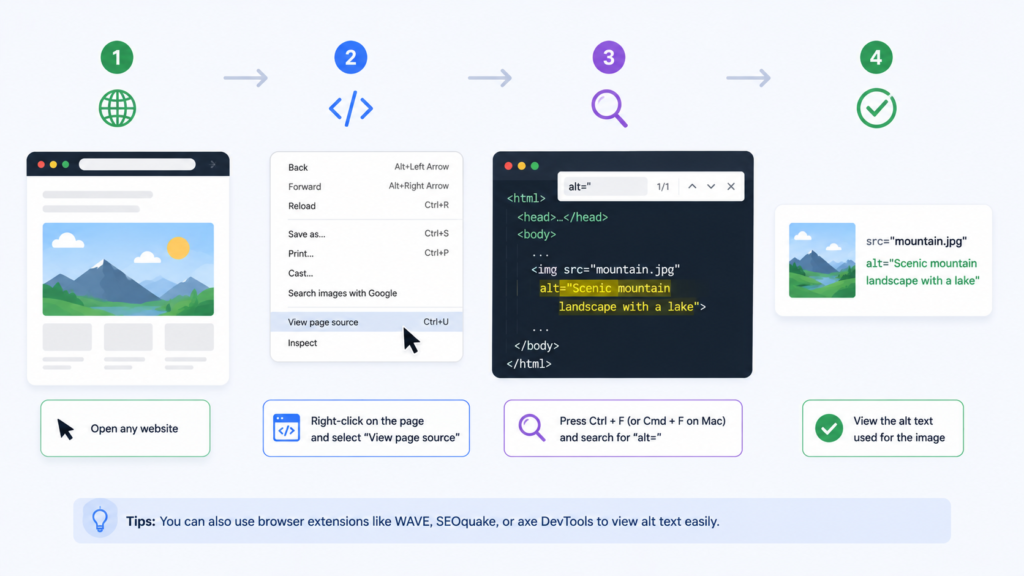
Method 1: View page source. Right-click anywhere on a page and select View Page Source. Use Ctrl+F to search for “alt=” and review all alt attributes on the page. This shows the raw HTML alt text for every image.
Method 2: Browser Inspect tool. Right-click on any specific image and select Inspect. The Elements panel highlights the img tag for that image, showing the alt attribute value directly.
Method 3: Image alt text checker tools. Several browser extensions and online tools function as image alt tag checkers, scanning entire pages and reporting which images have missing, empty, or duplicate alt text. These are the most efficient option for auditing large pages or running regular checks across a site.
Method 4: Google Search Console. While GSC does not directly report alt text content, the Coverage and Page Experience reports highlight pages with accessibility and indexing issues that often correlate with missing alt attributes. Reviewing this alongside a full technical SEO audit checklist ensures alt text gaps are caught alongside other on-page issues.
Running a regular image alt text audit as part of your technical SEO audit checklist ensures no images go untagged as new content is published.
Image Alt text Tag Generator and Tools
Several tools function as image alt tag generators or image alternative text generators, helping you produce descriptive alt text at scale.
AI-powered image alt text generators analyse the visual content of an uploaded image and suggest descriptive alt text automatically. These tools use computer vision to identify objects, scenes, colours, and subjects within images. While AI-generated suggestions are a useful starting point, always review and edit them to ensure accuracy, keyword relevance, and natural language quality.
CMS integrations for platforms like WordPress offer plugins that integrate AI alt text generation directly into the media upload workflow. When an image is uploaded, the plugin analyses it and populates the alt text field automatically.
Spreadsheet-based bulk generation is suitable for eCommerce catalogues where product attribute data can be combined into descriptive alt text strings programmatically, then imported back into the platform.
For websites built through professional website design services, ensuring alt text fields are included in the content management workflow from the design phase is far more efficient than retrospective auditing.
Common image Alt Text Mistakes to Avoid
Leaving alt text blank on meaningful images. Empty alt text is appropriate only for decorative images. Every image that contributes informational value must have a description.
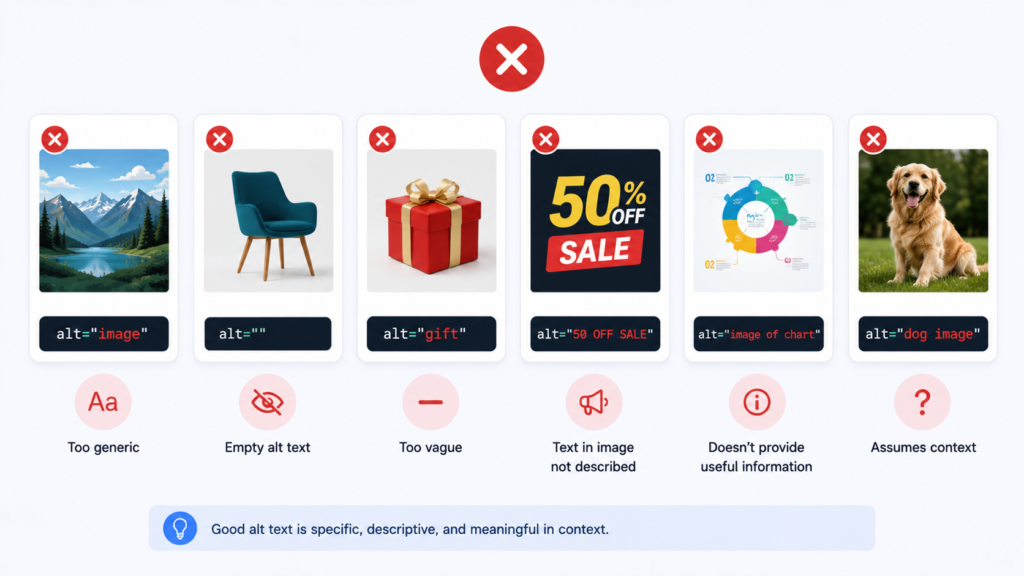
Keyword stuffing in alt attributes. Repeating target keywords multiple times within a single alt text attribute is a manipulative practice. Write naturally.
Using file names as alt text. Alt text like “IMG_4523.jpg” or “photo-1.png” provides zero descriptive value and is one of the most common errors found during SEO audits.
Writing identical alt text for multiple images. Each image on a page should have unique alt text describing its specific content.
Describing the image format instead of the content. “A JPEG image” tells search engines and users nothing. Describe what the image shows.
Ignoring images added through CSS. Background images added through CSS rather than HTML img tags cannot carry alt attributes. Ensure meaningful content images are in HTML, not CSS backgrounds.
Not updating alt text after image replacement. When an image is swapped for a new one, the alt text must be updated to match the new visual content.
Avoiding these mistakes is part of a clean data-driven marketing approach where every on-page element is intentional and measurable.
Frequently Asked Questions
Image alt text is a written description added to the HTML img tag alt attribute. It tells search engines and screen readers what an image contains. It improves SEO accordingly accessibility, and provides fallback text when images fail to load.
Write a specific, accurate description of what the image shows. Include a relevant keyword naturally if it fits. Keep it between 50 and 125 characters. Avoid starting with “image of” and never stuff keywords unnaturally into the description.
Yes—Google confirms alt text as a ranking signal for regular and Image Search; descriptive alt text outperforms missing or empty attributes.
Right-click an image and select Inspect, or view page source and search “alt=” to review it; audit tools automate this site-wide.
No decorative images should use an empty alt="" attribute so screen readers skip them without creating accessibility or crawling issues.
Alt text is invisible HTML describing an image for SEO and accessibility; a caption is visible text adding context or credit.
Both help SEO by improving page speed. AVIF offers better compression and quality but has less universal support; WebP is more widely supported. Use AVIF with a WebP/JPEG fallback for the best balance of performance and compatibility.
In the US, the Americans with Disabilities Act (ADA) is commonly cited; in the EU, the European Accessibility Act (EAA) sets enforceable requirements. Both reference WCAG’s non-text content standard.
Conclusion
Alt text on image is one of the simplest yet most consistently overlooked elements of on-page SEO. Every image on your website without descriptive alt text is a missed opportunity to communicate with Google, support visually impaired users, and capture additional traffic from image search.
The standard is clear: every meaningful image needs a specific, accurate, naturally written alt text description that includes relevant keywords where they fit. Decorative images need an empty alt attribute. No image should be left without any alt attribute at all.
Whether you are managing a growing eCommerce catalogue, a content-heavy blog, or a service business website, applying the image alt text SEO practices in this guide will improve your search visibility, accessibility compliance, and overall page quality. Start by auditing your existing images, fix any missing or weak alt attributes, and build a workflow that ensures every future image is tagged correctly from upload.
For expert help implementing image optimisation as part of a complete SEO strategy, or to learn how alt text fits into your broader digital marketing strategies, explore our full range of services.

About the author
Ujjwal Kumawat
I specialize in SEO, website development, Google Ads and online business growth strategies. Through my blogs, I share practical insights, marketing tips and proven strategies to help businesses improve their online visibility, generate more leads and grow faster in the digital space.