According to Google Search Central, 53% of mobile users abandon a site that takes longer than three seconds to load. That single statistic defines the stakes. But slow speed is only one of dozens of technical factors that determine whether your website ranks or disappears entirely. This is the complete guide to technical SEO: what it is, why it matters, and exactly how to fix every issue that holds your website back.
What Is Technical SEO?
Technical SEO is the process of optimising a website’s infrastructure its architecture, server configuration, code, and crawlability so that search engines and AI systems can access, render, understand, and index its content efficiently.
Unlike content SEO, which focuses on keywords and copy, and off-page SEO, which focuses on backlinks, technical SEO addresses the foundational layer that makes all other SEO efforts possible. If search engines cannot crawl and index your pages, your content is invisible regardless of how good it is.
Technical SEO covers three core areas:
- Search engine discoverability ensuring crawlers can find and access every important page
- Website performance speed, stability, and interactivity signals that directly influence rankings
- Structured data and semantic clarity helping search engines and AI systems understand what your content means, not just what it says
In short: Technical SEO is the foundation. Content and links are built on top of it. Without a solid technical foundation, everything else underperforms.
Why Is Technical SEO Important?
Technical SEO determines whether search engines and increasingly, AI systems like ChatGPT, Google AI Overviews, and Microsoft Copilot can reach, interpret, and cite your content.
Without a solid technical foundation:
- Your best content won’t appear in search results, no matter how valuable it is
- AI-generated answers won’t cite your pages, because they can’t access or interpret them
- Users encounter slow load times, broken pages, and confusing navigation and leave
- Revenue and conversions suffer as a direct result
For eCommerce sites the stakes are even higher. A user landing on a 404 page while searching for a product doesn’t just bounce they take their purchase elsewhere.
As a pillar page for technical SEO, this guide establishes the full framework. Deeper dives into specific topics are available in our spoke guides:
- Core Web Vitals complete metric-by-metric optimisation guide
- Site speed optimisation faster pages, more revenue
- Technical SEO audit checklist step-by-step audit process
- Structured data implementation schema markup complete guide
How Search Engines Crawl and Index Your Site
Understanding the crawl-index-rank pipeline is essential before attempting to fix technical problems.
Crawling: Search engine bots (Googlebot, Bingbot, GPTBot) follow links from pages they already know about to discover new pages.
Rendering: The crawler processes HTML and executes JavaScript (where supported) to see what the page actually displays to users.
Indexing: Crawled and rendered pages are analyzed and stored in the search engine’s database.
Ranking: Indexed pages are evaluated against hundreds of signals including technical performance to determine their position in search results.
A failure at any step prevents ranking. A page that is blocked from crawling cannot be indexed. A page that is indexed but loads in 8 seconds will rank below a faster competitor with equivalent content.
Technical SEO vs. On-Page SEO vs. Content SEO
| Dimension | Technical SEO | On-Page SEO | Content SEO |
|---|---|---|---|
| Focus | Site infrastructure and architecture | Individual page elements | Content quality and relevance |
| Key elements | Crawlability, speed, schema, HTTPS | Title tags, headings, internal links | Keywords, depth, topical authority |
| Primary goal | Make the site accessible and fast for search engines | Optimise pages for target queries | Attract and satisfy search intent |
| Tools | Search Console, PageSpeed Insights, Site Audit | Yoast, SEMrush On-Page | Ahrefs, SurferSEO, Content Genius |
All three work together. Technical SEO is the prerequisite it ensures on-page and content efforts can actually be discovered and ranked.
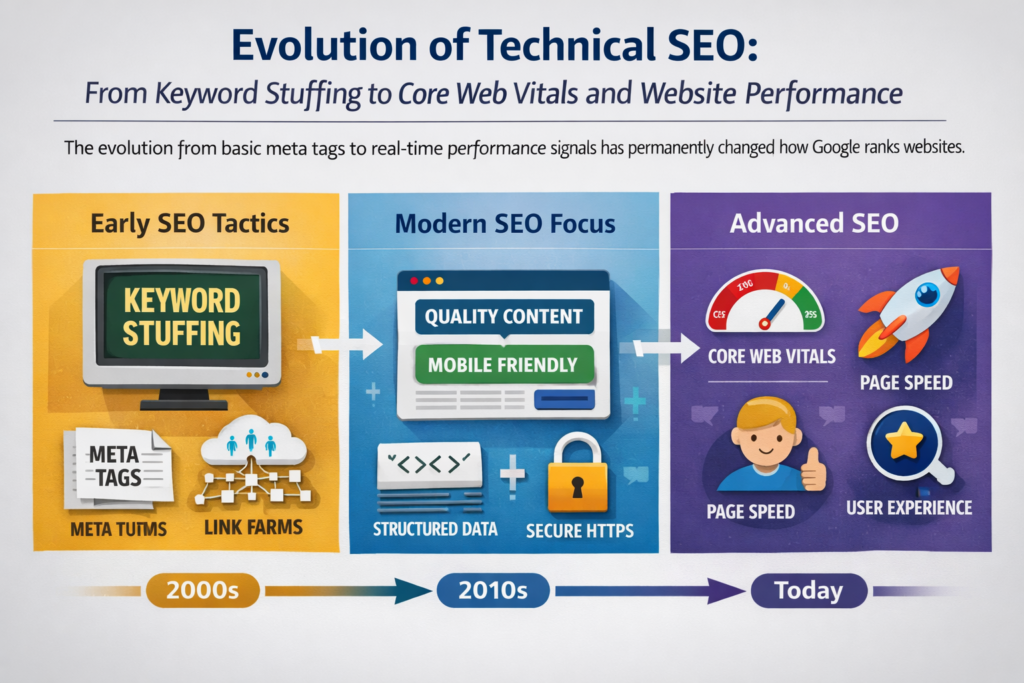
Then vs Now: How Technical SEO Has Evolved
Technical SEO has undergone a fundamental transformation over the past decade.
| Dimension | Old Technical SEO | Modern Technical SEO |
|---|---|---|
| Focus area | Meta tags and keyword density | Core Web Vitals and user experience signals |
| Speed measurement | Page load time (seconds) | LCP, INP, CLS scores per page |
| Mobile approach | Desktop-first with mobile adaptation | Mobile-first indexing as default |
| Ranking signals | Backlinks and on-page keywords | Performance signals plus E-E-A-T |
| Structured data | Rarely implemented | Essential for rich results and AI citation |
| AI systems | Not a consideration | Active crawlers with specific access rules |
The most significant recent shift: AI-driven search experiences now depend on strong technical SEO fundamentals. If your pages aren’t crawlable and indexable, they won’t be surfaced in AI-generated answers a channel that is rapidly growing in traffic significance.
Crawlability and Indexability
Crawlability is the ability of search engine bots to access and navigate your website. Indexability is the ability of those bots to store your pages in their index. Both must be working correctly before any other SEO effort matters.
XML Sitemaps
An XML sitemap is a file listing all important URLs on your site. It tells search engines which pages exist and where to find them especially valuable for large sites or pages with few internal links.
Best practices:
- Include every live, canonical page returning a 200 status code
- Exclude paginated URLs, filter variations, login pages, and thank-you pages
- Keep it updated regenerate and resubmit when new pages are published
- Submit via Google Search Console (Indexing → Sitemaps → Submit)
Your sitemap is typically found at yoursite.com/sitemap.xml or yoursite.com/sitemap_index.xml.
HTML Sitemaps
An HTML sitemap is a user-facing page listing all main sections of your website. Unlike XML sitemaps (for crawlers), HTML sitemaps serve both users and bots simultaneously.
For eCommerce sites continuously expanding with new products and categories, an up-to-date HTML sitemap helps users and crawlers navigate your full content offering.
Robots.txt Configuration
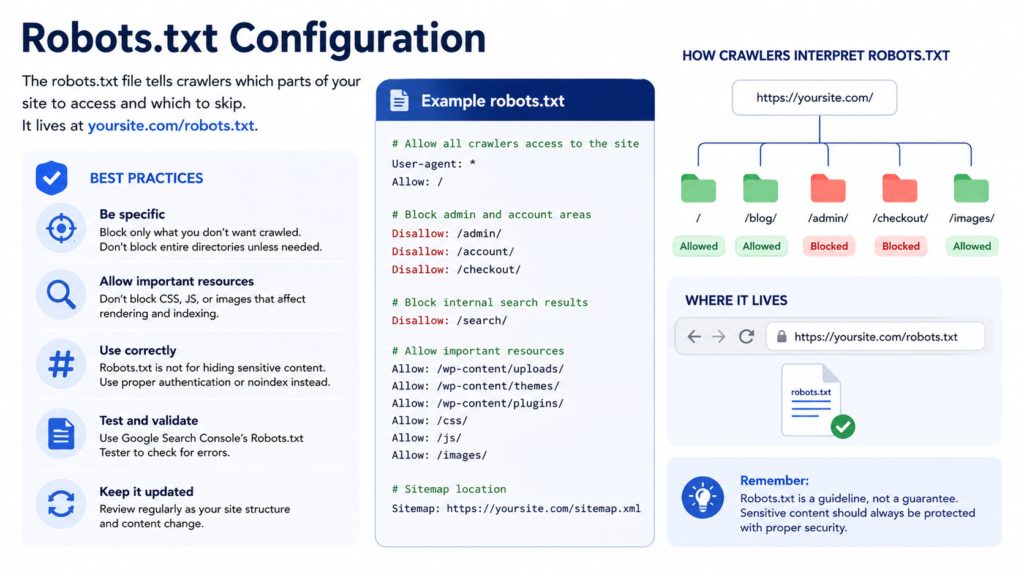
The robots.txt file tells crawlers which parts of your site to access and which to skip. It lives at yoursite.com/robots.txt.
Critical rules:
- Never block important pages, CSS files, or JavaScript files needed for rendering
- Use
Disallowonly for genuinely low-value pages (admin areas, internal search results, filter URLs) - Do not use robots.txt to prevent indexing use the
noindextag for that instead - Validate your file regularly to catch accidental blocks
Allowing AI crawlers: If you want your content to be cited in AI-generated answers, ensure AI crawlers are not blocked. Key bots to allow:
GPTBotOpenAI / ChatGPTOAI-SearchBotChatGPT search experiencesClaudeBotAnthropic / Claude AI
Example robots.txt entry:
User-agent: GPTBot
Allow: /

User-agent: OAI-SearchBot
Allow: /

User-agent: ClaudeBot
Allow: /
Note: Blocking crawling in robots.txt does not prevent a URL from appearing in search results if other pages link to it. Use noindex tags to prevent indexing.
Orphan Pages
Orphan pages have no internal links pointing to them. Search engines cannot find them through crawling, so they are rarely indexed.
How to identify them: Crawl your site with a tool like Screaming Frog and compare your crawl list against your XML sitemap. Pages in the sitemap but not discovered through links are orphans.
How to fix them: Add relevant internal links from other pages on your site to connect orphan pages into your overall structure.
JavaScript Rendering and AI Crawlers
If your site relies heavily on JavaScript (single-page applications, React, Vue, Next.js), there is a critical distinction to understand:
- Google processes JavaScript in phases: crawl, render, index. Content only visible after rendering may be delayed in indexing.
- Most AI crawlers (GPTBot, OAI-SearchBot, ClaudeBot) do not execute JavaScript. They only see the initial HTML response. Any content loaded client-side may be completely invisible to them.
Fix: Ensure all important content, navigation links, and structured data are present in the initial HTML not injected after JavaScript execution. Use server-side rendering (SSR) or static generation for content-critical pages.
Crawl Budget Optimisation
Crawl budget is the number of pages Googlebot will crawl on your site within a given timeframe. For large sites (10,000+ pages), wasted crawl budget means important pages are crawled infrequently or not at all.
How to save crawl budget:
- Block low-value pages in robots.txt (faceted navigation variants, sort/filter URLs)
- Use
noindexon thin or duplicate pages - Fix redirect chains each redirect hop wastes crawl budget
- Ensure your XML sitemap includes only high-value, indexable pages
- Consolidate near-duplicate pages with canonical tags
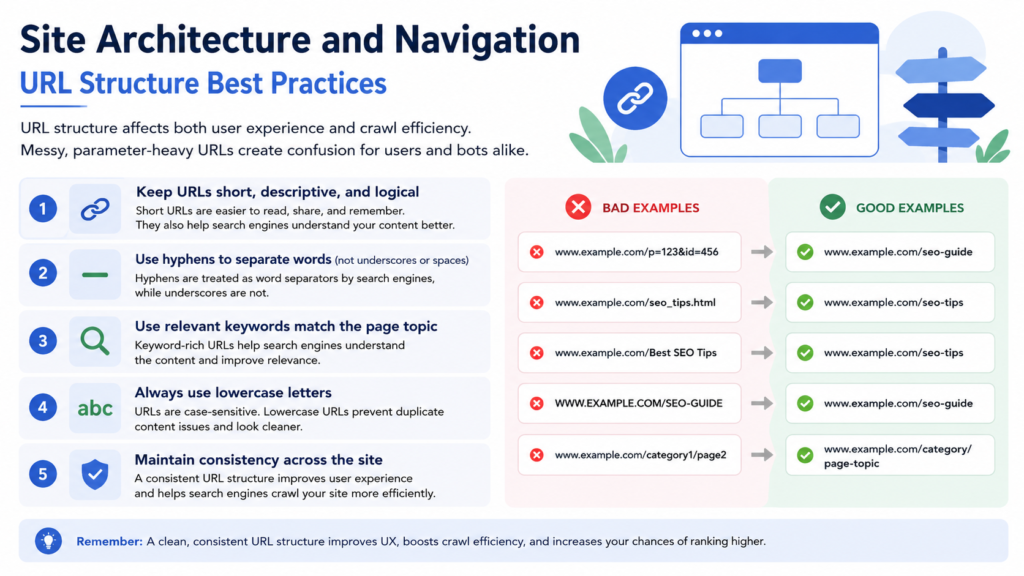
URL Structure Best Practices
URL structure affects both user experience and crawl efficiency. Messy, parameter-heavy URLs create confusion for users and bots alike.
5 URL best practices:
- Keep URLs short, descriptive, and logical
- Use hyphens to separate words (not underscores or spaces)
- Use relevant keywords match the page topic
- Always use lowercase letters
- Maintain consistency across the site
Good: yoursite.com/technical-seo-guide/ Bad: yoursite.com/page?id=1234&cat=5&sort=asc
Avoid unnecessary parameters that create duplicate URLs. If parameters are unavoidable (eCommerce filters), manage them through canonical tags or robots.txt disallow rules.
Faceted navigation lets users filter products by attributes (colour, size, price). It is essential for usability on eCommerce sites but it creates a serious technical SEO problem by generating thousands of unique URLs for filtered combinations.
The problems: Duplicate or near-duplicate content across filter URLs, crawl budget wasted on low-value pages, and diluted link equity.
Best practices:
- Use canonical tags on filter URLs pointing to the base category page
- Block parameter URLs in robots.txt for combinations with no SEO value
- Use
noindexfor specific filtered pages that should not rank - Use the
nofollowattribute on links to filtered pages - Maintain consistent parameter order across all filter URLs
Pagination
Pagination divides long lists of content across multiple pages. Implemented correctly, it allows search engines to discover deep content. Implemented incorrectly, it creates orphan pages and blocks indexing of important content.
Pagination best practices:
- Use self-referencing canonical tags on each paginated page
- Do not use
noindexon paginated pages this blocks discovery of content accessible only through those pages - Include paginated pages in your XML sitemap
- Use proper
<ahref>links for pagination (not JavaScript event triggers, which Googlebot cannot follow) - Add internal links to pages buried deep in pagination from higher-authority pages
Breadcrumbs are a trail of links showing where a page sits in the site hierarchy. Example: Home > Category > Subcategory > Product Page.
Why they matter:
- Help users navigate without using the back button
- Distribute link equity (PageRank) throughout the site
- Enable breadcrumb rich results in SERPs when combined with breadcrumb schema markup
Implement breadcrumbs on all pages more than one level deep from the homepage. Use breadcrumb schema markup (JSON-LD) alongside the visible navigation element.
Internal Linking Strategy
This help search engines understand your site structure and distribute authority from high-value pages to those needing ranking support.
Internal linking best practices:
- Every important page should be reachable within 3 clicks from the homepage
- Use descriptive, keyword-relevant anchor text (not “click here”)
- Anchor text should be concise, relevant to the destination page, and not over-optimised with exact-match keywords
- Eliminate redirect chains in internal links link directly to the final destination URL
- Link spoke pages back to this pillar: all technical SEO topic pages should link to this guide
Pillar-spoke linking required for this article:
- Core Web Vitals link from every Core Web Vitals mention
- site speed optimization link from site speed sections
- technical SEO audit checklist link from audit sections
- structured data implementation link from schema sections
- performance-first website development link from architecture and development sections
Duplicate Content and Canonical Tags
Duplicate content occurs when the same or very similar content appears at multiple URLs. Search engines struggle to determine which version to index and rank, often splitting authority between them and ranking neither well.
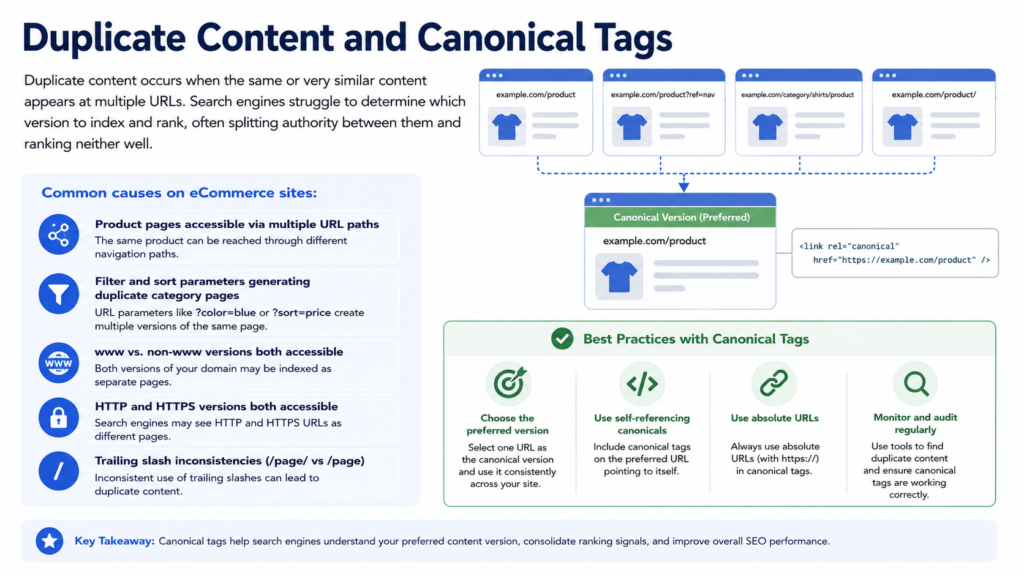
Common causes on eCommerce sites:
- Product pages accessible via multiple URL paths
- Filter and sort parameters generating duplicate category pages
- www vs. non-www versions both accessible
- HTTP and HTTPS versions both accessible
- Trailing slash inconsistencies (
/page/vs/page)
The fix canonical tags:
The rel="canonical" tag tells search engines which version of a page is the authoritative original.
html : <link rel=”canonical” href=”https://yoursite.com/original-page/” />
Canonical tag best practices:
- The canonical page must return a 200 status code and be indexable
- Every page should have exactly one canonical tag
- Use self-referencing canonical tags on pages that are already the canonical version
- Never apply a noindex tag to a canonical page
- Ensure canonical tags are consistent across desktop and mobile versions
Beyond canonical tags, ensure only one version of your site is accessible: pick either https://yoursite.com or https://www.yoursite.com and redirect the other permanently with a 301.
Core Web Vitals and Site Speed
Google’s Core Web Vitals are the primary performance metrics determining how page experience influences search rankings. They measure three dimensions of user experience:
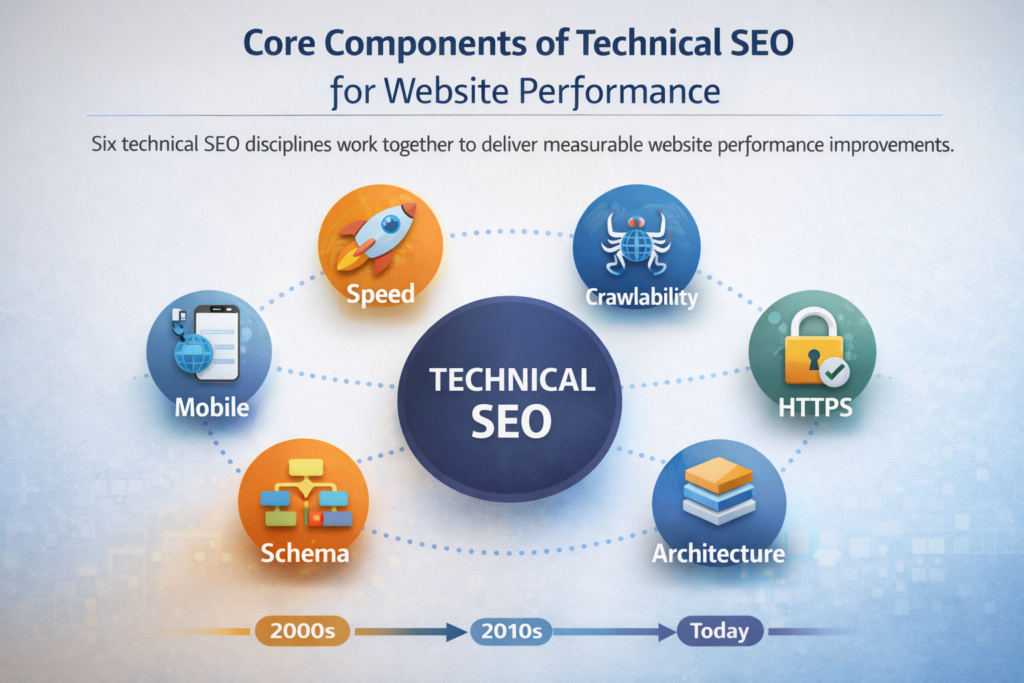
| Metric | What It Measures | Good Threshold |
|---|---|---|
| LCP (Largest Contentful Paint) | Loading speed of the main content element | ≤ 2.5 seconds |
| INP (Interaction to Next Paint) | Responsiveness to user interactions | ≤ 200 milliseconds |
| CLS (Cumulative Layout Shift) | Visual stability as the page loads | ≤ 0.1 |
Note: INP replaced FID (First Input Delay) as Google’s interactivity metric. If your audit reports still reference FID, update to track INP instead.
Things to improve LCP:
- Compress and convert images to WebP or AVIF formats
- Preload the hero image using
<link rel="preload"> - Remove unused third-party scripts
- Use a CDN to reduce server response time
- Lazy-load images below the fold (not the hero image)
How to improve INP:
- Minimise or defer non-critical JavaScript
- Remove render-blocking scripts
- Use browser caching for static assets
- Break up long JavaScript tasks
How to improve CLS:
- Set explicit width and height attributes on all images and videos
- Reserve space for ads and embeds before they load
- Avoid inserting content above existing content after page load
- Use
font-display: swapto prevent layout shifts from web fonts
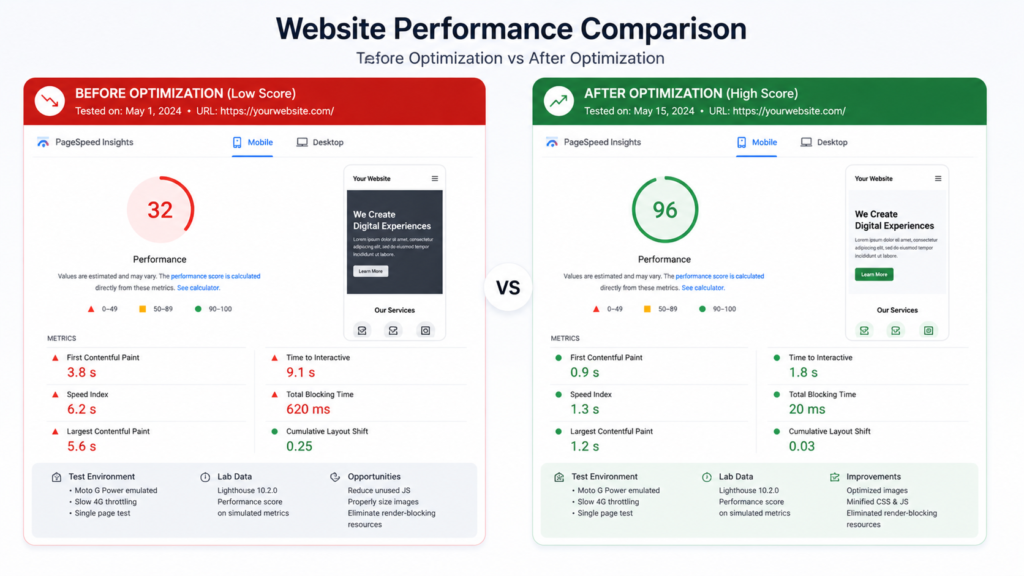
Check your site speed optimization status in Google Search Console under Core Web Vitals, or use Google PageSpeed Insights for page-level analysis.
Additional Speed Factors
Beyond Core Web Vitals, these speed optimisations directly improve rankings and user experience:
- Image compression use tools like ShortPixel; images are the most common LCP culprit
- Minify HTML, CSS, JavaScript remove unnecessary whitespace and characters
- Browser caching store static assets locally to reduce repeat load times
- Content Delivery Network (CDN) serve assets from servers geographically close to the user
- HTTP/2 enables parallel requests; upgrade from HTTP/1.1 where still in use
- Eliminate render-blocking resources defer non-critical CSS and JavaScript
Website Speed Tools:
| Tool | Best For | Cost |
|---|---|---|
| Google PageSpeed Insights | Page-level CWV analysis | Free |
| Google Lighthouse | Full developer audit | Free |
| GTmetrix | Detailed waterfall reports | Free / Paid |
| WebPageTest | Advanced multi-location testing | Free |
| Google Search Console | Site-wide CWV trends | Free |
Mobile-First Optimisation
Google uses mobile-first indexing. This means Google evaluates the mobile version of your site not the desktop version when determining crawlability, indexability, and rankings.
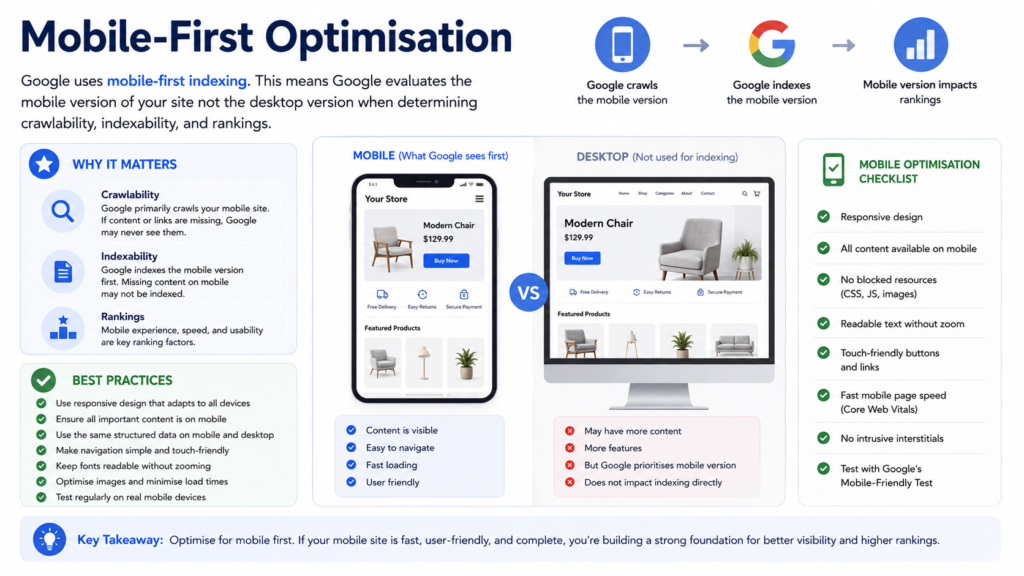
What this means in practice:
- Content present only on desktop is effectively invisible to Google’s indexer
- Mobile and desktop versions must have content parity same text, same structured data, same internal links
- Images, videos, and critical page elements must load correctly on mobile
Mobile optimisation checklist:
- Implement responsive design same URL for all devices, layout adapts to screen size
- Set the viewport meta tag:
<meta name="viewport" content="width=device-width, initial-scale=1"> - Use legible font sizes (minimum 16px body text)
- Ensure adequate spacing around tap targets (minimum 48x48px)
- Optimise images for mobile use
srcsetto serve appropriately sized images - Test with Google’s Mobile-Friendly Test and PageSpeed Insights mobile tab
Interstitial ads and popups on mobile: Google penalises intrusive interstitials on mobile. Follow these rules:
- Popups must occupy no more than 25% of the viewport
- Full-screen interstitials only permitted for legal requirements (cookie consent, age verification)
- Popups must be easily dismissible
- Do not show popups immediately after a user arrives from search results
HTTPS and Technical Security
HTTPS is a confirmed Google ranking signal and has been since 2014. Beyond rankings, it protects user data and is required for trust by browsers (Chrome flags non-HTTPS sites as “Not Secure”).
HTTPS implementation checklist:
- Install an SSL/TLS certificate (free from Let’s Encrypt, or via your hosting provider)
- Implement 301 redirects from all HTTP URLs to HTTPS equivalents
- Ensure
wwwand non-wwwversions both redirect to a single canonical HTTPS URL - Fix mixed content all resources (images, scripts, CSS) should load over HTTPS
- Eliminate redirect chains HTTP → HTTPS → www → non-www is a 3-hop chain; consolidate to 1
Technical hygiene beyond HTTPS:
- No redirect chains (multiple sequential redirects)
- No redirect loops (A→B→A)
- All internal links point directly to final destination URLs
- No 5xx server errors on crawled pages
Check HTTPS status and security issues in Google Search Console under Security & Manual Actions → Security Issues.
Structured Data and Schema Markup
Structured data (schema markup) is code that helps search engines understand the meaning of your content not just its words. Correctly implemented, it makes pages eligible for rich results in SERPs and increases the likelihood of being cited in AI-generated answers.
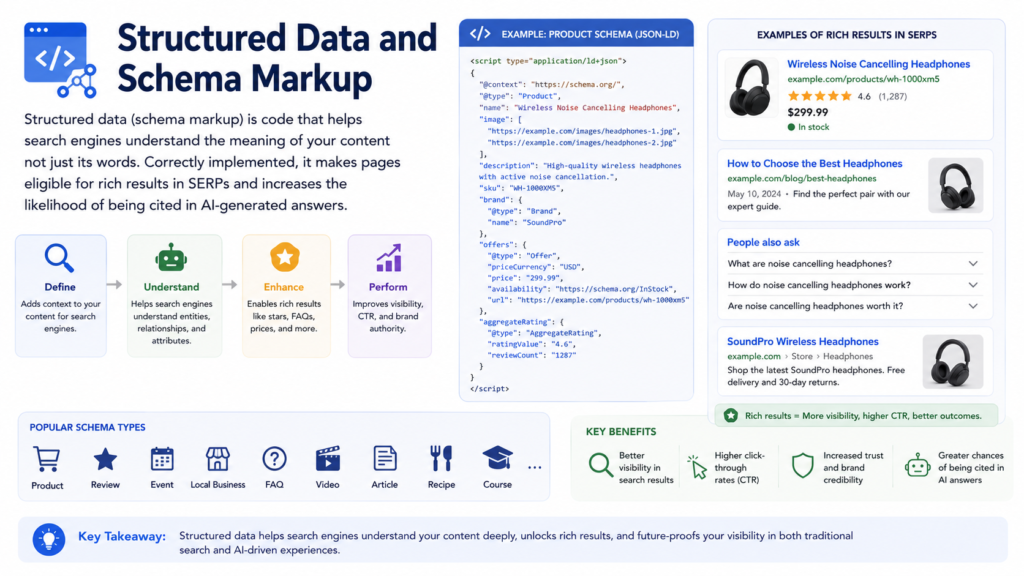
For full implementation guidance, see our structured data implementation guide.
Schema types most relevant for technical SEO articles and service pages:
| Schema Type | Best Used For |
|---|---|
| Article | Blog posts, guides, news articles |
| FAQPage | Pages with question-and-answer sections |
| BreadcrumbList | Navigation breadcrumbs |
| Product | eCommerce product pages |
| LocalBusiness | Location-based service pages |
| Organization | Site-wide brand information |
| HowTo | Step-by-step instructional content |
Implementation format: Use JSON-LD embedded in the <head> section. Google recommends JSON-LD over Microdata or RDFa.
Schema best practices:
- Only mark up content that is visible to users on the page never hidden content
- Ensure structured data matches the visible on-page content exactly (product names, prices, ratings)
- Apply page-specific markup, not sitewide a product schema belongs on a product page, not a category page
- Use real customer reviews, not company-written reviews, for review schema
- Validate all structured data with Google’s Rich Results Test before publishing
- After implementation, monitor in Google Search Console → Enhancements
6 common schema mistakes to avoid:
- Marking up content invisible to users (hidden review stars, off-screen elements)
- Applying product schema to category or listing pages
- Using individual ratings instead of aggregated/average ratings
- Marking up company-written reviews as customer reviews
- Inconsistent structured data across language/region versions of the same page
- Using similar schema tags interchangeably (e.g.
authorvscreator)
Image and Video Optimisation
Images and videos are critical for user engagement but are among the most common technical SEO problems. Unoptimised media files are the most frequent cause of poor LCP scores.
Image optimisation checklist:
- Use next-generation formats: WebP (ideal) or AVIF (best compression, growing support)
- Compress images before upload target under 100KB for most images
- Set explicit
widthandheightattributes on all<img>tags (prevents CLS) - Write descriptive, keyword-relevant
alttext for every image - Lazy-load images below the fold:
<img loading="lazy" src="…" alt="…"> - Do not lazy-load the hero/LCP image it must load as fast as possible
- Include images in your XML sitemap (or create a separate image sitemap for image-heavy sites)
Video optimisation checklist:
- Host videos on public, indexable pages
- Wrap video elements in appropriate HTML tags (
<video>or embedded iframe) - Add VideoObject schema markup
- Include videos in your XML sitemap or a dedicated video sitemap
- Provide descriptive titles, descriptions, and thumbnails for each video
Broken Links and Redirect Management
Broken Links
A broken link points to a URL that returns a 4xx error (most commonly 404 Not Found). Broken links damage user experience, waste crawl budget, and lose the link equity that the broken link was passing.
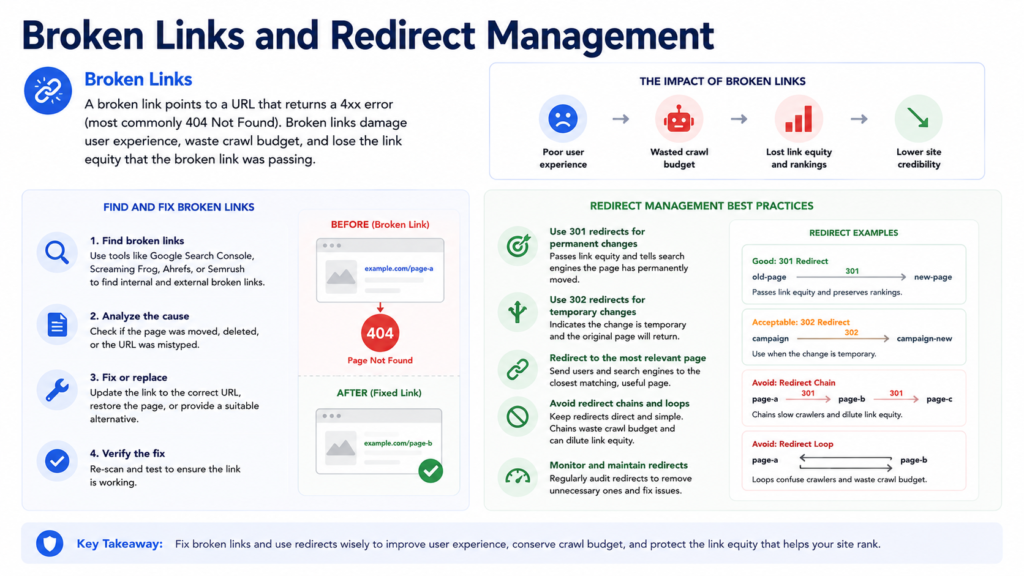
How to find broken links: Crawl your site with Screaming Frog or a site audit tool and filter for 4xx status codes. Also check Google Search Console → Crawl Stats for 404 errors.
How to fix broken links:
- If the destination page was moved: implement a 301 redirect to the new URL
- If the destination page was deleted permanently: 301 redirect to the most relevant alternative page
- If the link destination should be removed: update or remove the internal link
- For external broken links: find an alternative resource or remove the link
Internal Redirects
A 301 redirect permanently sends users and bots from one URL to another. Redirects are necessary after page moves, site migrations, and domain changes but too many can cause problems.
Redirect best practices:
- All internal links should point directly to final destination URLs (not to a URL that then redirects)
- Avoid redirect chains (A→B→C) consolidate to a direct redirect (A→C)
- Avoid redirect loops (A→B→A) these cause crawl errors
- After a site migration, monitor redirect performance in Search Console for 6+ months
Hreflang for Multi-Language Sites
If your site serves content in multiple languages or targets users in different regions, hreflang tags are essential. They tell search engines which version of a page to serve to which users.
Implementation format (add to <head> of all language versions):
html
<link rel="alternate" hreflang="en" href="https://yoursite.com/page/" />
<link rel="alternate" hreflang="es" href="https://yoursite.com/es/page/" />
<link rel="alternate" hreflang="fr" href="https://yoursite.com/fr/page/" />
<link rel="alternate" hreflang="x-default" href="https://yoursite.com/page/" />
Key rules:
- Every language version must reference all other language versions (bidirectional annotation)
- Use ISO language codes (
en,es,de) and optionally region codes (en-gb,es-mx)- The
x-defaulttag signals the fallback version for users not matching a specific language- Monitor hreflang errors in Google Search Console → International Targeting
Technical SEO Audit: How to Run One
A technical SEO audit checklist systematically identifies all technical issues affecting crawlability, indexability, and performance. Run one at least quarterly new issues emerge as your site grows.
4 steps to a technical SEO audit:
Full site crawl: Use a crawl tool to gather data on status codes, redirects, canonical tags, meta robots, response times, and internal links for every URL on your site.
Analyse technical issues: Review crawl data against this checklist:
- ☐ No 4xx or 5xx errors on important pages
- ☐ XML sitemap complete, accurate, and submitted to Search Console
- ☐ Robots.txt correctly configured (no accidental blocks)
- ☐ All important pages indexed (check Search Console Coverage report)
- ☐ Canonical tags correct on all pages
- ☐ No duplicate content without canonical resolution
- ☐ Core Web Vitals passing across all key templates
- ☐ Mobile-friendly across all pages
- ☐ HTTPS on all pages, no mixed content
- ☐ No redirect chains or loops
- ☐ Internal links pointing to final destination URLs
- ☐ No orphan pages
- ☐ Structured data valid and matching visible content
- ☐ AI crawlers (GPTBot, ClaudeBot) not blocked
- ☐ Hreflang correct (if multilingual)
Prioritise and fix: Address Critical issues first (crawl blocks, 5xx errors, noindex on important pages), then High (Core Web Vitals failures, missing schema, broken links), then Medium (redirect chains, missing alt text, duplicate content).
Track and monitor: Re-crawl monthly. Set up alerts in Search Console for new crawl errors and security issues. Monitor Core Web Vitals trends in the CWV report.
7 Best Practices to Improve Website Performance Through Technical SEO
These seven practices represent the sequence that consistently delivers results from diagnosis through to compounding organic growth.
1. Run a Full Technical SEO Audit Before fixing anything, know what is broken. A complete crawl-based audit is the only reliable way to find every issue across a large site. Get your free SEO audit to identify critical issues immediately.
2. Establish a Content Hierarchy (Pillar-Spoke Model) If you have multiple articles covering overlapping technical SEO topics, assign clear roles: one pillar page (this guide) covers the full topic; spoke pages go deep on specific subtopics (Core Web Vitals, site speed optimization). All spokes must link back to the pillar.
3. Fix Crawlability First No content or speed optimisation matters if bots can’t access the page. Fix robots.txt, resolve 4xx errors, connect orphan pages, and submit a clean sitemap before touching anything else.
4. Optimise Core Web Vitals Across All Templates Pass LCP, INP, and CLS thresholds site-wide not just on the homepage. Focus on your highest-traffic templates first (homepage, category pages, product pages).
5. Implement Structured Data on Every Key Page Type Add Article + FAQPage schema to guides. Add Product schema to product pages. Add BreadcrumbList schema sitewide. Validate in Google’s Rich Results Test before deploying.
6. Achieve and Maintain Mobile Parity Audit mobile versions for content parity. Every element that exists on desktop text, links, structured data, images must exist on mobile. Google’s indexer only sees mobile.
7. Monitor Continuously Technical SEO is not a one-time task. New issues emerge with every site update, new page launch, or CMS change. Monthly crawl audits and Search Console monitoring are non-negotiable.
Real-World Case Studies
Crawlability Fix — 40% Indexability Increase in 13 Days A client’s site had a difficult navigational structure with poorly configured XML sitemap and robots.txt. After implementing the technical fixes: indexability increased by 40.3% (886 additional pages) in 13 days, and crawl errors were reduced by 14.7% in the following 20 days.
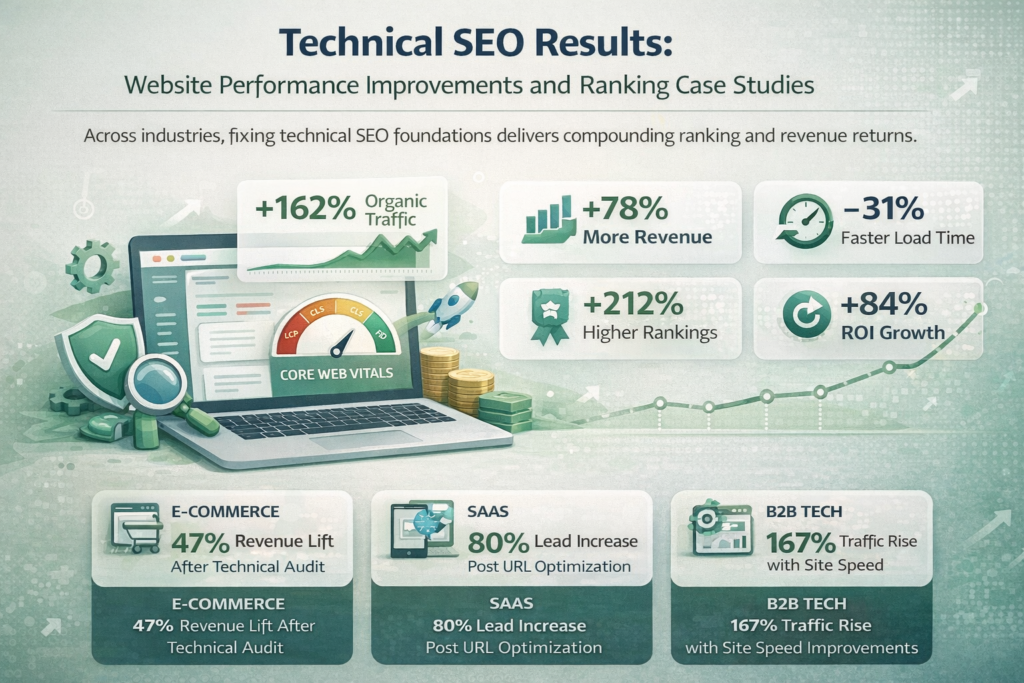
Internal Linking — 104% Keyword Ranking Growth NetAnAgent had several key pages buried deep in site structure, receiving little crawl priority. After implementing breadcrumbs and an HTML sitemap to improve internal linking: +104% growth in keywords ranking, +707 key terms ranking 50+ positions higher, and a positive increase in rankings on pages 1–3.
Image Optimisation — +37% Clicks from Google Images Yellow Zebra Safaris had rich imagery critical to their brand identity. After implementing structured data and optimised alt text across 150+ pages: +37% clicks from Google Image Search and +42% clicks from web search.
eCommerce Crawl Budget — 41% More Indexed Product Pages A national eCommerce retailer with 80,000+ product pages was wasting crawl budget on faceted navigation URLs. After implementing canonical tags, removing faceted URLs from the sitemap, and fixing redirect chains: 41% increase in indexed product pages within 10 weeks and a 28% rise in organic revenue.
Core Web Vitals Fix — 19-Position Average Ranking Improvement A B2B SaaS company with a 200,000-page documentation site had an average LCP of 6.2 seconds. After server-side rendering optimisation, image compression, and JavaScript deferral: LCP dropped to 1.8 seconds, a 34% improvement in organic CTR, and a 19-position average ranking improvement across 450 target keywords in three months.
For performance-first website development that builds these technical foundations from the ground up rather than requiring expensive retrofitting, explore our web development services.
The Future of Technical SEO and Website Performance
AI-driven search changes the crawlability stakes. As ChatGPT, Google AI Overviews, and Copilot grow as traffic sources, being crawlable by AI bots becomes as important as being crawlable by Googlebot. Allow GPTBot, OAI-SearchBot, and ClaudeBot in your robots.txt. Ensure critical content is in the initial HTML, not JavaScript-rendered.
INP replaced FID as Google’s interactivity metric. If your audits still target FID, update them. INP measures responsiveness across the entire user session, not just the first interaction it is a harder metric to pass.
Zero-click search and structured data dominance. A growing proportion of queries are resolved directly in the SERP through featured snippets, knowledge panels, and AI summaries. Structured data is the mechanism by which your content participates in those answers. Sites implementing schema now will own SERP real estate their competitors have not yet considered.
Continuous monitoring becomes non-negotiable. As sites grow and search behaviour shifts, new technical issues emerge constantly. Tools that provide real-time crawl monitoring, automated schema validation, and Core Web Vitals alerting are no longer nice-to-have they are essential infrastructure.
Frequently Asked Questions
Website performance in SEO refers to the technical quality of a site across four dimensions: page speed, Core Web Vitals scores, crawlability, and indexability. These signals directly influence how Google ranks pages in search results. Strong performance means faster content delivery, stable visual rendering, and full accessibility to search engine crawlers.
Page speed is a confirmed Google ranking factor for both desktop and mobile search. Google Search Central data shows that as page load time increases from one to three seconds, the probability of a bounce increases by 32%. Beyond rankings, faster pages deliver higher conversion rates Ahrefs reports that a one-second improvement in load time can increase conversions by up to 7%.
Core Web Vitals are Google’s standardised set of user experience metrics: LCP (Largest Contentful Paint) measures loading speed, FID (First Input Delay) measures interactivity, and CLS (Cumulative Layout Shift) measures visual stability. Google uses these scores as direct ranking signals. Sites with “Good” scores across all three metrics gain a ranking advantage over technically weaker competitors with equivalent content
A technical SEO audit examines page speed, crawl errors, mobile performance, structured data implementation, HTTPS status, and internal linking structure. Start with a free SEO audit to identify your most critical technical issues immediately. For a comprehensive audit across all technical dimensions, explore Adclickr’s full services to understand the depth of analysis available.
Conclusion: Build the Technical SEO Foundation Your Site Deserves
Technical SEO is not a peripheral discipline — it is the foundation on which every ranking gain is built. Sites with passing Core Web Vitals, clean crawl architecture, correct canonical tags, and properly implemented structured data consistently outperform technically weaker competitors, regardless of content volume or backlink count.
The gap between where your site ranks today and where it could rank is often a technical gap, not a content gap. Fixing it starts with knowing exactly what is broken.
Request your free SEO audit and identify the technical issues suppressing your rankings right now. Explore Adclickr’s complete services to understand how each technical component is addressed within a structured, results-driven programme. Contact the Adclickr team to schedule a technical strategy session tailored to your site’s architecture and competitive landscape.
The websites that rank tomorrow are the ones being optimised today.

About the author
Ujjwal Kumawat
I specialize in SEO, website development, Google Ads and online business growth strategies. Through my blogs, I share practical insights, marketing tips and proven strategies to help businesses improve their online visibility, generate more leads and grow faster in the digital space.