Want to master schema markup wordpress the easy way?
Adding structured data feels tricky at first glance. This guide breaks everything into simple steps.
Introduction
Schema markup wordpress setup does not need coding skills anymore. Modern plugins handle most of the heavy lifting. Structured data helps search engines read your content clearly. This often leads to better visibility in results.

In short, you install a plugin and choose a schema type. Then fill in required fields. Most tools generate clean code automatically. This saves hours compared to manual coding. Many WordPress and Shopify owners skip this step. That is a missed opportunity in 2026.
This guide covers setup for both platforms clearly. It also connects to broader technical SEO audit practices.
What Is Schema Markup and Why It Matters
Schema markup is structured code added to pages. It tells search engines what your content means. Search engines use this data to build rich snippets. These include star ratings, prices, and FAQs. WordPress schema markup improves how Google understands posts and products. This often boosts click through rates significantly.
Sites with strong structured data often rank better for organic search queries. Visibility improves across many result types. Ecommerce brands benefit heavily too. Product schema pairs well with focused ecommerce SEO strategies.
How to Add Schema Markup in WordPress
Adding schema markup wordpress sites is simple today. Follow these steps carefully for best results.
Step 1: Choose a Reliable Plugin
Popular options include RankMath, Yoast, and Schema Pro. Each offers different features and pricing tiers. RankMath includes built in schema types for free. Yoast offers strong basic schema support too.
Step 2: Install and Activate the Plugin
Go to your WordPress dashboard and search plugins. Install your chosen tool, then activate it. This step takes only a few minutes. No coding knowledge is required here.
Step 3: Select the Right Schema Type
Choose article schema for blog posts. Choose product schema for online stores. FAQ schema works great for question based content. Local business schema suits service pages well.
Step 4: Fill in Required Fields
Add accurate titles, images, and descriptions. Incorrect details can confuse search engines badly. Double check dates, prices, and author names. Accuracy matters greatly for schema validity.
Step 5: Test Your Schema Markup
Use Google’s testing tool before publishing changes. This confirms your code works correctly. Fix any warnings shown during testing. Then publish your updated page confidently. This process pairs well with regular content audits to keep pages fresh.
How to Add Schema Markup Plugin WordPress Recommendations
Choosing the right schema markup plugin wordpress site needs matters greatly. Consider these popular choices carefully. RankMath SEO offers advanced schema generation. It supports many schema types out of the box. Yoast SEO remains a trusted choice for beginners. It handles basic schema automatically for most content.

Schema Pro focuses purely on structured data. It gives more control over advanced schema fields. All in One SEO also includes solid schema tools. It integrates smoothly with most WordPress themes. Pick a plugin that matches your site complexity. Simple blogs need less than large stores.
Schema Markup Shopify Setup Explained
Schema markup shopify stores works a bit differently. Shopify requires theme editing or dedicated apps. Many Shopify themes include basic product schema already. Check your theme documentation first. For more control, use dedicated schema apps. These add structured data without touching code directly. Apps like JSON LD for SEO simplify this process. They generate valid code automatically for products.
Product schema on Shopify displays price and stock instantly. This connects well with ecommerce development services. Review schema also works well on Shopify stores. It builds trust before customers even click through.
Schema Markup Types for WordPress Sites
Different content types need different schema. Choosing correctly improves your visibility chances. Article schema suits blog posts and news content. It highlights author, date, and headline clearly. Product schema fits ecommerce listings perfectly. It displays price, stock, and reviews directly.
FAQ schema works great for question based pages. It often appears as expandable results. Local business schema helps location based searches. It connects with strong local SEO ranking factors. Review schema adds star ratings visually. This builds trust before a user even clicks.
Event schema displays dates and locations clearly. This suits businesses hosting webinars or events.
Schema Markup for Different Business Types
Different industries use wordpress schema markup uniquely. Tailoring your approach brings better results. Hospitals and clinics can use medical schema types. This pairs well with focused healthcare SEO strategies.
Restaurants benefit from menu and review schema together. This works with dedicated restaurant local SEO efforts. Law firms often use service and review schema. Explore our local SEO guide for lawyers for more detail. Dental practices can apply similar strategies. Our dental local SEO guide covers this closely.Doctors and therapists also benefit greatly. Check our local SEO guide for doctors for specific tips.
How Schema Markup Boosts Shopify SEO Performance
Schema markup shopify stores gain several advantages. Rich snippets often increase organic click through rates. Product listings with schema show price and ratings instantly. Shoppers trust these results more quickly.

This connects closely with broader ecommerce SEO services for online stores. Combined efforts improve overall store visibility. Shopify merchants should also review official Shopify SEO documentation regularly. This keeps setups aligned with platform updates.
Pairing schema with strong keyword research improves targeting further. Both elements work together for better rankings.
Validating Your Schema Markup Correctly
Always validate structured data before publishing changes. This prevents invalid code from affecting your site. Use the official Schema.org validator for strict syntax checks. It catches formatting errors quickly.
The Google Rich Results Test shows actual snippet eligibility. Both tools work well together. Browser extensions can also show live schema markup instantly. These help during quick competitor research too. Regular validation pairs well with routine SEO audits for your entire site. This keeps everything technically sound.
Measuring the Impact of Schema Markup
Tracking results helps justify ongoing schema efforts. Use available tools to monitor performance closely. Search Console shows which pages earn rich results. Check the enhancements report regularly for updates.
Compare click through rates before and after implementation. Improvements often appear within a few weeks. Watch your organic traffic trends alongside these changes. Schema is one piece of a larger puzzle.
Pair this tracking with broader analytics reporting dashboards for full visibility. This keeps your entire strategy data driven. Document changes carefully over time. This helps you understand what truly moves rankings.
Choosing Between WordPress and Shopify Schema Tools
Not every tool fits every platform equally. Consider your technical skill level first. WordPress beginners should choose plugins like RankMath or Yoast. These handle most setup automatically.
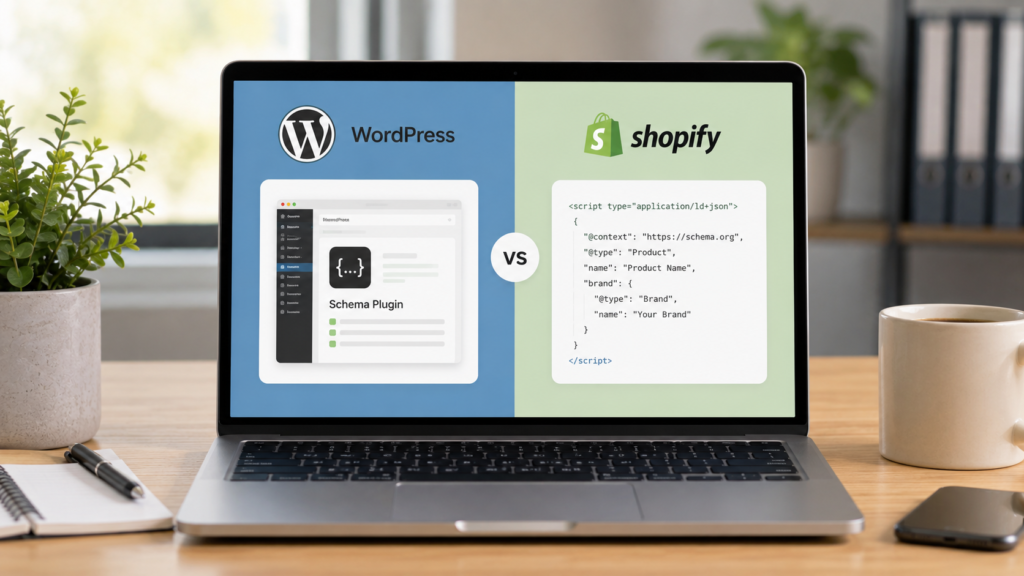
Shopify beginners should choose dedicated schema apps instead. This avoids risky theme code edits. Advanced teams may prefer manual json ld implementation. This gives more control over complex schema needs. Budget also matters for larger stores. Some tools offer free plans while others require subscriptions.
Some agencies bundle schema work inside broader website design services packages. This can simplify implementation for busy teams. Others prefer standalone tools paired with manual technical audits. Both approaches can work well.
How to Add Schema Markup in Website Manually
Some site owners prefer manual coding instead. This works for custom built websites too. Start with a reliable schema markup generator tool online. Copy the generated json ld code carefully. Paste the code inside your page header section. Most custom sites support this easily.
Always test manual code using validation tools. Errors are more common without plugin automation. This manual approach suits developers comfortable with javascript SEO concepts. Beginners should stick with plugins instead.
Common Schema Markup Mistakes to Avoid
Many site owners make small errors during setup. Avoid these common pitfalls carefully. Do not use conflicting schema types on one page. This confuses search engines significantly. Never copy schema details from another website. Information must match your actual content exactly.
Skipping validation testing is risky. Always check code before publishing anything live. Forgetting mobile testing also causes problems. Review rendering using solid core web vitals practices. Ignoring plugin updates creates outdated code over time. Keep plugins updated for best results.
Best Practices for Schema Markup Success
Following proven practices improves your results significantly. Keep these tips in mind always. Mark up only visible page content. Hidden schema data violates search engine guidelines. Keep information accurate and current always. Outdated details confuse both users and crawlers.
Use Google’s official structured data documentation as your reference. It explains supported types clearly. Test regularly using the Google Rich Results Test tool. This catches errors before they affect rankings.
Combine schema with strong meta title practices for better overall optimization. Both elements work together well. Pair structured data with clean canonical URLs too. This avoids duplicate content confusion.
Schema Markup and Broader SEO Strategy
Schema markup works best alongside other SEO efforts. It should never stand alone completely. Strong keyword research ensures your schema targets valuable terms. This connects structured data with real search intent.

Regular backlink audits support overall domain strength too. Combined efforts improve rankings faster. Monitoring your domain authority helps track long term progress. Schema alone cannot fix weak authority. Businesses often pair schema setup with professional SEO services for faster results. Agencies offering AI SEO services now include schema automation too. This saves internal teams valuable time.
If you manage multiple stores, explore our multi location SEO guide. It covers scaling schema efficiently. WordPress developers may also benefit here. Our WordPress development services offer full setup support.
Comparing WordPress and Shopify Schema Approaches
Both platforms support structured data effectively. Their setup methods differ in some ways though. WordPress relies heavily on plugins for automation. This makes setup accessible for non developers. Shopify often requires theme knowledge or dedicated apps. This can feel slightly more technical initially.
Both platforms benefit from regular testing and audits. Consistency matters more than the platform itself. Choosing the right approach depends on your team skills. Either platform can achieve strong results. Pair your setup with a solid sitemap generator too. This helps search engines discover pages faster. Both platforms also benefit from clean site architecture. Organized categories help crawlers find schema pages easily.
Consider reviewing Google’s official structured data policies before large rollouts. This avoids accidental guideline violations. Small teams should start simple and expand gradually. Add one schema type, test it, then move forward. Larger stores may need automated bulk schema generation. This saves time across thousands of product pages. Whichever platform you choose, consistency wins long term. Regular checks keep your structured data trustworthy and accurate.
Frequently Asked Questions
Install a plugin like RankMath or Yoast SEO first. Choose your schema type, then fill in required fields. The plugin generates valid code automatically, saving development time for site owners.
Not always, since many modern themes include basic schema already. For advanced control, dedicated apps add structured data without coding. Developers can still edit code manually for custom store needs.
RankMath and Yoast SEO remain top choices for most WordPress sites today. Schema Pro suits advanced users needing granular control. Choose based on your site complexity and technical comfort level.
Use a schema generator tool, then copy the json ld code manually yourself. Paste it inside your page header section carefully. Always validate the code before publishing anything live online.
WordPress schema markup helps search engines understand your content clearly and accurately. This can improve rich snippet chances significantly. Better visibility often leads to higher click through rates over time.
Conclusion
Setting up schema markup wordpress correctly boosts your visibility online. It also improves how search engines read your pages. Whether you use WordPress or Shopify, structured data matters equally. Choose the right plugin or method for your platform.
Always test your code using trusted validation tools. This keeps your structured data accurate and error free. If you want expert help, explore our AI SEO services for full support. Our team handles setup, testing, and ongoing optimization smoothly.
Structured data is no longer optional in modern search. Start improving your schema markup wordpress setup today. Consistent testing and updates keep results strong long term. Small efforts now bring lasting SEO gains later.

About the author
Ujjwal Kumawat
I specialize in SEO, website development, Google Ads and online business growth strategies. Through my blogs, I share practical insights, marketing tips and proven strategies to help businesses improve their online visibility, generate more leads and grow faster in the digital space.