
What is robots.txt, and why does every website need one?
This small text file controls how search engines crawl your site. Get it wrong, and Google may skip important pages. Get it right, and your crawl budget works in your favor.
Introduction
Robots.txt sits quietly at the root of your domain. It tells search engine bots which pages to crawl. Most site owners never think about it. Yet it plays a huge role in SEO success.

Quick answer: Robots.txt is a plain text file. It lives at yourdomain.com/robots.txt. This gives crawling instructions to search engine bots. It does not remove pages from search results directly. It only manages crawl access.
In this guide, you will learn what robots.txt actually is. You will see how it affects your rankings. You will learn how to write one correctly. We will also cover common mistakes to avoid.
What Is Robots.txt?
Robots.txt is a simple instruction file. It follows a protocol called the Robots Exclusion Protocol. Search engines like Google respect these instructions. Bots check this file before crawling your site.
The file uses simple rules. Each rule tells a bot what to do. You can allow or block specific folders. You can also target specific bots by name.
Understanding robots.txt for SEO starts with its basic syntax. Every rule includes a user agent line. It also includes allow or disallow directives. This structure keeps things simple for bots.
Search engines discovered this standard decades ago. It became a web wide agreement over time. Today, it works alongside other tools like XML sitemaps and canonical tags.
Why Robots.txt Matters for SEO
Search engines have limited resources for every website. This concept is called crawl budget. Wasting crawl budget hurts larger websites the most. Robots.txt helps you protect that budget.
Blocking unnecessary pages saves crawler time. Bots then focus on your valuable content. This matters greatly for ecommerce sites. Managing crawl budget properly boosts indexing speed.
Robots.txt also protects sensitive site areas. Admin panels and staging folders stay hidden. This keeps duplicate or thin content away from bots. That protects your domain authority over time.
Sites focused on organic search growth cannot ignore this file. A single wrong line can block your whole site. That mistake tanks your visibility overnight.
How Robots.txt Works
Every crawler checks robots.txt first. It reads the rules before visiting pages. Bots then follow allow and disallow instructions. This happens before any page loads.
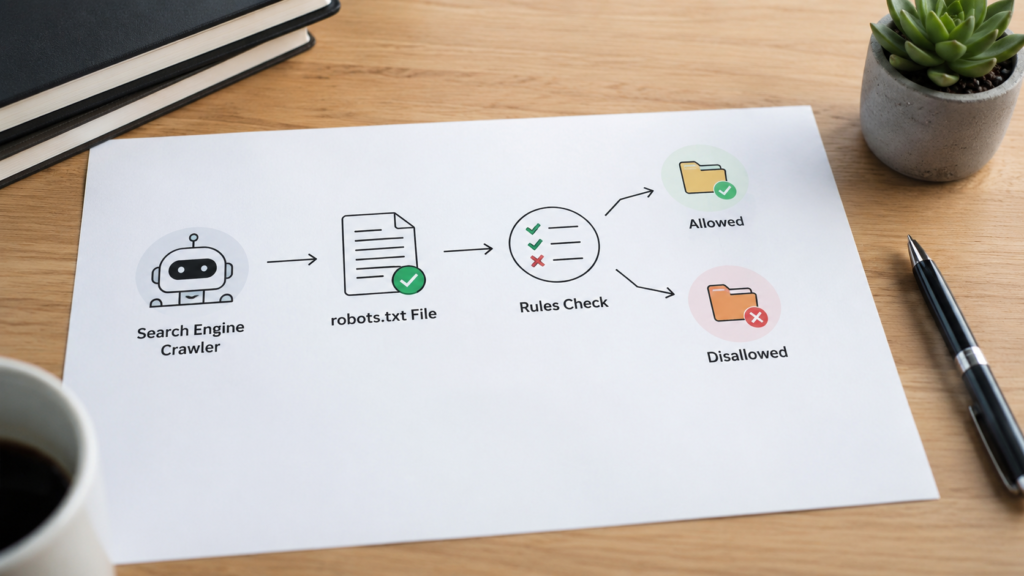
The file structure is simple. It uses three main directives. These are user agent, disallow, and allow. Some files also include a sitemap line.
Here is a basic example structure:
User agent: *
Disallow: /admin/
Allow: /blog/
Sitemap: https://example.com/sitemap.xml
This example blocks the admin folder. It allows the blog folder fully. It also points bots to your sitemap. Many sites use a sitemap generator to build that file quickly.
Robots Txt for Google: Special Considerations
Googlebot follows robots.txt strictly. However, it treats disallow differently than blocking. A disallowed page can still appear in results. This happens if other sites link to it.
To fully hide a page, use noindex tags instead. Robots.txt only manages crawling, not indexing. Many beginners confuse these two concepts.
Google also supports wildcard characters. You can block entire file types easily. For example, you can block all PDF files. This helps sites doing detailed technical SEO audits.
If you run an online store, this matters even more. Filter pages and search result pages create duplicates. Managing them properly supports strong ecommerce SEO performance.
Robots Txt for SEO: Best Practices
Good robots.txt files follow clear patterns. Keep the file short and readable. Avoid blocking your CSS or JavaScript files. Search engines need these to render pages properly.
This connects directly to JavaScript SEO. Blocking scripts can break how Google sees your site. Google needs to render pages like a real browser.
Also avoid blocking your entire site by mistake. One misplaced slash can disallow everything. Always test changes before publishing them live.
Keep mobile crawling in mind too. With mobile first indexing, Google mainly uses your mobile version. Your robots.txt should treat both versions equally.
How to Use Robots.txt: Step by Step
Follow these steps to create your file correctly.
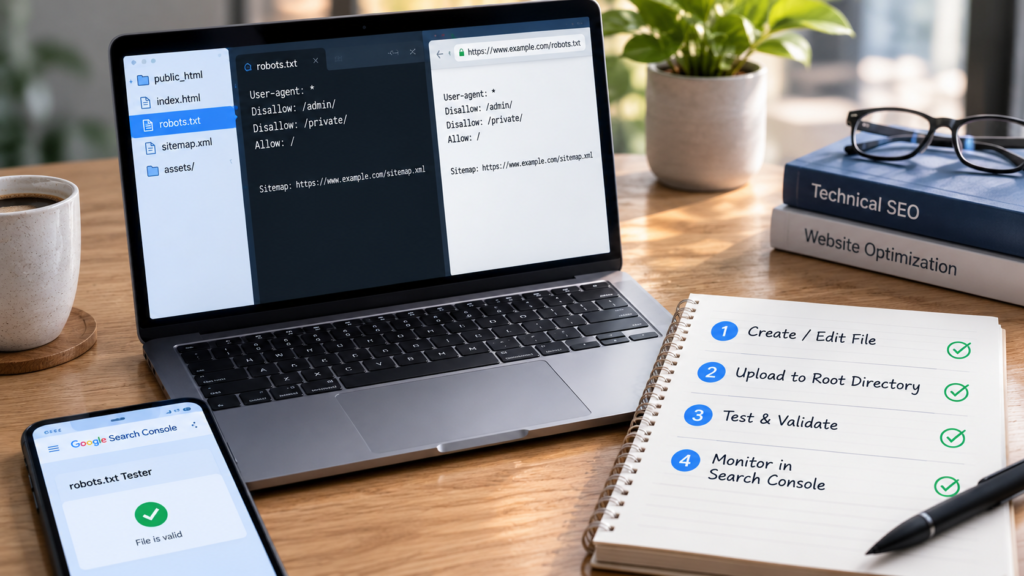
- Open a plain text editor on your computer.
- Add a user agent line for target bots.
- Add disallow lines for private folders.
- Add allow lines for exceptions if needed.
- Include your sitemap URL at the bottom.
- Save the file as robots.txt exactly.
- Upload it to your root domain folder.
- Test it using Google Search Console.
This simple process works for most websites. Larger sites may need more detailed rules. Sites managing many URLs often pair this with a full technical SEO audit to catch other crawl issues.
Robots Txt Disable All: When and Why
Sometimes you want to block every bot completely. This works well for staging sites. It also suits sites still under development.
Use this simple rule to block everything:
User agent: *
Disallow: /
This tells all bots to stay away entirely. Remove this rule before launching publicly. Forgetting to remove it is a common mistake. It can silently kill your organic traffic.
Always double check this setting after launch. Many site owners forget this simple step. That single oversight can undo months of SEO work.
Common Robots.txt Mistakes to Avoid
Many beginners make the same errors repeatedly. Knowing these mistakes helps you avoid them.
Blocking important pages accidentally. This happens through overly broad rules. Always review your disallow lines carefully.
Confusing noindex with disallow. These serve completely different purposes. Disallow stops crawling, not indexing.
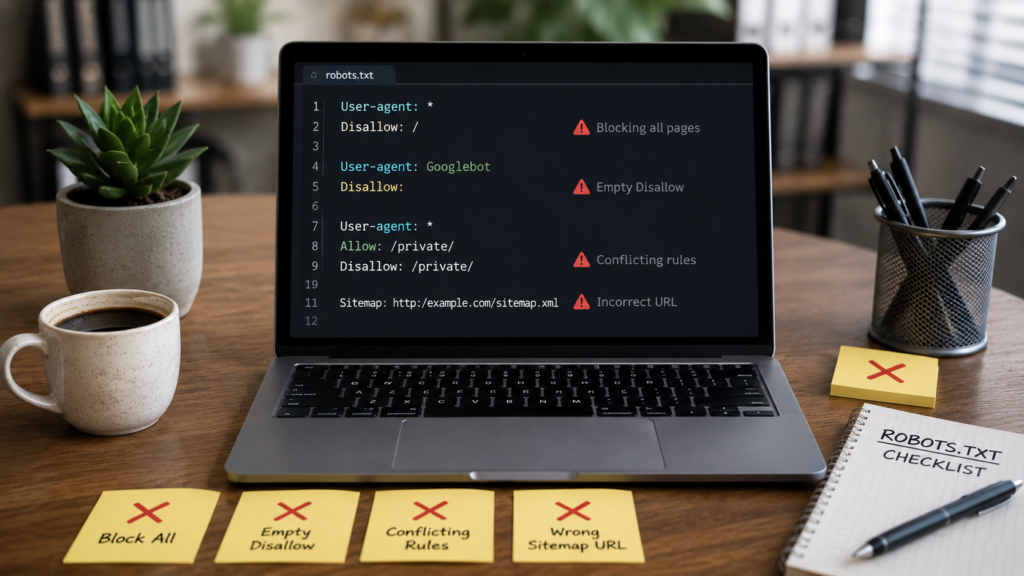
Forgetting the sitemap reference. Adding your sitemap helps bots find content faster. This supports better organic search visibility.
Blocking pagination pages incorrectly. This can hurt sites relying on pagination SEO strategies for category pages.
Ignoring canonical signals. Robots.txt should work alongside your canonical URL setup, not against it.
Testing Your Robots.txt File
Always test your file before publishing. Google Search Console offers a testing tool. It shows exactly how Googlebot reads your file.
You can also test manually. Visit yourdomain.com/robots.txt in any browser. Confirm the rules match your intentions exactly.
Regular testing prevents costly mistakes. Combine this habit with routine SEO audits for best results. Many agencies now use an AI SEO checker to speed up this process.
Robots.txt and Site Performance
A clean robots.txt supports faster crawling. Faster crawling connects to better rankings overall. This also ties into your site speed optimization efforts.
Search engines reward efficient websites. Reducing wasted crawl requests helps your core web vitals indirectly. Every technical improvement adds up over time.
Pairing robots.txt cleanup with strong keyword research creates a solid foundation. Technical health and content strategy work best together.
Robots.txt for Local and Ecommerce Websites
Local businesses often overlook this file entirely. Yet it still matters for their visibility. Clean crawling supports strong local SEO performance too.
Ecommerce sites face bigger challenges here. Product filters create thousands of duplicate URLs. Managing this well protects your domain authority and crawl efficiency.
Agencies offering SEO services often start technical work here. It is a foundational step before deeper optimization begins.
Robots.txt and Modern SEO Trends
SEO keeps evolving with new technology. Many brands now explore AI SEO strategies alongside traditional methods. Robots.txt still remains relevant in this shift.

Search engines and AI crawlers both read this file. Managing bot access remains important either way. Businesses using SEO automation tools still rely on solid basics first.
Pairing technical fundamentals with services like AI SEO support keeps strategies future ready. The basics never truly go out of style.
Measuring the Impact of Robots.txt Changes
After editing your file, track your results. Watch your crawl stats in Search Console. Monitor how bots respond over several weeks.
You can also check your organic traffic regularly. Look for unexpected drops after changes. Quick detection helps you fix problems fast.
Over time, clean crawling should help increase organic traffic naturally. Combine this with a broader content audit for stronger results.
Robots.txt Alongside Other SEO Elements
Robots.txt rarely works alone. It pairs with your meta description strategy and meta title length choices for full page optimization.
It also supports structured data efforts. Adding schema markup alongside clean crawling helps search engines understand content faster.
Together, these elements build a strong technical base. That base supports every other SEO effort you make.
According to Google Search Central, robots.txt remains a core crawling standard. The official protocol is documented in RFC 9309, published by the IETF. Resources like Moz and Cloudflare also explain the standard well. For deeper crawler behavior research, Search Engine Land publishes regular updates.
FAQs
Robots.txt guides search engine crawlers around your website. It tells bots which folders they may access. It helps manage crawl budget and protects private or duplicate content areas from being crawled unnecessarily by search engines.
Open a plain text editor and add user agent rules. Include disallow and allow lines for specific folders. Save the file as robots.txt and upload it to your website’s root domain directory.
Not directly. Robots.txt only stops crawling, not indexing. A blocked page might still appear in results if other sites link to it. Use noindex tags for guaranteed removal instead.
Yes, using Disallow with a single slash blocks every bot. This works well for staging sites. Remember to remove this rule before your website goes live publicly again.
Use Google Search Console’s robots.txt testing tool. It simulates how Googlebot reads your rules. You can also visit yourdomain.com/robots.txt directly in any browser to confirm settings.
Conclusion
Robots.txt looks small but carries real weight. It shapes how search engines crawl your site. Getting it right protects your crawl budget fully.
Review your file regularly as your site grows. Pair it with strong technical habits always. Combine this with efforts like checking organic traffic and ongoing keyword research for lasting results.
If your site needs deeper technical help, explore professional SEO services or specialized ecommerce SEO support to build on this foundation.

About the author
Ujjwal Kumawat
I specialize in SEO, website development, Google Ads and online business growth strategies. Through my blogs, I share practical insights, marketing tips and proven strategies to help businesses improve their online visibility, generate more leads and grow faster in the digital space.