Do you know what a canonical url actually does to your Google rankings?
A canonical url tells search engines which version of a page is the preferred one. Without it, duplicate content splits your ranking signals across multiple URLs. This guide covers canonical url meaning, rel canonical implementation, examples, and common mistakes. We also cover how to do a canonical link check correctly.
For brands building digital marketing strategies, canonical tags are a foundational technical SEO element requiring consistent attention.
What Is a Canonical URL
This is the direct answer most readers want immediately here. A canonical url is the master version of a webpage you want Google to index. It signals which URL should receive all link equity and ranking credit.
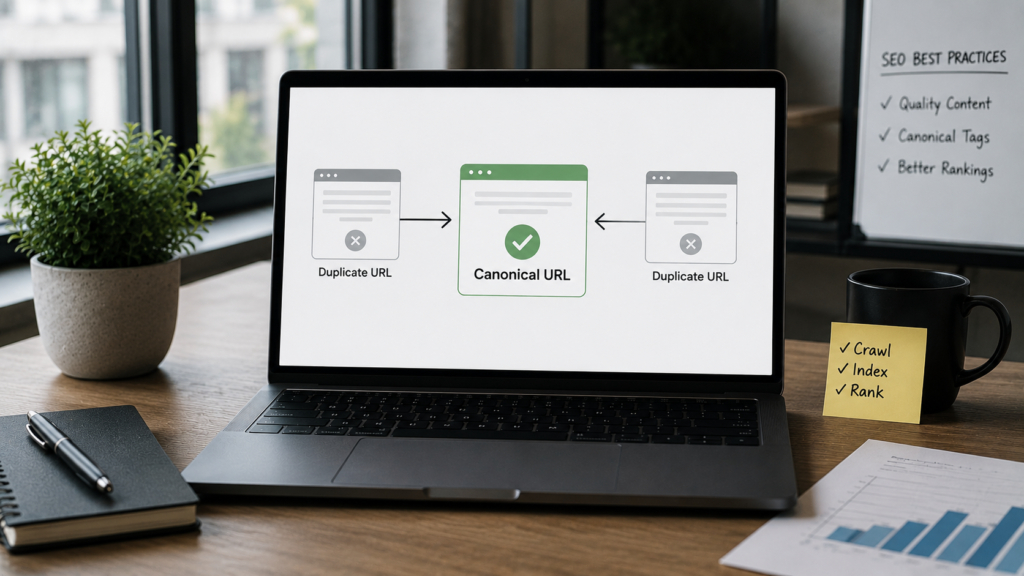
According to Google’s official canonical URL documentation, canonicals help you specify the URL you want to appear in search results. Google treats duplicate URLs as a consolidation problem that canonicals solve.
Our dedicated canonical tags guide covers this topic in its fullest technical depth.
Canonical URL in SEO: Why It Matters
Understanding canonical url in seo helps you protect hard earned ranking signals effectively.
When multiple URLs show identical or near identical content, Google splits crawl budget and link authority. This dilution hurts every version instead of concentrating signals on one winner. Canonicals consolidate those signals onto your preferred URL cleanly.
According to Moz’s canonicalization guide, improper canonicalization is one of the most common technical SEO errors auditors find. This is especially true for ecommerce sites with faceted navigation or filter parameters.
For ecommerce brands managing thousands of product URLs, our eCommerce SEO service handles canonical strategy as a core implementation step.
Common Situations That Create Duplicate URLs
Several everyday website scenarios create duplicate URL problems requiring canonical tags.
HTTP vs HTTPS. Both protocol versions load the same content without proper redirects or canonicals in place.
Trailing slashes. example.com/page and example.com/page/ are technically different URLs to crawlers.
www vs non-www. Your domain may resolve at two separate URLs simultaneously without canonical guidance.
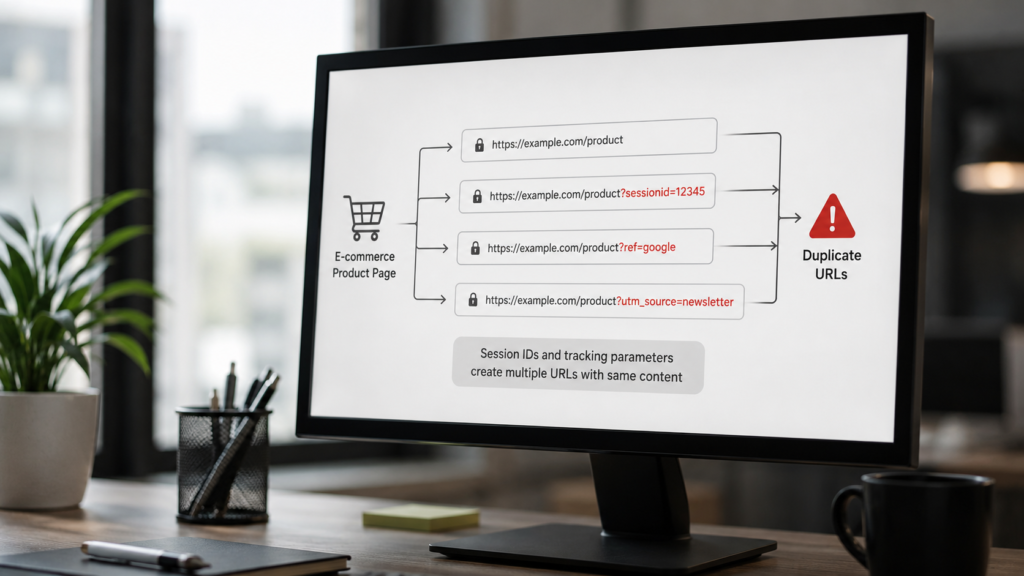
Session IDs and tracking parameters. UTM parameters like ?utm source=newsletter create infinite URL variations of the same page.
Pagination. Paginated series can create near duplicate content issues. Our pagination SEO guide covers how canonical tags interact with paginated series specifically.
Faceted navigation. Filter combinations on ecommerce sites multiply URL count dramatically. Our technical SEO audit checklist covers identifying these issues systematically.
Canonical URL Example in Real Websites
A canonical url example helps visualise how this works in real life clearly.
Imagine an ecommerce product available at three different URLs:
example.com/shoes/blue-trainers
example.com/shoes/blue-trainers?color=blue
example.com/category/trainers?product=blue-trainers
All three load identical content. Without a canonical, Google may index all three or choose unpredictably. With a canonical tag pointing to the first URL, all three pages tell Google the first URL is the correct, preferred version.
According to Ahrefs’s canonical tags implementation guide, you can place canonical tags either in the HTML head section or in HTTP response headers. Both tell Google the same thing, though head placement is more common.
Canonical URL HTML Implementation
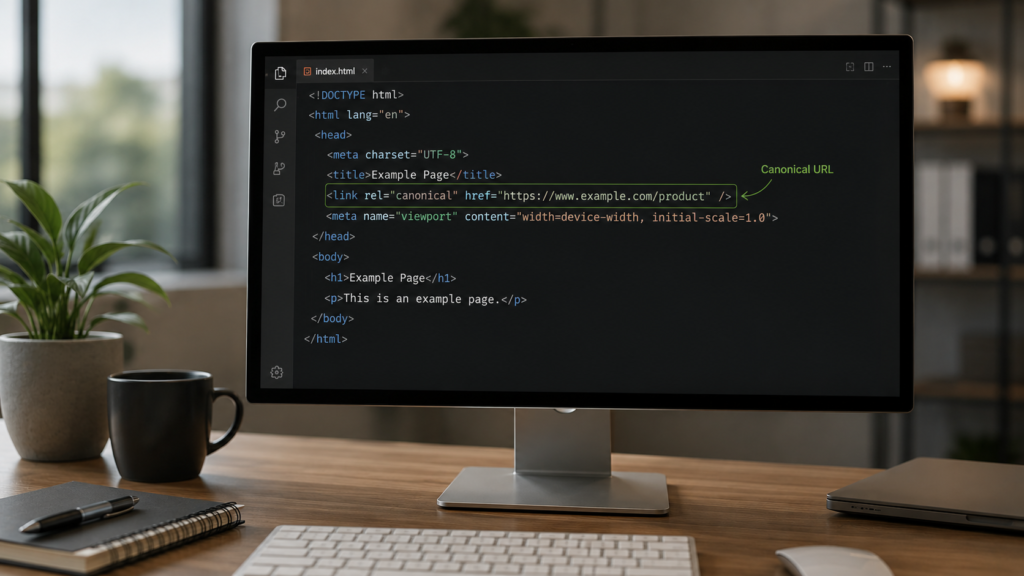
Implementing canonical url html requires adding a single line to each page’s head section.
The rel canonical tag looks like this in the page head:
html
<link rel="canonical" href="https://www.example.com/preferred-page-url/" />Every page should carry a canonical tag. Self referencing canonicals on unique pages are best practice. They prevent Google from inventing a canonical if it finds another URL resolving to the same content.
For pages with duplicate versions, the canonical should point to the preferred URL across every duplicate consistently. Inconsistent canonicals where page A points to B but page B points to A create crawl confusion.
According to Google’s canonical implementation guidance, the canonical element is a hint, not a directive. Google may still choose a different URL if signals contradict your declared canonical.
Rel Canonical URL: HTTP Header Method
The rel canonical url can also be declared in the HTTP response header for non HTML files.
This method suits PDF files, image files, and other non HTML content types that cannot carry HTML head tags. The HTTP header declaration looks like this:
Link: href=”https://www.example.com/preferred-url/“; rel=”canonical”
This approach is less commonly needed for standard web pages. Our JavaScript SEO guide covers how JavaScript rendered pages handle canonical signals differently from server rendered pages.
How to Do a Canonical Link Check
A canonical link check confirms your tags are correctly implemented and visible to crawlers.
Method one: View page source. Right click any page and select View Page Source. Search for rel canonical. The href value should match your intended preferred URL exactly.
Method two: Use a browser extension. Tools like Ahrefs SEO Toolbar show canonical tags directly in the browser without opening page source each time.
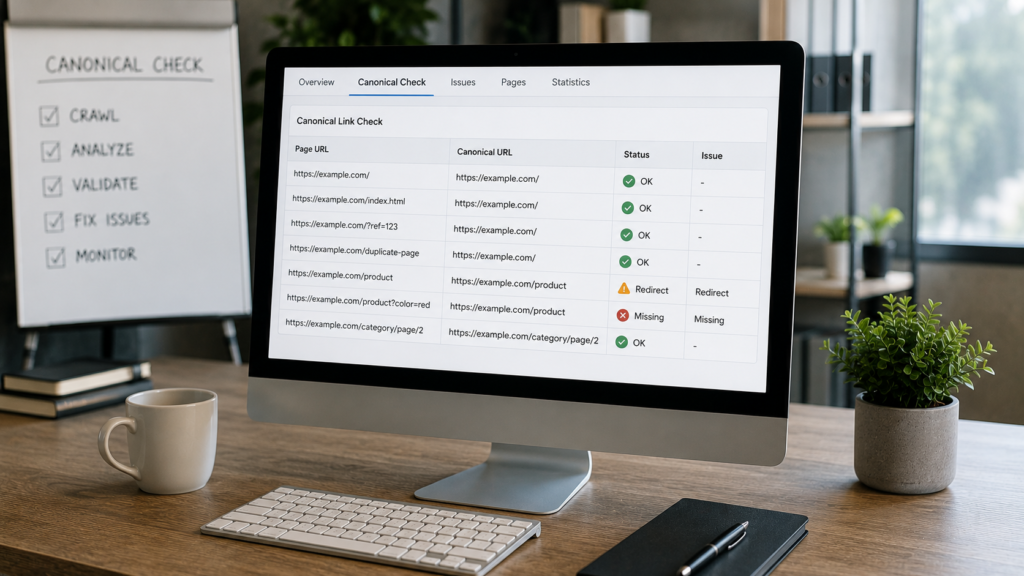
Method three: Google Search Console. The URL Inspection tool shows how Google sees your page including the canonical Google selected. This may differ from your declared canonical if your implementation has conflicts.
Method four: Crawl with a tool. According to Semrush’s canonical URL implementation guide, crawling your site with Screaming Frog or Semrush Site Audit reveals canonical implementation at scale across all pages.
Our how to perform an SEO audit guide covers integrating canonical link checks into your full technical audit workflow.
Canonical URL vs 301 Redirect
This distinction confuses many developers and marketers when solving duplicate content problems.
A canonical tag tells search engines which URL to prefer for ranking purposes. Both the canonical and the non-preferred URL remain accessible to users.
A 301 redirect permanently moves users and crawlers from one URL to another. The old URL stops functioning as a live destination entirely.
Use a canonical when you need both URLs to remain accessible. Use a 301 redirect when the old URL should permanently stop receiving traffic. Our site speed optimisation guide explains how excessive redirect chains also affect performance alongside canonical strategy.
Self Referencing Canonical URLs
A self referencing canonical url points a page to itself as the preferred version.
This is best practice for every page on your site, even if no duplicate version exists. Self referencing canonicals prevent Google from inferring a different canonical based on other signals it encounters.
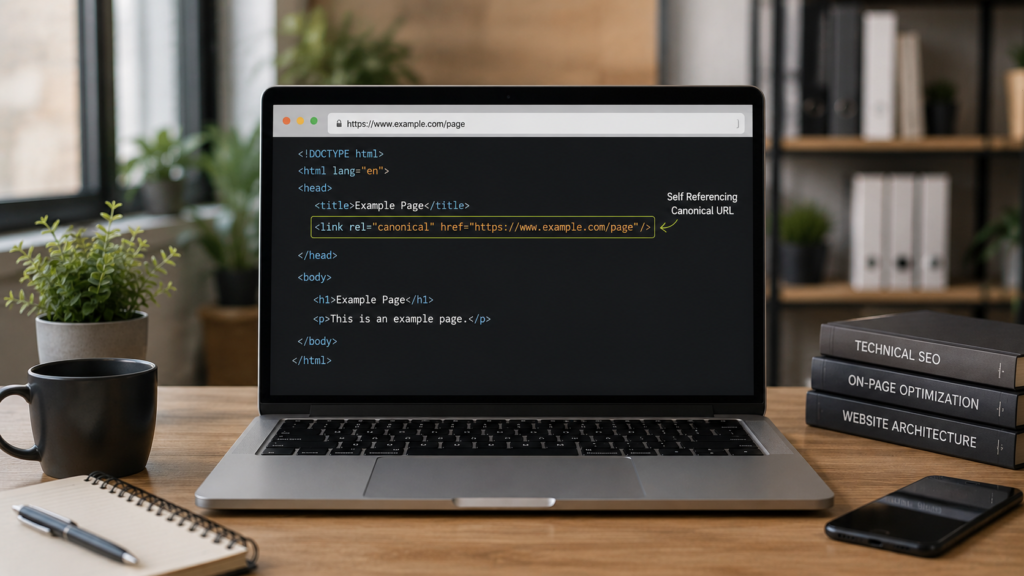
Add a self referencing canonical to your homepage, all blog posts, service pages, and product pages. This prevents problematic scenarios where Google chooses an unexpected canonical URL from a crawl path.
For WordPress sites, most SEO plugins add self referencing canonicals automatically. Our WordPress website development service ensures canonical configuration is correct from the initial build phase.
Cross Domain Canonical URLs
A cross domain canonical tells Google that content on one domain originated on another domain.
This is common for content syndication, where the same article appears on multiple websites simultaneously. The syndicated copy should carry a canonical pointing to the original source URL.
According to Ahrefs’s cross domain canonical guidance, Google does support cross domain canonicals but is more skeptical about honoring them. Ensure the original content publishes first and the canonical is correctly implemented before syndication.
Our content audit guide helps identify syndicated content creating unexpected cross domain canonical issues.
Common Canonical URL Mistakes to Avoid
These mistakes consistently undermine canonical implementation even on well managed websites.
Canonicalising paginated pages to the first page. This hides important paginated content from Google unnecessarily. Use self referencing canonicals on paginated pages instead.
Conflicting canonicals and noindex tags. A page carrying both a noindex and a canonical pointing to another page sends contradictory signals to Google.
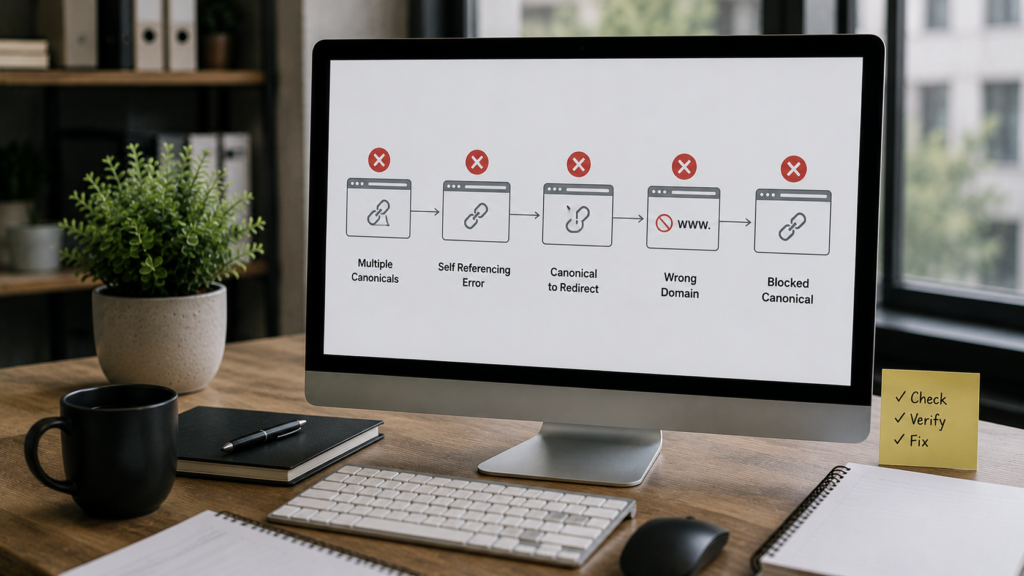
Canonical and redirect chain conflicts. If your canonical points to a URL that then redirects, Google may follow the redirect and change which URL it treats as canonical.
Missing canonicals on parameter URLs. Every parameter variation needs a canonical pointing to the clean version. Our canonical tags guide covers parameter handling in full.
Canonical to a noindexed page. Pointing a canonical to a noindexed URL tells Google to treat that page as preferred but then also not index it. This creates a crawl signal contradiction.
According to Semrush’s canonical mistakes list, these errors are extremely common across enterprise sites with complex URL structures.
Canonical URL for International SEO
Canonical tags interact with hreflang tags when managing international site versions.
For international SEO, hreflang tags specify language and regional versions. Canonicals within each language cluster should point to the preferred URL within that same language version. Pointing all language versions to a single English canonical is incorrect.
According to Google’s international canonicalization guidance, canonicalize across language versions only when the content is truly identical, not just translated. Each translated version should canonicalize to itself typically.
Our international SEO strategy guide covers how canonical and hreflang interact across multi language website architectures.
Canonical URL for Mobile Versions
Mobile specific URLs once required canonical tags pointing mobile versions to desktop counterparts.
With Google’s full adoption of mobile first indexing, most modern sites use responsive design instead. Responsive sites serve identical HTML across all devices, eliminating the need for separate mobile canonical tags.

If your site uses a separate m.dot subdomain for mobile, canonical tags pointing to the desktop version remain important. Your technical SEO audit checklist should verify mobile canonical configuration for any non responsive site.
Canonical Tags in WordPress, Shopify, and Other CMS Platforms
Most content management systems provide canonical tag support either natively or through plugins.
WordPress. Yoast SEO, Rank Math, and All in One SEO all add canonical tags automatically. Manual overrides are possible per page or post where needed.
Shopify. Shopify automatically generates canonical tags for product pages. However, duplicate product URLs from collections may still need attention in complex store architectures.
Custom builds. Custom websites require manual canonical implementation in the page template. Our custom website development service implements canonical tags correctly across all page templates.
For ecommerce specifically, our eCommerce development service ensures canonical tags are configured correctly across product, category, and filter pages from day one.
Frequently Asked Questions
It tells Google which version of a page is the preferred one. All ranking signals consolidate onto that URL.
Use canonical when both URLs must remain accessible to users. Use 301 redirect when the old URL should permanently stop working.
Yes, including unique pages with no duplicates. Self referencing canonicals prevent Google inventing one from other crawl signals.
Use Google Search Console URL Inspection or Screaming Frog crawler. Confirm the canonical Google selected matches your intended preferred URL.
Yes, badly implemented canonicals consolidate signals onto the wrong pages. This can suppress rankings for pages you actually want indexed.
Conclusion
A canonical url is one of the most important technical SEO signals your website sends to Google. Implementing rel canonical correctly consolidates link equity, prevents duplicate content penalties, and ensures your preferred pages rank. Every page on your site deserves a canonical tag, whether self referencing or pointing to a preferred version.
Run a canonical link check regularly as part of your technical audit process. Catch conflicts with redirects, noindex tags, and hreflang implementations before they dilute your ranking signals. Stay consistent and deliberate about which URLs you declare as canonical across every page type.
Pair strong canonical implementation with other technical foundations like mobile first indexing, Core Web Vitals, and JavaScript SEO for the strongest possible technical SEO foundation.
Explore our complete services overview to see how we help brands implement canonical tags correctly across every page type and platform.

About the author
Ujjwal Kumawat
I specialize in SEO, website development, Google Ads and online business growth strategies. Through my blogs, I share practical insights, marketing tips and proven strategies to help businesses improve their online visibility, generate more leads and grow faster in the digital space.