
How does mastering YouTube keyword research explain why some channels with average production quality reach millions of views, while polished channels with superior content barely break a thousand?
The answer is almost always keyword strategy. YouTube is the world’s second-largest search engine, and like Google, it rewards content optimized for what people are actually searching for. This guide covers the best YouTube keyword research tools in 2026 including newer options beyond the usual TubeBuddy/VidIQ pair how to find keyword search volume, and the step-by-step process for finding keywords that can drive real channel growth.
This complete guide covers every YouTube keyword research tool available in 2026, how to find keyword search volume for YouTube, and the step-by-step process for identifying keywords that can drive real channel growth.
Why YouTube Keyword Research Matters
YouTube processes more than 3 billion searches every month, according to YouTube’s own reporting on search behavior. YouTube is the world’s second largest search engine, behind only Google itself. Every search on the platform represents a person looking for a specific video on a specific topic and unlike a passive scroll through recommendations, search traffic arrives with clear intent already formed.
Before diving into YouTube specific tactics, it helps to understand the fundamentals of keyword research that apply across every search platform. Without YouTube keyword research, you are creating content based on what you think people want to watch rather than what they are actively searching for. That gap between assumption and reality is where most channels fail to grow.
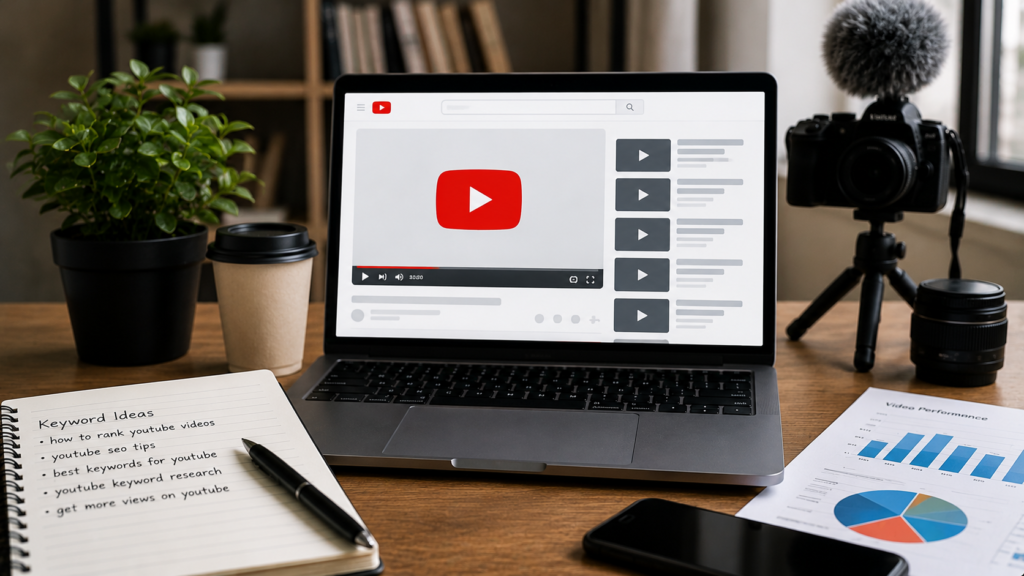
YouTube keyword research identifies the exact phrases, questions, and topics your target audience types into YouTube search. It reveals which topics have enough search demand to justify creating a video, how competitive those topics are among existing creators, and which specific keyword phrasing will trigger YouTube’s algorithm to recommend your video to relevant viewers.
The benefits of YouTube keyword research extend beyond direct search traffic. YouTube’s recommendation algorithm uses watch time, engagement rate, and keyword signals from your title, description, and tags to determine which viewers to show your videos to. Targeting the right keywords increases the likelihood that YouTube will recommend your video to viewers who are most likely to watch it in full, generating the engagement signals that compound into channel growth.
For businesses using YouTube as part of their broader social media marketing strategy, keyword research ensures every video investment generates maximum reach and compounds over time rather than fading after initial publication.
How YouTube Search Works
Understanding how YouTube’s search algorithm functions helps you use keyword research data more effectively.
When a user searches on YouTube, the algorithm evaluates potential result videos against three primary factors: relevance, engagement, and quality. Relevance is determined by how closely your video’s title, description, tags, and spoken content match the search query. Engagement is measured by click-through rate, average view duration, likes, comments, and shares. Quality signals include channel authority, upload consistency, and overall watch time accumulation.
Keyword research directly influences the relevance factor. Choosing keywords that accurately match what your target audience is searching for and incorporating them correctly into your video metadata sends clear relevance signals to YouTube’s algorithm. This is why a video with strong keyword optimisation often outranks a video with higher production value but weak keyword targeting.
YouTube keyword research also connects to your broader digital marketing strategies. Videos that rank on YouTube frequently also rank in Google video search results, doubling your organic visibility from a single piece of content.
What Makes a Good YouTube Keyword
Not every keyword you discover through a YouTube keyword research tool is worth targeting. Evaluating keywords against four criteria ensures you focus on terms with genuine growth potential.
Search volume. The keyword must have enough monthly searches on YouTube to make ranking for it worthwhile. Very low volume keywords may be easier to rank for but deliver minimal views even at position one. A balance between achievable ranking and meaningful search volume is the goal.
Competition level. Each keyword attracts a different level of competition from established channels. Targeting keywords dominated by channels with millions of subscribers is realistic only once your channel has comparable authority. New and growing channels should target keywords where the top results include channels of similar size.
Viewer intent alignment. The keyword must accurately match what your video delivers. If someone searches for a tutorial and finds a promotional video, they will leave immediately. High bounce rates and low watch time destroy a video’s ranking potential regardless of keyword optimisation.
Relevance to your channel niche. Every video you publish contributes to or detracts from YouTube’s understanding of what your channel is about. Targeting keywords within a consistent niche builds topical authority that benefits every video on your channel.
Best Keyword Tool YouTube Options in 2026
YouTube Autocomplete: The Most Underrated Free Tool
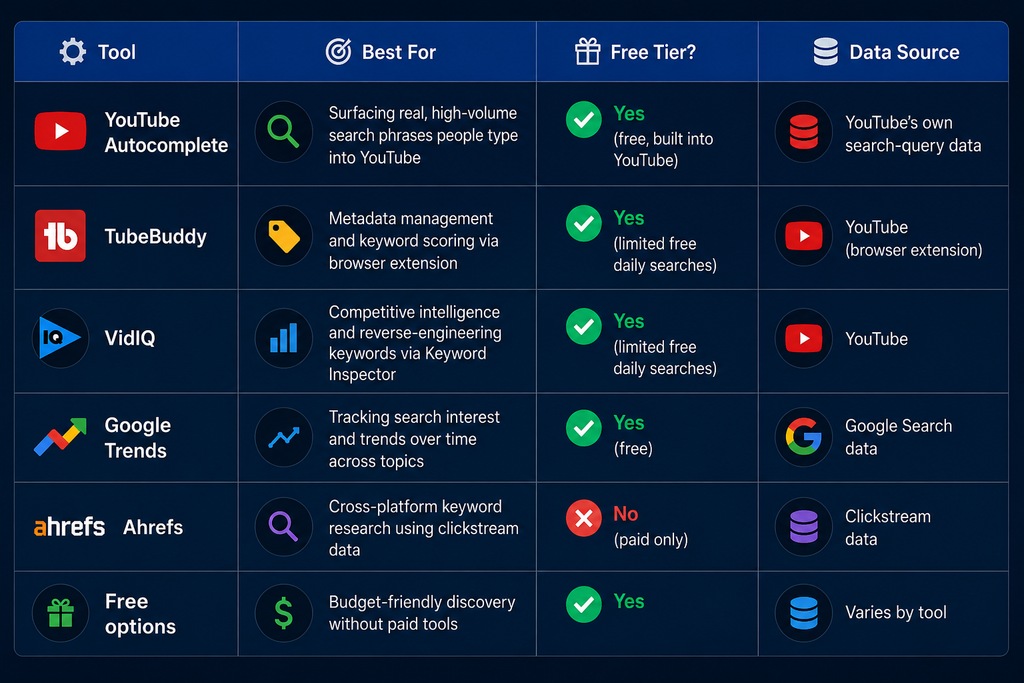
YouTube’s own search bar is one of the most accurate and up-to-date YouTube keyword research tools available. When you begin typing any query into YouTube search, the autocomplete suggestions that appear represent the most commonly searched extensions of that query by real YouTube users right now.

This method is completely free, requires no account or subscription, and reflects actual current search behaviour rather than database estimates that may be weeks or months old. For keyword research for free on YouTube, autocomplete is the starting point every creator should use before opening any other tool.
To maximise autocomplete research, type your seed keyword and note every suggestion. Then add letters of the alphabet after your keyword to surface additional long-tail variations. For example, typing “cooking tutorial a,” “cooking tutorial b,” and so on reveals dozens of long-tail keywords around a single seed topic.
TubeBuddy: The Most Popular YouTube Keyword Research Tool
TubeBuddy is a browser extension and the most widely used YouTube keyword research tool among serious creators. It integrates directly into the YouTube interface, overlaying keyword data onto search results, video pages, and your own channel analytics.
Its keyword explorer feature provides a weighted score combining search volume and competition into a single metric called the Keyword Score. Higher scores indicate keywords with strong search demand relative to their competition level. TubeBuddy also shows the search volume, competition rating, and a list of the top-ranking videos for any keyword you research.
The free version of TubeBuddy provides limited daily keyword searches but includes enough functionality to validate keyword ideas and check competition levels for specific terms. Paid tiers unlock unlimited keyword research, bulk processing, and competitor channel analysis.
For businesses running social media management across multiple channels and platforms, TubeBuddy’s ability to manage YouTube metadata at scale makes it valuable beyond keyword research alone.
VidIQ: Best for Competitive Intelligence
VidIQ is the primary competitor to TubeBuddy in the YouTube keyword research space and is often preferred by creators who prioritise competitive intelligence over metadata management. Its keyword tool for YouTube shows search volume estimates, competition scores, and a breakdown of the top-performing videos for any keyword including their view counts, upload dates, and channel sizes.
VidIQ’s Keyword Inspector feature analyses any existing video and shows which keywords YouTube associates it with, providing insight into how successful videos in your niche are optimised. This reverse engineering capability makes VidIQ particularly valuable for understanding why competitor videos rank and replicating those keyword strategies.
The free version includes basic keyword research functionality with daily limits. The paid tiers unlock unlimited research, trend alerts, and AI-powered keyword suggestions.
For channels that are part of a broader AI marketing strategy, VidIQ’s AI-powered recommendations align well with data-driven content planning workflows.
Google Trends for YouTube Keyword Research
Google Trends includes a specific YouTube search filter that shows how search interest in any topic has changed over time on YouTube specifically, separate from Google web search data. This makes it one of the most accurate free tools for understanding YouTube keyword trend direction.

Using Google Trends for YouTube keyword research reveals whether a topic is growing in viewer interest, peaking, or declining. Producing content on a topic with rising YouTube search trend data before it peaks positions your video to capture traffic during the highest-demand period.
Google Trends also shows geographic search interest breakdowns, which is directly relevant for creators targeting specific regional audiences or for businesses using YouTube as part of geo-targeted SEO and audience development strategies.
Ahrefs YouTube Keyword Tool
Ahrefs includes YouTube keyword research functionality within its paid platform, using clickstream data to provide search volume estimates specific to YouTube rather than estimated from Google search data. This distinction matters because YouTube and Google audiences search differently, using different keyword phrasing and intent patterns.
Ahrefs provides keyword difficulty scores, related keyword suggestions, and SERP-like analysis of which videos rank for any given term. Its database covers multiple languages and regions, making it useful for creators targeting international audiences.
For businesses that already use Ahrefs for their broader SEO services and content strategy, extending its use to YouTube keyword research provides a consistent data infrastructure across all organic channels.
Newer YouTube Keyword Tools
Beyond the established players, a newer wave of tools built specifically around outlier detection, niche discovery, and AI-assisted suggestion has emerged in recent years. These tools tend to focus on surfacing underperforming-topic opportunities and breakout formats rather than replicating the search-volume-and-competition model of TubeBuddy and VidIQ.
They’re worth evaluating alongside the incumbents, particularly for channels in emerging niches where traditional keyword databases have thinner data. For a deeper breakdown of how to evaluate and combine these tools, see our full YouTube keyword search strategy guide.
Keyword Tool for YouTube Free Options
Several dedicated platforms provide YouTube keyword research capabilities at no cost:
Keyword Tool (keywordtool.io) generates hundreds of long-tail YouTube keyword suggestions from YouTube autocomplete data. The free version shows keyword suggestions without volume data. The paid version adds search volume, competition, and trend data.
Rapidtags generates YouTube tag suggestions for any keyword and shows how commonly those tags are used across existing videos. While primarily a tag generator, it functions as a lightweight keyword discovery tool.
YouTube Studio Analytics for your own channel shows the actual search terms that led viewers to find your videos. This real performance data is invaluable for understanding which keywords are already driving discovery and identifying related terms to target in future content.
How to Find Keyword Search Volume for YouTube
Keyword search volume on YouTube is more difficult to access accurately than Google search volume because YouTube does not provide its own public keyword volume data. The available approaches range from direct estimates to inference from related data sources.

TubeBuddy and VidIQ both provide YouTube-specific search volume estimates drawn from their own data collection and modelling. These are the most commonly used and most directly YouTube-specific volume estimates available.
Google Keyword Planner shows Google web search volume data for keywords but YouTube search volume often correlates directionally with Google search volume for the same terms. Creators use Google Keyword Planner as a proxy for identifying whether a topic has meaningful search demand before using YouTube-specific tools to evaluate competition.
YouTube Studio shows impression data and search term reports for your own videos. For channels with existing content, this provides direct evidence of which keyword searches are actually driving views to your specific content.
Ahrefs clickstream data provides YouTube-specific volume estimates that are generally considered the most accurate third-party source available, though they require a paid Ahrefs subscription.
Understanding keyword search volume for YouTube should always be combined with competition analysis. A keyword with high volume but dominated by channels with millions of subscribers is less valuable than a keyword with moderate volume where the top results are from smaller channels. Volume alone does not determine keyword opportunity.
YouTube Keyword Research Process Step by Step
Step 1: Define your content topic. Start with a broad topic area relevant to your channel niche. For a cooking channel, this might be “pasta recipes.” For a fitness channel, this might be “home workouts.”
Step 2a: Generate seed keywords using YouTube Autocomplete. Type your broad topic into YouTube search and record every autocomplete suggestion. Add alphabet letters after your seed to expand the list.
Step 2b: Brainstorm with AI, then validate with real data. Use AI tools for content planning to quickly generate additional keyword angles and content ideas around your seed topic. Treat these as a starting point, not a final list — always validate any AI-suggested keyword against actual search volume and competition data in TubeBuddy or VidIQ before committing production time to it.
Step 3: Evaluate each keyword in a YouTube keyword research tool. Enter your candidate keywords into TubeBuddy or VidIQ to get search volume estimates and competition scores. Prioritise keywords with moderate to high search volume and competition levels realistic for your channel size.
Step 4: Analyse the top-ranking videos. Watch the top three to five videos ranking for your target keyword. Note their video length, format, structure, and the specific angle they take on the topic. Your video needs to provide comparable or superior value.
Step 5: Check Google Trends for YouTube. Verify that the keyword has stable or growing search interest on YouTube specifically. Avoid investing production time in keywords with declining trend data.
Step 6: Select a primary keyword and supporting keywords. Choose one primary keyword for each video that will appear in your title. Identify three to five supporting keywords to incorporate into your description and tags.
Step 7: Plan your content to match search intent. Create your video to genuinely satisfy the search intent behind the keyword. A tutorial keyword requires tutorial content. A review keyword requires an honest review. Mismatched intent destroys watch time regardless of keyword optimisation.
This keyword research process mirrors the broader content planning approach covered in our guide on how to identify the right content length for different search intents.
Using YouTube Keywords in Your Video Optimisation
Finding the right keyword through YouTube keyword research is only half the work. Implementing those keywords correctly in your video optimisation determines whether YouTube’s algorithm understands what your video is about.
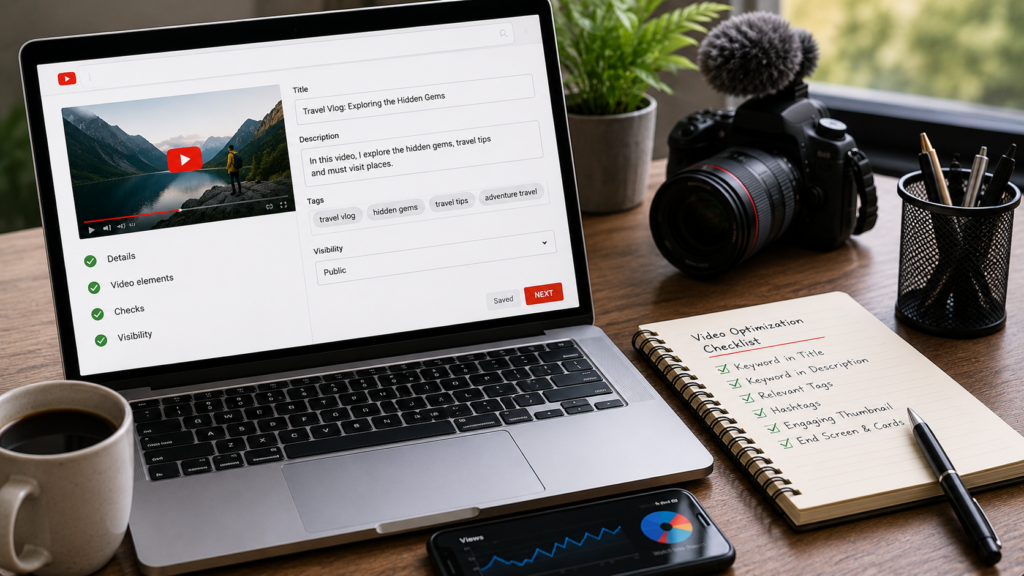
Video title. Your primary keyword should appear as close to the beginning of your title as naturally possible. The title is the single most important keyword signal for YouTube’s algorithm.
Video description. Write at least 200 to 300 words in your video description. Include your primary keyword in the first two sentences. Use secondary keywords naturally throughout the description. YouTube indexes your description text and uses it to understand your video’s topic.
Tags. Include your primary keyword as the first tag. Add secondary keywords and closely related terms as additional tags. Tags remain a minor but useful keyword signal, particularly for clarifying topic ambiguity.
Spoken content. YouTube automatically transcribes video audio and uses the transcript as a content signal. Naturally mentioning your target keyword in your video’s spoken content reinforces the relevance signal beyond metadata.
Custom thumbnail. While thumbnails do not carry keyword data, they directly influence click-through rate, which is the engagement signal YouTube weighs most heavily alongside watch time. A thumbnail that accurately represents the video topic reduces bounce rates by attracting viewers with genuine interest.
For businesses incorporating YouTube into their content writing services and broader content strategy, video description optimisation should follow the same keyword and intent principles applied to written content.
YouTube Keyword Research for Different Content Goals
The right YouTube keyword research approach varies depending on what you want your channel to achieve.
For brand awareness. Target broad informational keywords with high search volume in your niche. Prioritise discoverability over competition avoidance. Accept that early videos may not rank high but will build the authority that supports future rankings.
For lead generation. Target commercial intent keywords that attract viewers already considering a product or service in your category. A software company should target keywords like “how to manage projects online” rather than generic technology topics. This connects directly to conversion rate optimisation strategy where video content drives qualified traffic to the products or services being offered.
For eCommerce product discovery. Target product review and comparison keywords. Viewers searching “best wireless earbuds under 5000” on YouTube are actively in the purchase evaluation stage. For businesses running eCommerce SEO alongside YouTube, review content targeting these keywords drives purchase-intent traffic from two channels simultaneously.
For community building. Target niche-specific topics where a smaller, highly engaged audience exists. Lower-volume keywords in tightly defined communities often generate better engagement metrics than broad keywords with casual viewer audiences.
Frequently Asked Questions
TubeBuddy and VidIQ are the two best YouTube keyword research tools in 2026. TubeBuddy is best for metadata management and keyword scoring. VidIQ is best for competitive intelligence and understanding how successful competitor videos are optimised. Both offer free versions.
Use YouTube Autocomplete by typing seed keywords into YouTube search and recording all suggestions. Combine this with Google Trends YouTube filter and the free versions of TubeBuddy or VidIQ for competition scoring. This combination provides comprehensive keyword research for YouTube at zero cost.
Use TubeBuddy or VidIQ which both provide YouTube-specific search volume estimates. Google Keyword Planner can be used as a directional proxy for YouTube search demand. YouTube Studio analytics shows real search term data for your own channel’s existing content, providing the most accurate demand signals.
Yes. Videos that rank in YouTube search often also appear in Google’s video search results for the same keywords. Strong YouTube keyword optimisation therefore generates visibility in two search engines simultaneously, making YouTube keyword research valuable for your overall SEO services strategy.
Use one primary keyword in your title and first description sentence. Include three to eight secondary keywords throughout your description and tags. Avoid stuffing your description with keywords unnaturally. YouTube’s algorithm penalises keyword spam just as Google does for web pages.
Yes. Newer tools built specifically around outlier video detection and niche discovery have emerged alongside the two incumbents evaluate them against your channel size and budget before committing to a paid plan.
Conclusion
YouTube keyword research is the foundation of every successful channel growth strategy. Without knowing what your audience is actively searching for, video content becomes a guessing game that even high production quality cannot overcome.
The best keyword tool for YouTube combines autocomplete research for real-time query data, a dedicated tool like TubeBuddy or VidIQ for search volume and competition scoring, and Google Trends for YouTube to validate trend direction. Together, these tools provide everything needed to identify keywords worth targeting, understand the competition you will face, and plan content that genuinely satisfies viewer search intent.
Whether you are doing YouTube keyword research for free using autocomplete and free tool tiers, or using paid platforms for deeper competitive intelligence, the principles remain the same: find keywords your target audience is searching for, evaluate whether you can realistically rank for them, create content that fully satisfies the intent behind those searches, and optimise every video with the keyword data your research reveals.
For businesses looking to integrate YouTube into a complete digital marketing strategies framework backed by a forward looking AI SEO strategy or for channels seeking expert support in social media advertising and organic video growth, explore our full range of services.

About the author
Ujjwal Kumawat
I specialize in SEO, website development, Google Ads and online business growth strategies. Through my blogs, I share practical insights, marketing tips and proven strategies to help businesses improve their online visibility, generate more leads and grow faster in the digital space.