
Is your JavaScript-powered SEO website invisible to Google?
Millions of sites built with modern JavaScript frameworks rank far below their potential simply because search engines cannot crawl, render, or index their JS content correctly.
JavaScript SEO is the discipline that bridges the gap between dynamic web development and search engine visibility. Whether you’re managing a React application, a Next.js site, or an eCommerce platform built on headless architecture, this guide covers everything you need to know from how Google actually processes JavaScript to the exact fixes that get JS heavy pages ranking.
What Is JavaScript SEO?
JavaScript SEO is a specialist branch of technical SEO that focuses on ensuring search engines can efficiently crawl, render, and index websites built with or heavily reliant on JavaScript. The goal is to eliminate any negative SEO impact caused by how JavaScript delivers content and to make JS-powered websites as visible and rankable as possible in organic search results.
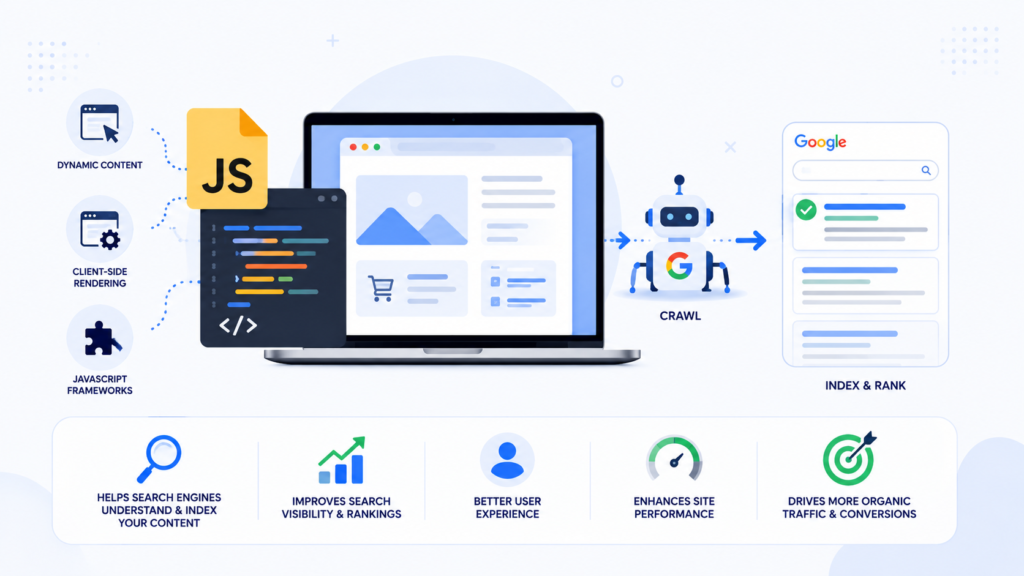
JavaScript powers dropdown menus, infinite scroll, product filters, dynamic pricing, personalisation, and entire page frameworks like React, Angular, Vue, and Next.js. JavaScript SEO covers optimising JS-delivered content so search engines can access it, resolving rendering issues that prevent indexing, managing canonical tags and meta robots directives in JS environments, and auditing how search engines see your pages versus how users see them.
Understanding Google’s official JavaScript SEO documentation is not optional for modern websites. With the rapid growth of JavaScript-heavy architectures, knowing how search engines interact with JS is essential for any SEO services strategy.
Why JavaScript SEO Matters for Your Website
JavaScript creates a fundamental challenge for search engines because it requires rendering before the content is visible. Unlike static HTML, which is immediately readable by any crawler, JavaScript content may not exist in the initial page response at all. Google’s guide to fixing JavaScript indexing issues.
Content may not be indexed at all. If critical content, headings, product descriptions, or links only appear after JavaScript executes, they may never make it into Google’s index. Pages without indexed content cannot rank for any keyword.
Indexing is delayed. Google processes JavaScript in two waves the first reads the initial HTML, the second renders the JavaScript. This gap has shortened significantly in recent years independent research has found most pages spend well under a minute in Google’s rendering queue but the delay can still stretch to days for very large sites or low-priority pages competing for limited crawl budget, meaning newly published content may not rank immediately after launch.
Internal links may be missed. Links generated by JavaScript onclick events or inserted dynamically are not discoverable on the first crawl pass, delaying Google’s ability to find and index those destination pages.
Crawl budget is consumed faster. JavaScript XHR requests use crawl budget at a higher rate than standard HTML resources. For large websites, this can mean Googlebot crawls important pages less frequently.
AI search systems face the same challenge. Most large language model crawlers, including those powering AI Overviews and AI-generated answers, cannot render JavaScript at all. If your content only exists after JS execution, AI search systems will not cite it in their generated results. For businesses investing in eCommerce SEO or AI SEO, resolving JavaScript SEO issues is critical to protecting both organic and AI-driven visibility.
How Google Crawls and Indexes JavaScript
Google processes JavaScript-powered pages in three distinct phases.
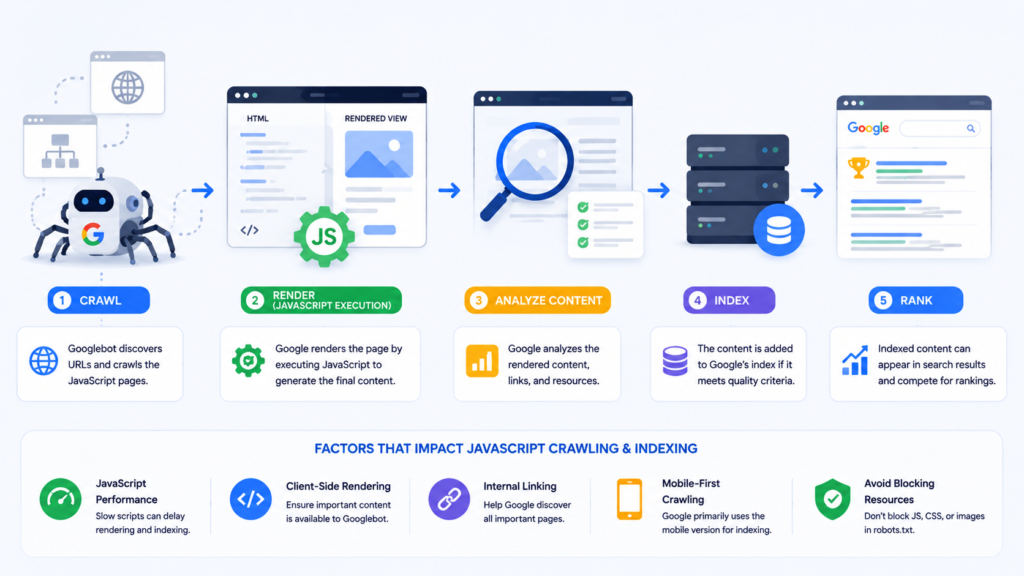
Phase 1: Crawling. Googlebot sends a GET request to your server and reads the raw HTML response. At this stage, Googlebot has not executed JavaScript — it reads only the content present in the initial HTML. Googlebot primarily crawls using a mobile user agent because Google operates on mobile-first indexing.
Phase 2: Rendering. Google places pages that pass initial crawling in a render queue. Google’s Web Rendering Service (WRS) uses a headless Chromium browser to execute the JavaScript.Critically, Google does not click, scroll, or interact with the page — click events or scroll triggers hide content from Google entirely. Google resizes the mobile viewport to approximately 411 pixels wide, meaning it sees all page content without scrolling.
Phase 3: Indexing. After rendering, Google analyses and stores the processed HTML in its index for ranking. The gap between Phase 1 and Phase 3 is why JavaScript SEO requires careful planning — any content, link, or directive that only exists after rendering adds delay and uncertainty to your indexing timeline.
Server Side Rendering vs Client Side Rendering vs Dynamic Rendering
Server Side Rendering (SSR) Generates the complete HTML page on the server before sending it to the browser. Googlebot receives fully populated HTML immediately, with all content, links, and metadata present in the initial response. SSR is the most SEO-friendly rendering approach. Common SSR implementations include Next.js and Gatsby for React, Nuxt.js for Vue, and Angular Universal for Angular.
Client Side Rendering (CSR) delivers a minimal HTML shell and then uses JavaScript to build the entire page in the browser. When Googlebot first crawls a CSR page, it receives a near-empty HTML document. CSR is the rendering approach most likely to cause JavaScript SEO problems: search engines struggle to index content quickly, delayed rendering holds back internal link discovery, and AI crawlers that cannot render JavaScript see essentially nothing.
Dynamic Rendering detects whether the visitor is a search engine bot and serves a pre-rendered HTML version to crawlers while serving the full client-side rendered version to users. While this solves the immediate indexing problem, Google does not recommend it as a long-term solution. Use dynamic rendering only as a temporary bridge while migrating toward SSR.
| Rendering Type | SEO Friendly | Immediate Indexing | LLM Visibility | Implementation Complexity |
|---|---|---|---|---|
| Server Side Rendering | Best | Yes | Yes | Medium |
| Client Side Rendering | Problematic | No | No | Low |
| Dynamic Rendering | Workaround | Yes (bots only) | Partially | High |
| Static Generation | Best | Yes | Yes | Low |
| Hydration (SSR + CSR) | Very Good | Yes | Yes | High |
JavaScript SEO Best Practices
Include Critical Content in the Initial HTML Response. Ensure headings, body text, product descriptions, and primary content are present in the initial HTML response. Check by right-clicking any page and selecting View Page Source. If your primary content is missing from the source code, it lives only in the rendered DOM and your indexing timeline is unpredictable.
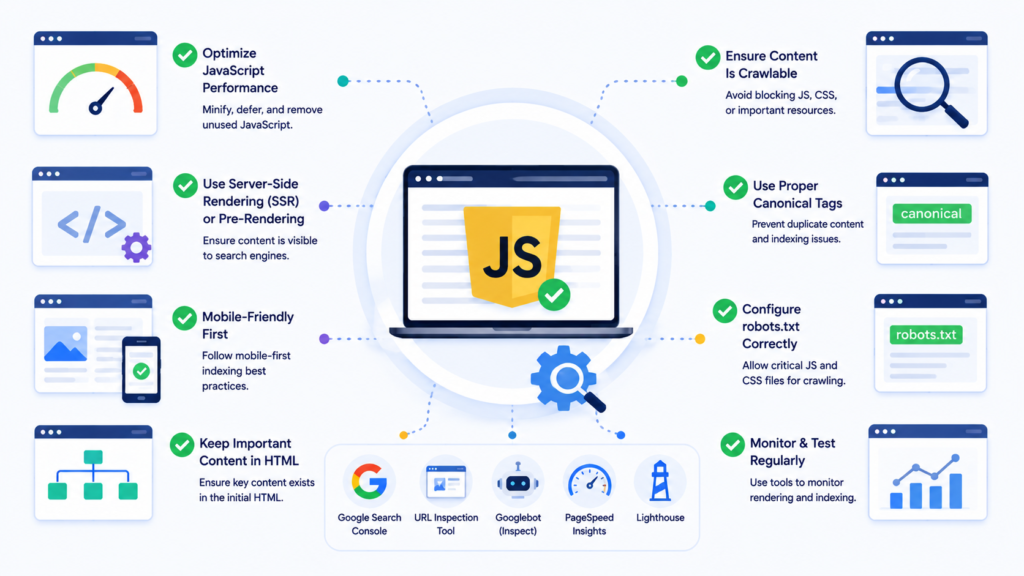
Use Standard Anchor Tags for All Internal Links. Internal links must use standard HTML anchor tags with href attributes. JavaScript-only approaches like onclick events or href="javascript:void(0)" are not reliable for SEO. The correct format is <a href="/target-page/">Link text</a>. For eCommerce development projects with large product catalogues, delayed link discovery means delayed indexing of product pages.
Keep Metadata in the Initial HTML Response. Title tags, meta descriptions, canonical tags, and robots meta tags should all be present in the raw HTML, not injected by JavaScript. If Google finds a noindex tag in the raw HTML, it honours it and skips rendering entirely — meaning JavaScript-injected canonical tags on the same page never reach Google.
Other Important Point
Do Not Block JavaScript Resources in Robots.txt. Blocking JavaScript or CSS files in robots.txt prevents Googlebot from rendering a page correctly. Your robots.txt should explicitly allow access to all JavaScript and CSS resources. This is a standard item in any technical SEO audit checklist.
Avoid Hash-Based URLs and Routing. Hash characters (#) in URLs create patterns that search engines cannot properly index. Avoid formats like yourdomain.com/#/products. Use history-mode routing instead to generate clean, indexable URLs.
Implement Lazy Loading Correctly. Only lazy load images and non-critical resources — never lazy load text content or product information that search engines need to index. Use the native loading="lazy" attribute for images rather than JavaScript-driven lazy loading where possible.
Use File Versioning for Major JavaScript Updates. Google aggressively caches JavaScript files. Use file versioning or fingerprinting in filenames (such as main.a7f3c92.js) to force Google to download updated files when significant changes are made.
Common JavaScript SEO Issues and How to Fix Them
Duplicate Content from JavaScript Routing. JavaScript frameworks can create multiple accessible URLs for the same content. Fix: implement self-referencing canonical tags in the raw HTML and use server-side redirects to enforce a consistent URL format.
Content Hidden Behind Accordions and Dropdowns. Since Google does not click during rendering, Google misses content inside accordions or tabs that loads only on click. Fix: ensure this content is present in the DOM on initial page load, even if visually hidden by CSS.
Soft 404 Errors. JavaScript frameworks cannot natively throw server-level 404 HTTP status codes, returning a 200 OK with a custom error message instead. Fix: redirect to a page that returns a true 404 server status, or add a noindex meta robots tag to error pages.
JavaScript Redirects Instead of Server-Side Redirects. JavaScript redirects require Google to render the page before following them. Fix: use server-side 301 or 302 redirects for all permanent URL changes — especially important during site migration projects.
Hreflang Issues in JavaScript Environments. Hreflang tags injected by JavaScript face the same rendering delay as other JS-injected tags. Fix: include hreflang tags in the raw HTML response for all language versions — a critical consideration for any international SEO strategy.
Structured Data Only in Rendered HTML. Google only processes JavaScript-injected JSON-LD after rendering. Fix: render structured data server-side and include the JSON-LD in the raw HTML response.
JavaScript SEO Audit: How to Identify and Resolve Problems
Step 1: Compare Raw HTML Against Rendered DOM. Right-click any page and select View Page Source for raw HTML, then Inspect for the rendered DOM. If content exists in Inspect but not in View Page Source, JavaScript renders it exclusively, making it subject to indexing delays.
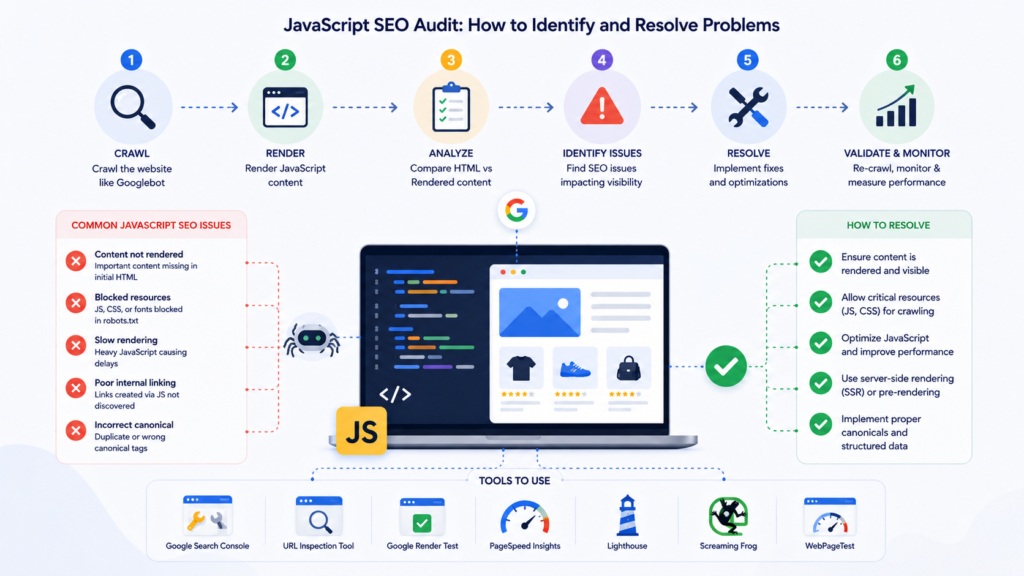
Step 2: Use Google Search Console URL Inspection Tool. This tool also reveals your Google-selected canonical, which is worth cross-checking against your intended canonical strategy. The URL Inspection tool is the most authoritative source for understanding what Google actually sees — including rendered HTML, blocked resources, the Google-selected canonical URL, and index status. Run the live test for recently changed or published pages.
Step 3: Check That Content Is Indexed. Use the site: search operator to verify specific content has been indexed: site:yourdomain.com "snippet of your content". If the URL appears but the content snippet does not, Google may not have indexed the content despite knowing the URL.
Step 4: Audit Internal Links for JavaScript Dependency. Crawl your website using a JavaScript-enabled crawl tool and compare results against a non-JavaScript crawl. Links discovered only in the JS-enabled crawl exist only in the rendered DOM and are not immediately available to crawlers on their first pass.
Step 5: Validate All Technical Directives in Raw HTML. Check every technical SEO directive — canonical tags, robots meta tags, hreflang annotations, and structured data. Any that appear only in the rendered DOM should be moved to the raw HTML response as a priority fix.
JavaScript SEO Tools You Should Be Using
Google Search Console URL Inspection Tool — the most authoritative JavaScript SEO testing tool, showing rendered HTML, blocked resources, index status, and canonical selection.
View Source vs Inspect — View Source shows raw HTML; Inspect shows the rendered DOM. Comparing the two reveals exactly which elements are JavaScript-rendered.
Google PageSpeed Insights and Lighthouse — provide detailed Core Web Vitals scores and performance metrics, essential for any Core Web Vitals optimisation work.
Screaming Frog with JavaScript Rendering Enabled — allows comparison of raw crawl data against rendered data to identify content, links, and directives that only exist after JavaScript execution.
Chrome DevTools Coverage Report — shows how much of your JavaScript code is actually executed on any given page. High percentages of unused JavaScript contribute to slower page loads and weaker technical SEO performance.
JavaScript and Core Web Vitals
Largest Contentful Paint (LCP) measures how quickly the main content element loads. If your LCP element is rendered by JavaScript rather than present in the initial HTML, the browser must execute JavaScript first — consistently producing poor LCP scores. Fix: ensure your LCP element is in the initial HTML and preload the LCP image using <link rel="preload">.
Interaction to Next Paint (INP) measures how quickly the page responds to user interactions. Heavy JavaScript execution blocks the browser’s main thread. Fix: reduce JavaScript bundle sizes through code splitting, tree shaking, and deferring non-critical scripts.
Cumulative Layout Shift (CLS) measures visual stability. JavaScript that injects content above existing elements after page load causes layout shifts. Fix: reserve space for dynamically loaded elements using CSS before the content loads, and set explicit dimensions on images and embedded content.
JavaScript SEO for eCommerce Websites
eCommerce websites built with JavaScript frameworks face a unique combination of challenges at scale. Product pages rendered by JavaScript may not be indexed quickly after creation, especially if the product listing page linking to them is also JavaScript-rendered — the crawl delay compounds across two layers.

Faceted navigation and filter URLs generated by JavaScript create both a JavaScript SEO challenge and a duplicate content challenge simultaneously. Dynamic pricing and availability updated by JavaScript may not reflect accurately in search result snippets if Google’s cached rendering does not match the current page state.
For eCommerce development projects, architectural decisions made at the framework selection stage have the longest-lasting SEO consequences. Choosing SSR-capable frameworks from the start is significantly more efficient than retrofitting rendering solutions after launch.
Platform-Specific Rendering: Shopify Hydrogen and Headless Setups
Headless commerce platforms add another layer of complexity, since the frontend framework and the backend catalog are decoupled. Shopify Hydrogen, built on React and Remix, supports server-side rendering out of the box, but SEO outcomes still depend heavily on how routes, meta tags, and structured data are configured within the Hydrogen storefront.
Teams migrating from standard Shopify themes to a headless Hydrogen build should audit rendering behavior early, since a poorly configured headless setup can regress indexing performance that a traditional theme handled automatically.
Other headless CMS and commerce combinations (e.g., Next.js storefronts on Shopify or BigCommerce APIs) carry the same risk: the platform being “headless” doesn’t guarantee SSR is correctly implemented end-to-end. Confirming pre-rendered HTML is served to crawlers, not just to browsers, should be a standard checkpoint in any headless commerce launch.
JavaScript SEO and Structured Data
Structured data via JSON-LD is technically compatible with JavaScript injection according to Google’s documentation. However, if your JSON-LD is not present in the raw HTML, it will not be processed during the first indexing wave, rich result eligibility may be delayed, and AI crawlers that cannot render JavaScript will not see the structured data at all.
For product schema, FAQ schema, breadcrumb schema, and organisation schema data, include the JSON-LD in the server-rendered HTML wherever possible. Test all structured data implementations using Google’s Rich Results Test tool, which shows the rendered version of structured data as Google sees it.
Does JavaScript hurt SEO?
JavaScript itself doesn’t hurt SEO, but poor implementation does. Googlebot renders JavaScript in a two-wave process: it crawls the initial HTML first, then queues pages for rendering later, sometimes days later, to execute JS and index the resulting content.
If critical content, links, or metadata only appear after JS execution and rendering is delayed or fails, indexing suffers. Client-side rendered (CSR) sites are especially vulnerable since the initial HTML is often near-empty until scripts run.
The safer approaches are server-side rendering (SSR), static site generation (SSG), or dynamic rendering, If your site relies heavily on JavaScript-rendered product or category pages, this is also worth reviewing alongside your eCommerce SEO strategy. Which ensure Googlebot receives fully-formed HTML immediately rather than relying on successful client-side execution. For a full technical breakdown of rendering methods and how to audit your site’s JS-SEO health, see this JavaScript SEO guide.
JavaScript SEO for Single Page Applications
Single Page Applications (SPAs) built with React, Vue, Angular, or similar frameworks present some of the most complex JavaScript SEO challenges. Each page within an SPA must be independently indexable. This requires:
Clean URL routing using the History API. Navigation between SPA views must produce distinct, clean URLs. Hash-based routing defeats this entirely.
Server-side or static rendering for content pages. Pure client-side rendered SPAs are the most challenging setup for Google to index correctly. Meta-frameworks like Next.js and Nuxt.js provide hybrid rendering options that solve this problem.
Independent metadata per route. Each SPA route must have its own unique title tag, meta description, and canonical tag. Modules like React Helmet or the native metadata API in Next.js handle this at the application level.
For businesses investing in custom website development using SPA architectures, JavaScript SEO considerations should be built into the technical specification from the start, not addressed as an afterthought after launch.
Advanced JavaScript SEO Considerations
AI Crawlers and JavaScript. Most AI crawlers, including those used by major LLM platforms, cannot execute JavaScript — they read only the initial HTML response. For content to be eligible for AI-generated answers and citations, it must be present in the raw HTML. As AI search grows as a traffic channel, the SSR-first approach becomes even more important for any website pursuing visibility in AI search, AI Overviews and generative engine optimisation.
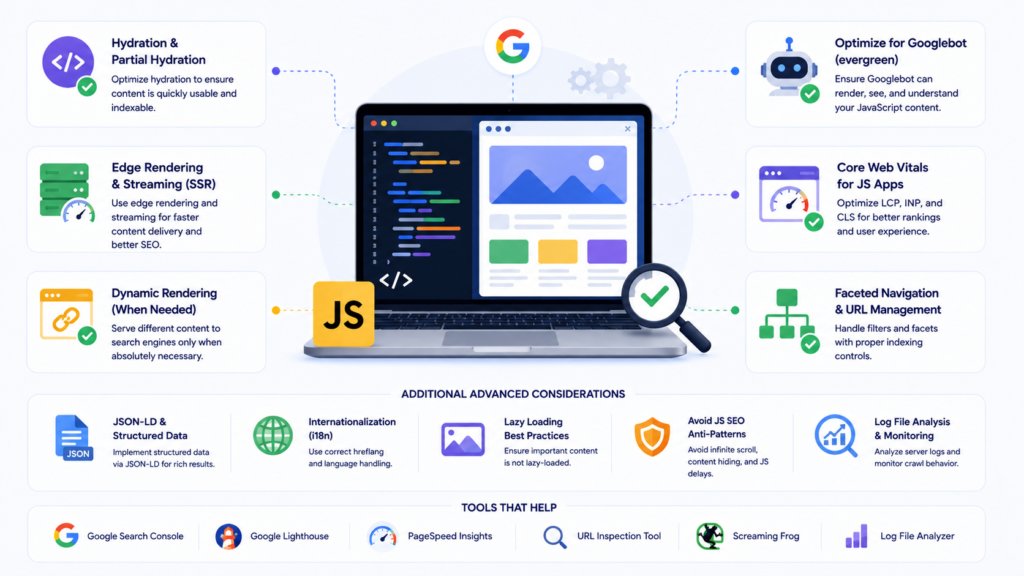
Crawl Budget and JavaScript. JavaScript XHR requests made during rendering consume crawl budget at a higher rate than standard HTML page requests. Managing crawl budget requires reducing XHR requests during rendering, blocking low-value dynamically generated URLs through robots.txt, and ensuring your XML sitemap contains only canonical, indexable URLs.
Progressive Enhancement. Building the core experience in plain HTML first, then layering JavaScript enhancements on top, is naturally aligned with JavaScript SEO best practices. It guarantees that the most important content and functionality is available without any JavaScript execution — the most robust foundation for both accessibility and JavaScript SEO on new projects.
Frequently Asked Questions
Not inherently. The problem arises when critical content, links, or directives exist only in the rendered DOM rather than the initial HTML. Correctly implemented JavaScript with server-side rendering has no negative SEO impact.
JavaScript SEO is a branch of technical SEO focused on ensuring websites built with JavaScript are efficiently crawled, rendered, and indexed by search engines. It covers rendering strategies, internal linking, metadata placement, structured data, and audit processes for JS-powered websites.
Server-side rendering delivers complete HTML to crawlers immediately, making all content indexable on the first pass. Client-side rendering delivers a minimal HTML shell and builds the page using JavaScript, creating a rendering delay that slows indexing and creates visibility gaps for AI crawlers.
Compare your page’s raw HTML source against its rendered DOM using browser developer tools. Use Google Search Console’s URL Inspection tool to see what Google actually rendered. Check for content, links, and metadata that exist only after JavaScript executes, and verify that robots.txt is not blocking JS or CSS files.
Generally no most AI crawlers read only the initial HTML response and cannot execute JavaScript, so content that only appears after rendering is typically invisible to them.
Conclusion: Building a JavaScript SEO Strategy That Works
JavaScript SEO is not about avoiding JavaScript. It is about implementing JavaScript in a way that serves both users and search engines equally well. The websites that rank consistently with JavaScript-heavy architectures are those that have made deliberate technical decisions: choosing server-side rendering for content-critical pages, placing key content and directives in the initial HTML response, using standard anchor tags for internal links, and regularly auditing the gap between raw HTML and the rendered DOM.
As AI-powered search grows, the importance of having content in the initial HTML response increases further. AI crawlers do not render JavaScript, and content invisible to them cannot be cited in the answers users increasingly rely on.
If you are running a JavaScript-powered website and are unsure whether your content is being seen, crawled, and indexed correctly, a structured technical SEO audit is the right starting point. For businesses looking to build performant, SEO-ready websites from the ground up, integrating JavaScript SEO best practices into every project from the initial architecture stage eliminates the costly retrofitting that most JS sites eventually require.

About the author
Ujjwal Kumawat
I specialize in SEO, website development, Google Ads and online business growth strategies. Through my blogs, I share practical insights, marketing tips and proven strategies to help businesses improve their online visibility, generate more leads and grow faster in the digital space.