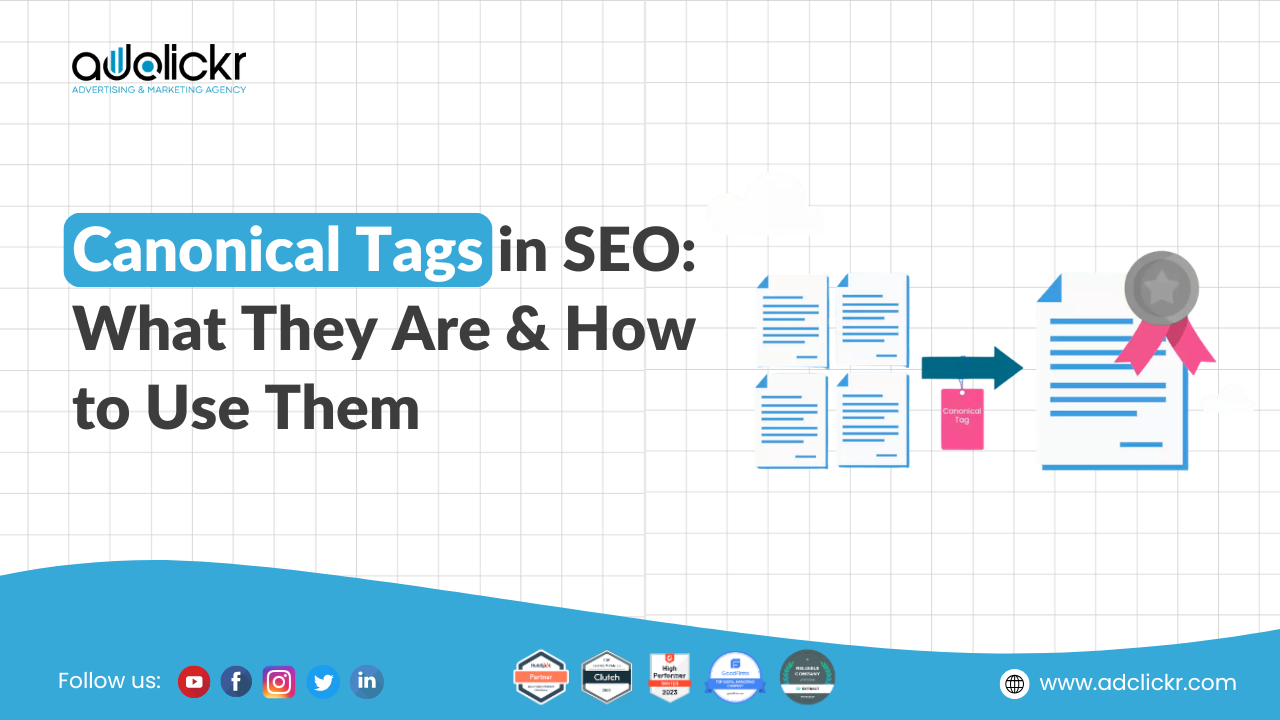
Quick answer: A canonical tag is an HTML link element that tells search engines which version of a page is the main one when similar or duplicate versions exist. Add rel=canonical pointing to the preferred URL, use self-referencing canonicals on normal pages, and never point canonicals to unrelated pages.
Ever wondered why two pages on your website show identical content, yet only one of them ranks on Google?
The answer almost always comes back to canonical tags the invisible HTML signal that tells Google which version of a page to index, rank, and show to users. This guide covers what canonical tags are, how to add them correctly in WordPress, Shopify, and custom HTML, how to compare all four canonicalization methods side by side, and how to fix the 8 most common canonical tag mistakes before they cost you rankings.
If you manage an eCommerce store, a multi-language website, or even a simple blog, getting canonical tags right is one of the highest-leverage technical SEO fixes available to you. Get them wrong, and you silently bleed ranking power. Get them right, and your most important pages consolidate authority and rise in search results. This guide covers everything you need to know about canonical tags, canonical URLs, and how to implement them correctly for SEO.
Unsure whether duplicate pages are hurting your rankings? Adclickr, an SEO company in Jaipur, offers a free SEO report for your website, or explore our SEO services.
What Is a Canonical Tag?
A canonical tag, also written as rel="canonical", is a snippet of HTML code placed in the head section of a webpage that tells search engines which version of a page is the preferred, authoritative version when identical or very similar content exists at multiple URLs.
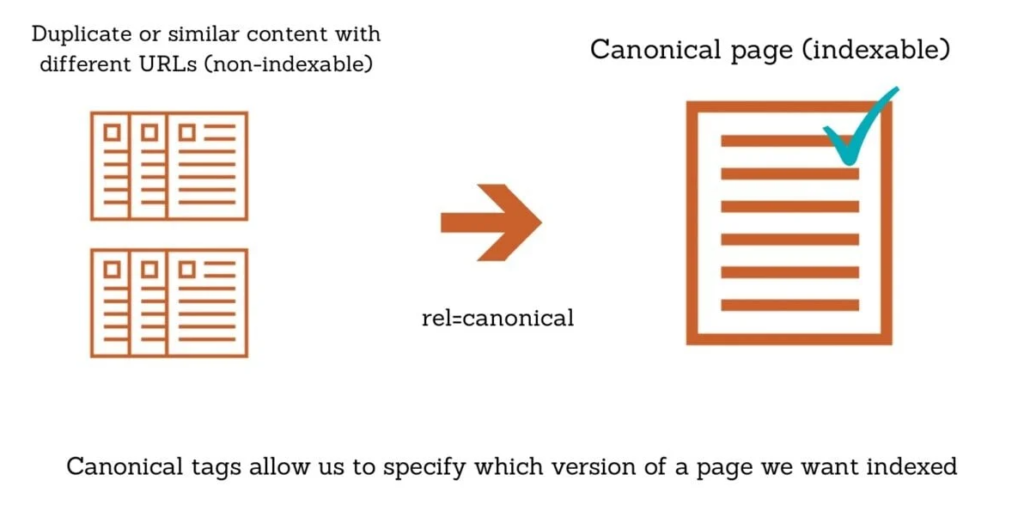
In simple terms, a canonical tag is your way of pointing search engines to the page you actually want indexed and ranked. Without it, search engines decide on their own, and that decision may not always favour the URL you intended.
Here is what a canonical tag looks like in HTML:
html
<link rel=”canonical” href=”https://example.com/preferred-page/” />
The URL inside the href attribute is the canonical URL, the version Google should treat as the master copy of the page. The Google’s own canonicalization guidelines.
What Is a Canonical URL?
A canonical URL is the URL that Google selects as the preferred version among a group of duplicate or near-duplicate pages. This is the page that gets indexed, ranked, and shown in search results.
Google evaluates around 40 distinct signals when choosing a canonical URL. Your canonical tag is one of the strongest signals you can send, but it is not a guaranteed directive. Google can and sometimes does override your declared canonical if it believes another version better serves users.
This is why correct implementation matters so much. A poorly implemented canonical tag sends conflicting signals, and Google may fall back on weaker signals like internal link patterns or URL length to make its decision.
Some of the strongest signals include: the presence and destination of your rel=canonical tag, the number and quality of internal and external links pointing to each version, whether the page uses HTTPS, hreflang clustering for multilingual sites, mobile-friendliness, and whether the URL is listed in your XML sitemap.
Why Canonical Tags Matter for SEO
Canonical tags solve one of the most persistent problems in SEO: duplicate content. Duplicate content happens when the same or very similar content is accessible from multiple URLs. This creates three major problems for your website.
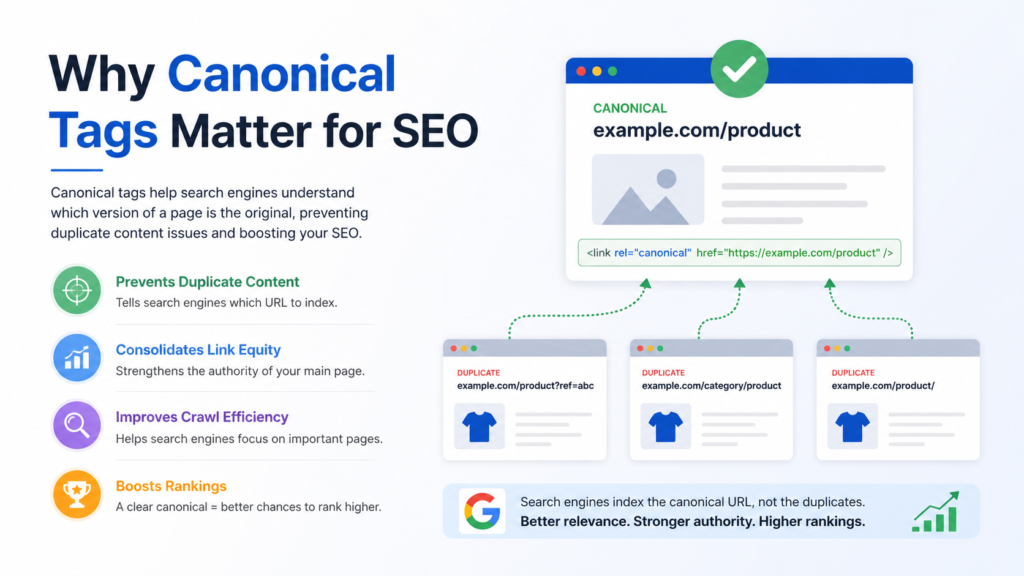
Canonical tags fix all three problems by consolidating signals to one preferred URL, directing crawl budget toward valuable pages, and giving Google a clear instruction about which version to show in search results.
How Canonical Tags Work
When a search engine bot crawls your website and finds a rel="canonical" tag, it reads the URL specified in that tag and treats it as the authoritative version of the page. Any ranking signals associated with the page being crawled, including backlinks and internal link equity, are consolidated toward the canonical URL rather than the duplicate.
One important detail: a canonical tag does not prevent Googlebot from crawling the duplicate page. It simply instructs Google not to index it as a separate page. This is different from using robots.txt or noindex tags, which block access or indexing entirely. Canonical tags allow the duplicate to remain accessible to users while directing all SEO value to the preferred version.
Canonical Tag Syntax and Code
Understanding canonical tag syntax is essential before implementation. The tag uses a standard HTML link element format.
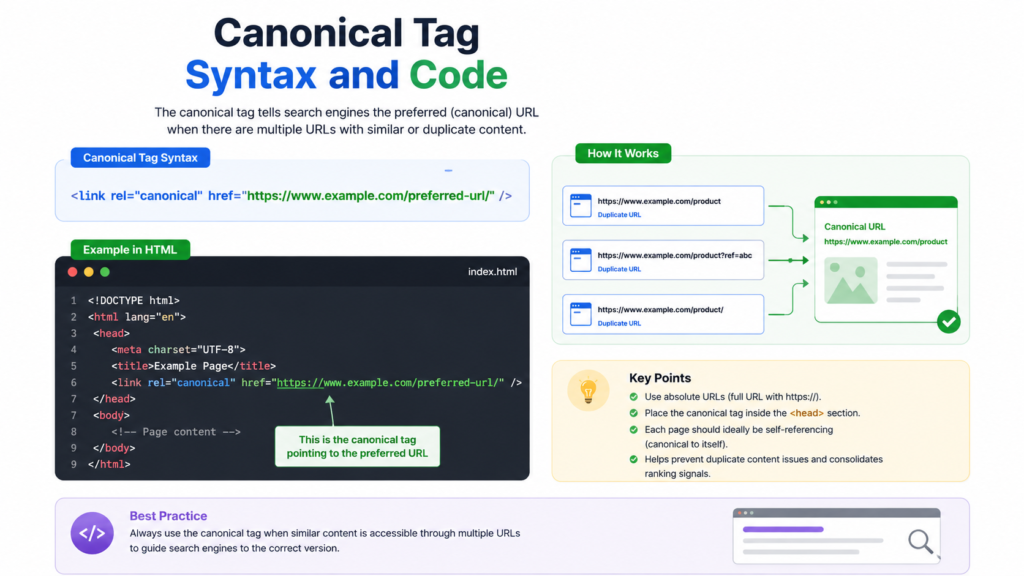
Basic canonical tag structure:
html
<link rel="canonical" href="https://example.com/preferred-page/" />
rel="canonical" declares the relationship type, telling the browser and search engines this link defines the canonical version
href="https://example.com/preferred-page/" is the absolute URL of the preferred page
Self-referencing canonical tag example:
html
<link rel="canonical" href="https://example.com/blue-widgets/" />
This appears on the page https://example.com/blue-widgets/ itself. Every page, even those with no duplicates, should carry a self-referencing canonical tag. This prevents any accidental duplicate signals from parameters or protocol variants
Critical syntax rules:
Always use absolute URLs, never relative paths like /preferred-page/
Always use the correct protocol. If your site is HTTPS, canonical URLs must also use HTTPS. Include only one canonical tag per page. Multiple canonical tags are ignored by Google. Place the canonical tag inside the <head> section only. Canonical tags in the body are ignored. Proper canonical tag in HTML must sit between the opening and closing head tags of your page, typically near other meta tags.
The canonical tag code is simple to write, but implementation errors are extremely common. Incorrect placement, relative URLs, and conflicting signals cause more canonical problems than almost any other factor.
Common Scenarios That Require Canonical Tags
URL Parameters and Tracking Codes
URLs generated by UTM parameters, session IDs, affiliate tracking codes, or sorting options create duplicate content instantly. Getting your baseline keyword targeting right before you start canonicalizing parameter variants is worth revisiting during keyword research, since parameter-driven pages often unintentionally compete with your intended target page. For example:
Clean URL: https://example.com/products/ Parameterised: https://example.com/products/?utm_source=email Parameterised: https://example.com/products/?sort=price-asc
All parameter variants should carry a canonical tag pointing to the clean URL. This is one of the most important applications for any eCommerce development project.
Faceted navigation lets users filter products by attributes like size, colour, and price. Each filter combination generates a unique URL, creating potentially thousands of near-duplicate pages.
For example:
https://example.com/women-jeans/ the base category page
https://example.com/women-jeans/?colour=black is a filter variant
https://example.com/women-jeans/?colour=black&size=10 is another combination
Using canonical tags on all filter variants pointing to the base category URL is the recommended approach. This preserves link equity and avoids crawl budget waste. It is more effective than using noindex or robots.txt for filter URLs because it allows the filter pages to remain accessible to users while consolidating SEO value to the clean category page. There are some eCommerce SEO strategy.
Products Listed Under Multiple Categories
An eCommerce site might list the same product under both /women-clothing/blue-dress/ and /summer-collection/blue-dress/. These are technically duplicate pages. Canonical tags should point to one preferred version, ideally the URL with the most internal links and backlinks pointing to.
How to Add Canonical Tags
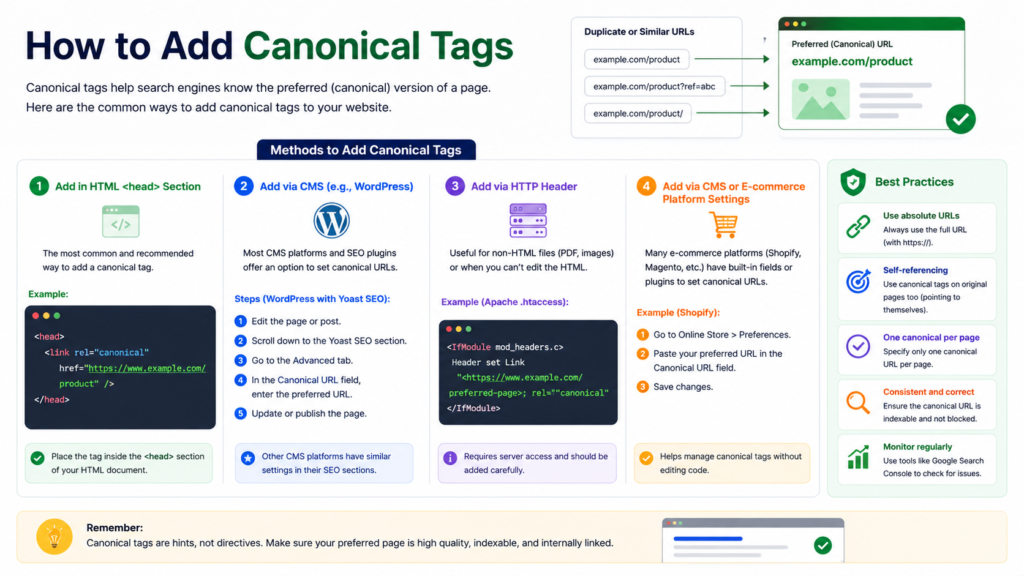
How to Add Canonical Tags in Shopify
Shopify automatically generates canonical tags for product pages, collection pages, and blog posts out of the box. For most stores, the default Shopify canonical logic is sufficient and accurate.
For complex custom website development projects built on Shopify, verify the auto-generated canonicals are correct for your URL structure, especially if you use international domains or multiple storefronts.
How to Add Canonical Tags Manually in HTML
For custom-built websites or any situation where a plugin or CMS cannot handle canonicals, add the tag directly to the HTML head section:
html
<head>
  <link rel="canonical" href="https://yourwebsite.com/preferred-page/" />
  <!-- other meta tags -->
</head>
Canonical Tag Best Practices
Always Use Absolute URLs
Canonical tags must always specify the full URL including protocol and domain. Never use relative paths.
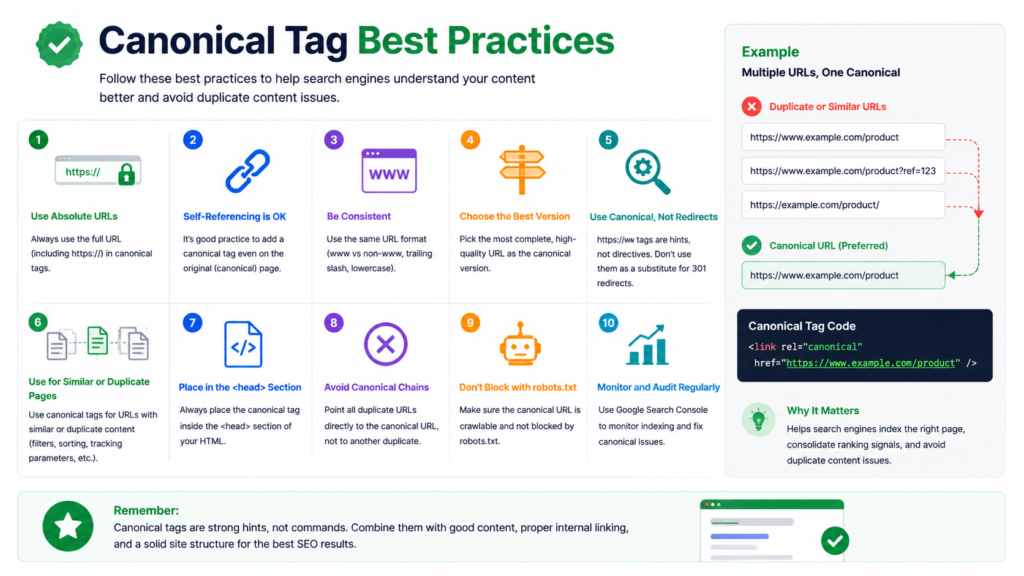
Correct: <link rel="canonical" href="https://example.com/page/" /> Incorrect: <link rel="canonical" href="/page/" />
Relative URLs can be misinterpreted by search engines, especially when content is syndicated or accessed through different subdomains.
Include a Self-Referencing Canonical on Every Page
Every page on your site, including the canonical version itself, should carry a canonical tag pointing to its own URL. This prevents any ambiguity when Google discovers the page through different paths or protocols.
Specify Only One Canonical Per Page
Multiple canonical tags on a single page cause Google to ignore all of them. This is one of the most damaging canonical mistakes because it leaves Google to make its own decision without any guidance from you.
Multiple canonicals often arise when both a CMS plugin and a theme inject canonical tags independently. Audit your templates carefully and use only one source for canonical tags.
The Canonical URL Must Return a 200 Status Code
Never point a canonical tag at a URL that returns a 404, 410, 301, or any other non-200 status code. If the canonical URL is broken or redirecting, Google cannot access it and cannot consolidate signals to it. Always verify canonical destinations are live and returning 200.
Canonical URLs Must Be Indexable
Do not set a canonical tag pointing to a URL that is also blocked by robots.txt or marked with noindex. This creates a direct contradiction. The noindex tag says “do not index this page” while the canonical says “this is the page to index.” Google may choose to ignore both signals entirely.
Avoid Canonical Chains
Point all duplicates directly to the final canonical URL.
Match Canonical Tags With Your Hreflang Tags
For multilingual or multi-regional sites, each language version should have a canonical tag pointing to itself (self-referencing) and hreflang tags listing all available language versions. Do not set the same canonical URL across all language versions. Doing so tells Google that only one language version should rank, defeating the purpose of your localisation efforts. Noting canonical selection also considers mobile-friendliness
Keep Canonical Tags Consistent With Your Sitemap
Audit Your XML sitemap should only contain canonical URLs. Including non-canonical or duplicate URLs in your sitemap sends a conflicting signal. Google treats sitemap entries as suggestions that a URL should be canonical, so listing a non-canonical URL there directly contradicts your canonical tag.
Canonical Tags vs 301 Redirects
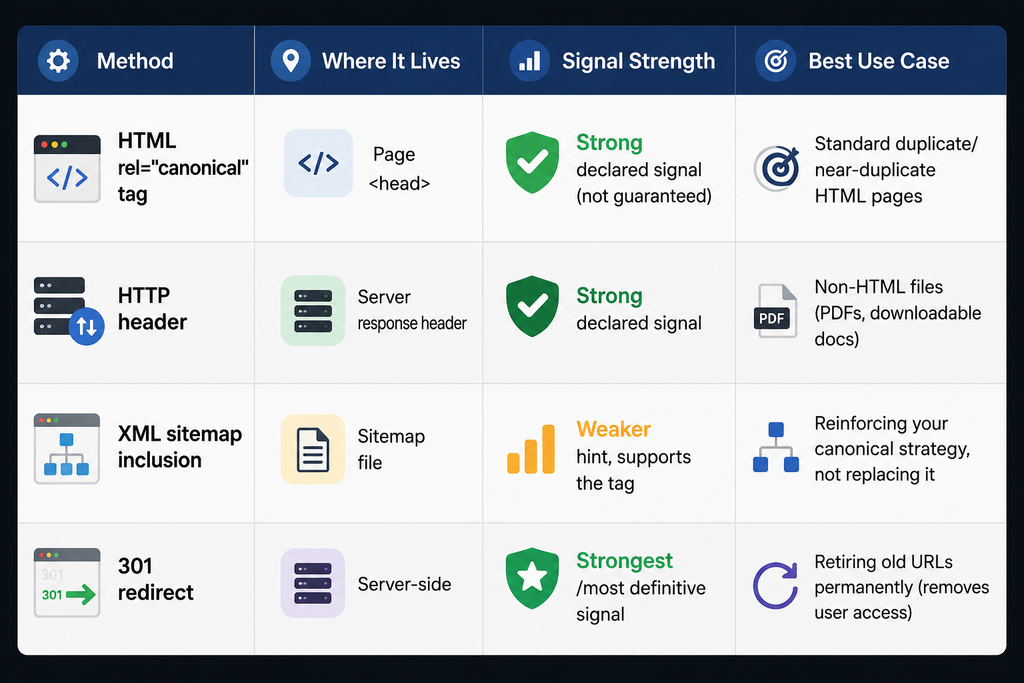
Both canonical tags and 301 redirects address duplicate content, but they serve different purposes and produce different outcomes. This is the right choice when multiple URLs must remain accessible for functional reasons, such as tracking parameters, filter pages, or different URL paths in a CMS.
| Factor | Canonical Tag | 301 Redirect |
|---|---|---|
| Duplicate URL accessible to users | Yes | No |
| Link equity consolidation | Yes (signal, not guarantee) | Yes (direct transfer) |
| Crawl budget impact | Reduces wasted crawl on duplicates | Eliminates the duplicate URL entirely |
| Best use case | Active duplicate pages that must stay live | Retiring old URLs permanently |
| Implementation complexity | Low (HTML tag) | Requires server-side configuration |
For most eCommerce filter pages, parameterised URLs, and paginated content, canonical tags are the better tool. For site migrations, domain changes, and discontinued content, 301 redirects are the correct choice.
When managing a comprehensive SEO services strategy, you will often need both working together: redirects for structural consolidation and canonical tags for active content management.
Other Ways to Declare Canonical URLs
Beyond the standard HTML canonical tag, there are three additional methods for specifying canonical URLs. Each has specific use cases.
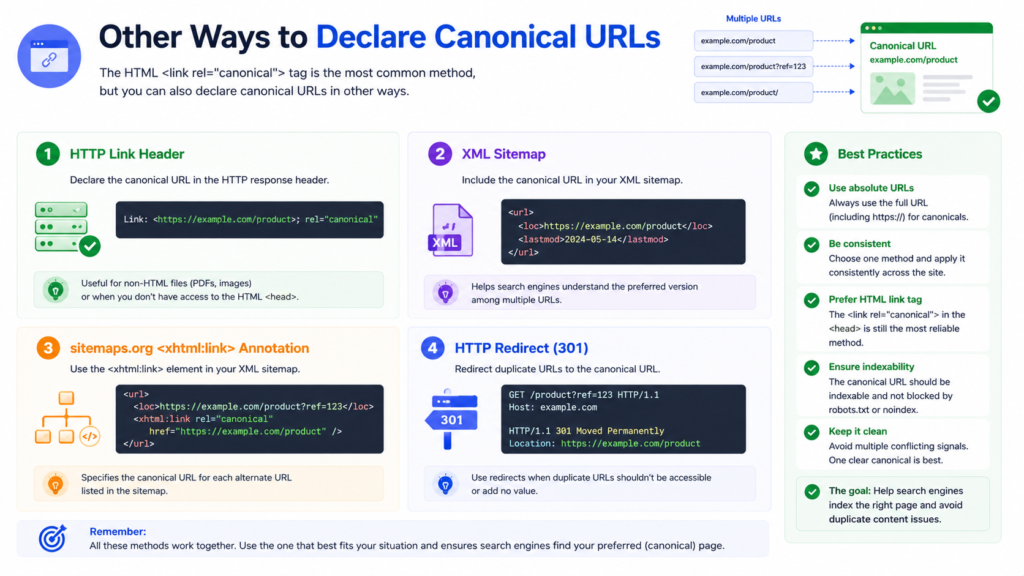
rel=”canonical” in HTTP Headers
For non-HTML documents like PDFs, Word files, or other downloadable content, there is no HTML head section to place a canonical tag in. In this case, you can specify the canonical URL in the HTTP response header.
The header entry looks like this:
Link: <https://example.com/preferred-document.pdf>; rel="canonical"This requires access to your server configuration, typically through your web server settings or hosting control panel. It is a more technical approach suited to developers working with server-side configuration.
XML Sitemap
Including a URL in your XML sitemap signals to Google that it is a canonical page. Google treats sitemap entries as a canonicalization hint. However, the sitemap signal is considered weaker than a rel="canonical" tag. It should support your canonical tag strategy, not replace it.
Only include canonical URLs in your sitemap. Excluding duplicate or parameterised URLs from the sitemap reinforces your canonical tags and helps Google understand which pages are genuinely important. This is an important part of any solid technical SEO audit checklist.
301 Redirects as a Canonicalization Signal
Implementing a 301 redirect from a duplicate URL to the preferred URL functions as a canonicalization signal. Google interprets the redirect destination as the canonical page. This method is the most definitive signal you can send, stronger than a canonical tag alone, but it removes user access to the redirected URL.
How to Check Canonical Tags on Your Website
How to Check Canonical Tags Using Google Search Console
Google Search Console provides the most direct view of how Google perceives your canonical setup. The URL Inspection tool shows both the user-declared canonical (what your tag says) and the Google-selected canonical (what Google actually chose).
To check a canonical tag in Google Search Console:
Open Google Search Console and go to the URL Inspection tool. Enter the URL you want to inspect and press Enter. In the Page Indexing section, look for Google-selected canonical and User-declared canonical.
If the two values match, Google is honouring your canonical tag. If they differ, Google has chosen a different canonical, which usually means there is a conflicting signal somewhere on your site that needs investigation.
How to Check Canonical Tags at Scale
For large websites, manually checking canonical tags page by page is not practical. Site audit tools crawl your entire website and report canonical issues across all pages simultaneously. This is how professional SEO services teams handle canonical audits at scale.
Using a site audit tool, you can identify pages missing canonical tags entirely, pages where the canonical points to a 4xx or redirecting URL, pages with multiple conflicting canonical tags, non-canonical pages appearing in your sitemap, and duplicate pages without any canonical resolution.
Running a canonical audit is a core part of any complete SEO audit. It should be reviewed alongside your technical SEO audit checklist so canonical issues aren’t checked in isolation. If you are managing a website with hundreds or thousands of pages, this should be a regular process rather than a one-time check.
Common Canonical Tag Mistakes and How to Fix Them
Mistake 1: Canonical Points to a 4XX or 5XX URL
If the URL in your canonical tag returns an error, Google cannot access the canonical page. It will likely choose its own canonical, which may not be the URL you want indexed.
Fix: Replace the canonical URL with the live, working version of the page that returns a 200 status code. Always verify that canonical destination URLs are live before publishing.
Mistake 2: Canonical Points to a Redirecting URL
Canonicals should always point to the final destination URL, not a URL that immediately redirects to another. A canonical pointing to a 301 redirect creates ambiguity.
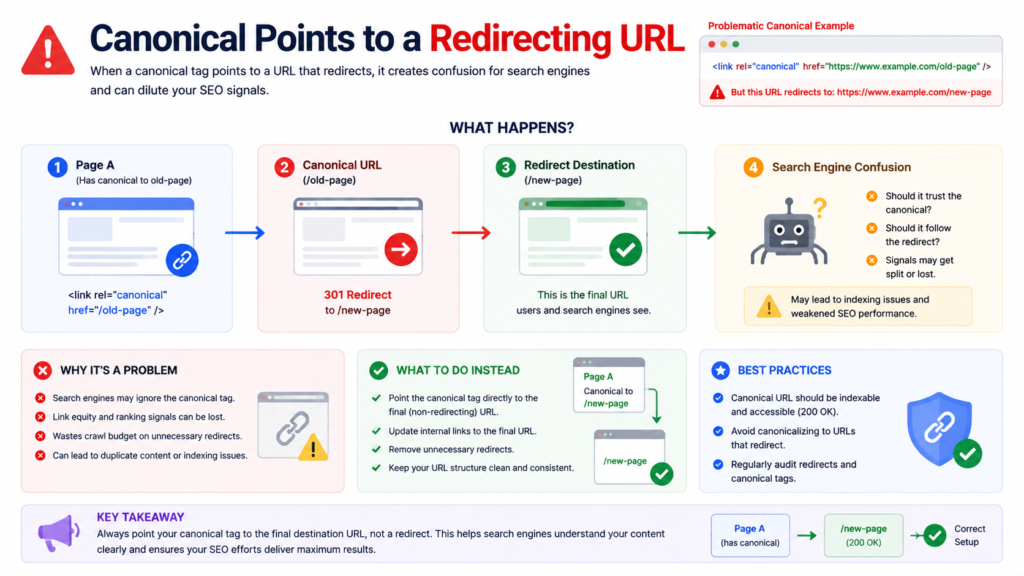
Fix: Update the canonical tag to point directly to the final destination URL, bypassing any redirect.
Mistake 3: Combining Canonical and Noindex on the Same Page
Setting a canonical tag on a page that is also marked noindex sends contradictory instructions. The canonical says “this is the preferred page to index” while noindex says “do not index this page.” Google may honour either instruction inconsistently.
Mistake 4: Multiple Canonical Tags on One Page
Having more than one canonical tag on a single page causes Google to ignore all of them. This often happens when a CMS plugin, a theme, and a manually added tag all inject canonical tags independently.
Fix: Audit your templates and eliminate all but one source for canonical tags. Most SEO plugins have an option to override or disable other canonical sources.
Mistake 5: Canonical Chains
A canonical chain occurs when canonical tags create a sequence: A points to B, B points to C. Google must follow the chain, adding complexity and potential for confusion.
Fix: All duplicate pages should canonicalise directly to the final canonical URL. Eliminate intermediate steps.
Mistake 6: Canonicalising All Pagination to Page 1
Some website owners canonicalise all paginated pages (/page/2/, /page/3/) to page 1 of the series. This is incorrect. It signals that pages 2 and beyond are duplicates of page 1, potentially causing Google to miss content that only appears on later pages.
Fix: Use self-referencing canonical tags on each paginated page. Each paginated page should canonicalise to itself. There are some pagination SEO best practices
Mistake 7: Incorrect Protocol (HTTP in Canonical on an HTTPS Site)
If your site runs on HTTPS but your canonical tags reference HTTP URLs, you are directing Google toward the less secure, lower-priority version of your pages.
Fix: Ensure all canonical URLs use HTTPS if your site is HTTPS. This is an easy to miss issue when migrating from HTTP to HTTPS without updating canonical tags globally.
Mistake 8: Canonical Tag in the Body Instead of the Head
Canonical tags placed outside the head section of your HTML are ignored by search engines. This can happen when JavaScript injects canonical tags after the page renders, or when a CMS theme outputs the canonical tag in an unexpected location.
Fix: Always place canonical tags inside the HTML head section. Verify placement by viewing page source and checking that the tag appears between <head> and </head>.
Canonical Tags and Advanced SEO Scenarios
Canonical Tags and JavaScript Rendering
For websites built with JavaScript frameworks like React, Vue, or Next.js, canonical tags must be present in the initial HTML response, not injected by JavaScript after rendering.
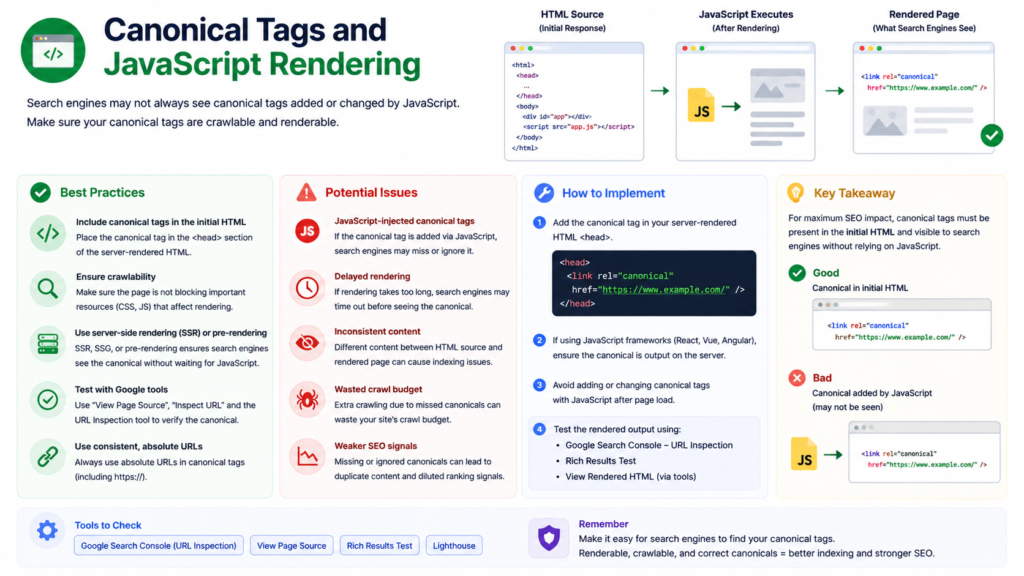
Many AI crawlers and some search engine bots do not execute JavaScript. If your canonical tag only appears after JavaScript renders the page, those crawlers see a page with no canonical tag at all.
For custom website development projects using JavaScript-heavy frameworks, ensure canonical tags are server-side rendered or included in the static HTML. Test by viewing the raw page source, not the rendered DOM, to confirm the canonical tag is present before any JavaScript executes. The same server-side-rendering principle applies to your structured data, which must also exist in the initial HTML to be processed correctly.
Canonical Tags in International SEO
For international websites targeting users across different countries and languages, canonical tags and hreflang tags must work together correctly. Each language version of a page should be self-referencing in its canonical tag and should list all available language versions in its hreflang annotations.
A common mistake is applying the same canonical URL to all language versions. This signals that only one language version should rank, making your localisation efforts invisible to search engines.
Canonical and hreflang configuration is a critical part of any international SEO strategy. Getting it right ensures each language version competes in its intended market rather than cannibalising your primary domain.
Canonical Tags and AI Search / GEO
While JS rendering and international SEO are critical technical considerations, canonical tags AI search implications deserve equal attention as generative answer engines reshape discovery. AI crawlers largely respect canonical signals the same way traditional search crawlers do when determining which version of a page to treat as authoritative.
When canonical tags are inconsistent or conflicting, AI Overviews and LLM-based answer engines can end up citing a non-canonical, outdated, or duplicate version of your content instead of the intended source. This creates real risks for brand accuracy and citation integrity.
As AI-driven search grows, ensuring clean, consistent canonicalization isn’t just a legacy SEO best practice, it’s foundational to GEO. Auditing canonical implementation should be a priority for any site aiming to control how it’s represented across AI-generated answers.
Frequently Asked Questions
A canonical tag <link rel="canonical" href="URL" /> placed in the HTML head tells search engines which page version is preferred among duplicates. It prevents duplicate content issues, consolidates ranking signals, and protects crawl budget.
In WordPress, install Yoast SEO or Rank Math. Open any page, go to the Advanced tab in the SEO panel, and enter your preferred canonical URL. Both plugins add self-referencing canonicals automatically when the field is left blank.
Right-click any page, select View Page Source, and search for “canonical” to verify placement and URL. For deeper checks, use Google Search Console’s URL Inspection tool to compare your declared canonical against Google’s selected canonical.
Canonical tags do not directly boost rankings but significantly impact them indirectly. They consolidate link equity from duplicate URLs to your preferred page, prevent authority splitting, and ensure Google indexes the correct version, ultimately strengthening your ranking potential.
Without canonical tags, Google independently selects which page version to rank, often choosing parameterised or session ID URLs over your clean preferred URL. Link equity splits across duplicate versions, weakening rankings and making efficient crawling harder over time.
Likely causes: conflicting signals (sitemap, redirects, or hreflang disagree with it), incorrect implementation, self-referencing errors, or search engines simply choosing another URL as canonical.
Yes. Cross domain canonicals are valid and commonly used for syndicated content, telling Google the original source should rank instead of the syndicating site.
No. Your canonical tag is a strong signal, not a directive Google can override it if other signals (links, sitemap, redirects) point to a different preferred URL.
Canonical Tags and Your Overall SEO Strategy
Canonical tags are not an isolated technical fix. They are a foundational element of how your website communicates structure and authority to search engines. They work best as part of a broader crawl-efficiency strategy that also protects your crawl budget from being wasted on low-value duplicate URLs. When implemented correctly alongside a well-planned internal linking strategy, a clean XML sitemap, and proper redirect management, canonical tags contribute to a technically sound website that ranks more predictably.
The websites that rank consistently are the ones that give search engines clear, consistent, and conflict-free signals. Canonical tags are one of the clearest signals available to you.
Need help auditing and fixing canonical tag issues across your website? Explore our SEO services or get in touch to discuss how we can improve your technical SEO foundation.

About the author
Ujjwal Kumawat
I specialize in SEO, website development, Google Ads and online business growth strategies. Through my blogs, I share practical insights, marketing tips and proven strategies to help businesses improve their online visibility, generate more leads and grow faster in the digital space.