A one-second delay in page load time reduces conversions by 7%. Amazon calculated that a 100-millisecond slowdown costs them 1% in sales. Google found that pages loading in under one second convert three times more than pages taking five seconds. Site speed optimization is not a technical preference. It is a direct revenue lever and most websites are leaving money on the table every single day.
Furthermore, in 2026, site speed connects directly to AI search visibility, schema markup effectiveness, and your overall technical SEO health. If you want professional SEO services that treat site speed as a revenue priority not just a technical checkbox read every section of this guide first.
Why Site Speed Optimization Directly Affects Revenue
Speed is user experience. Every additional second your page takes to load is a second your visitor reconsiders leaving. Google’s research confirms that as page load time increases from one second to ten seconds, the probability of a mobile user bouncing increases by 123%.
Consequently, slow pages do not just frustrate users they actively damage your business metrics across every channel simultaneously. The paid search cost-per-acquisition rises because slow landing pages convert less. Your organic rankings decline because Google deprioritizes poor page experience signals. Your email click-to-purchase rate drops because the destination page loses the momentum your email created.
The Data Behind Slow Pages and Lost Conversions
The revenue impact of site speed is measurable and consistent across industries:
- Walmart found that every one-second improvement in load time increased conversions by 2%
- Mobify calculated that a 100ms decrease in homepage load speed increased session-based revenue by 1.11%
- BBC discovered they lost an additional 10% of users for every additional second their site took to load
- Pinterest reduced perceived wait times by 40% and increased search engine traffic and sign-ups by 15%
Therefore, site speed optimization is not an IT project. It is a revenue project and it deserves the same prioritisation as your conversion rate optimisation or paid media strategy.
Core Web Vitals: The Metrics That Actually Matter
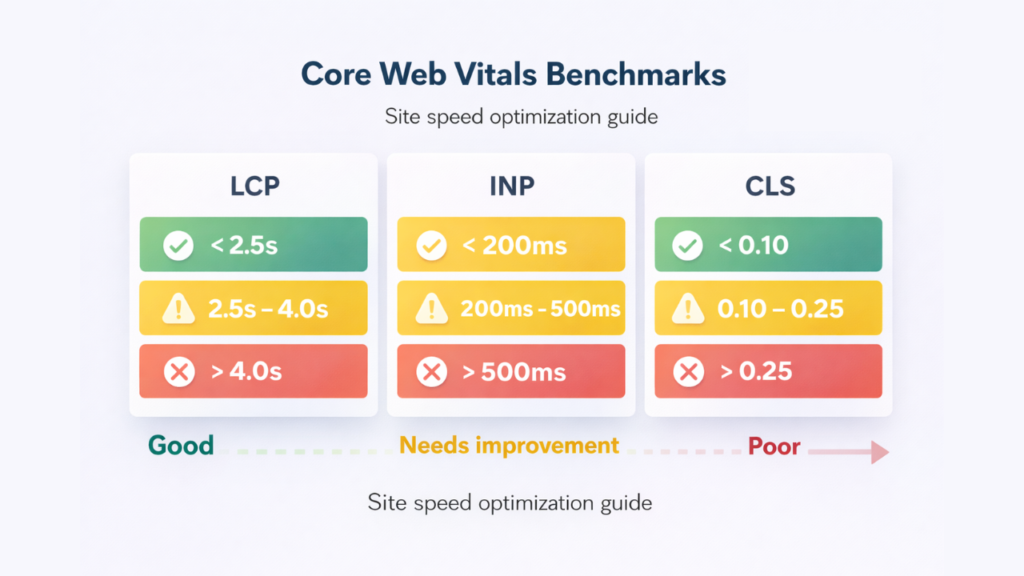
Google measures page experience through three specific signals called Core Web Vitals. Each metric has a precise benchmark. Each benchmark determines whether your page earns a “Good,” “Needs Improvement,” or “Poor” rating in Google Search Console.
| Metric | What It Measures | Good | Needs Improvement | Poor |
|---|---|---|---|---|
| LCP (Largest Contentful Paint) | Loading speed of largest visible element | Under 2.5s | 2.5s – 4.0s | Over 4.0s |
| INP (Interaction to Next Paint) | Page responsiveness to user interaction | Under 200ms | 200ms – 500ms | Over 500ms |
| CLS (Cumulative Layout Shift) | Visual stability during page load | Under 0.1 | 0.1 – 0.25 | Over 0.25 |
All three metrics come from real Chrome user data not lab simulations. This is what Google actually evaluates when ranking your pages.
LCP — Loading Speed Benchmark
LCP measures how long your largest visible element usually your hero image or main headline takes to render. In addition, every second above 2.5 seconds increases bounce rate significantly. The primary causes of poor LCP are uncompressed images, render-blocking resources, and slow server response times.
INP — Interactivity Benchmark
INP replaced FID (First Input Delay) as a Core Web Vital in March 2024. It measures how quickly your page responds to every tap, click, and keyboard input throughout the entire session. Heavy JavaScript and third-party scripts live chat widgets, ad pixels, social embeds are the primary culprits behind poor INP scores.
CLS — Visual Stability Benchmark
CLS measures unexpected layout shifts while your page loads. The frustrating experience of tapping a button that jumps just as you click it that is CLS in action. Images without explicit dimensions, late-loading ads, and web fonts that cause text reflow are the most common causes.
How to Run a Technical Audit for Site Speed
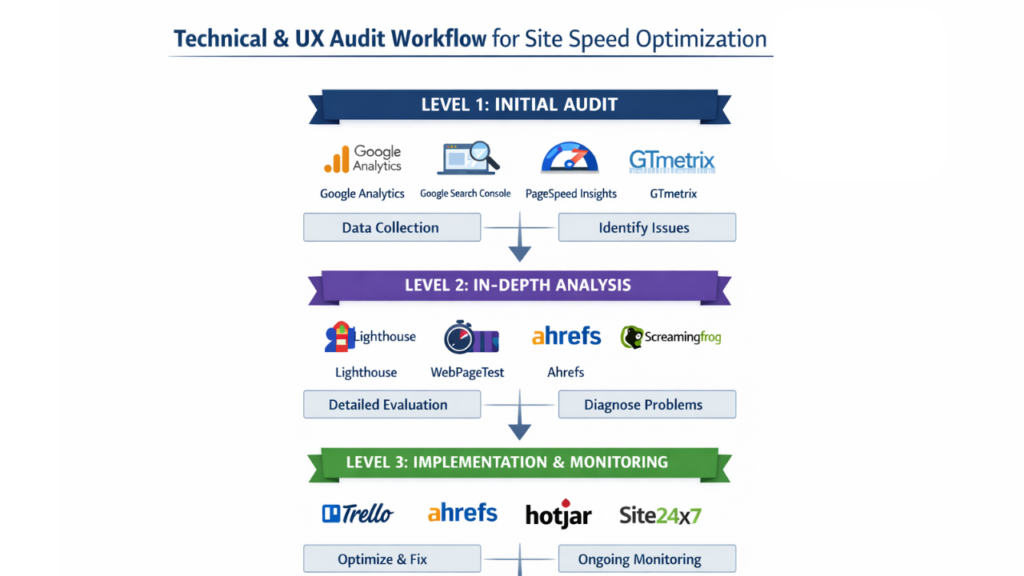
A technical audit identifies every speed failure across your site not just the homepage. Most businesses check their homepage speed and assume the entire site performs similarly. In contrast, product pages, blog posts, and landing pages often carry significantly heavier asset loads and score far worse.
Run your technical audit across these three levels:
- Page-level audit: test your five highest-traffic URLs individually in Google Page Speed Insights
- Sitewide audit : use Google Search Console → Enhancements → Core Web Vitals for a full picture of all failing pages
- Competitor benchmark: run your top three competitors through Page Speed Insights and compare field data scores
Tools You Need for a Complete Technical Audit
- Google Page Speed Insights: free, URL-by-URL analysis with both lab and field data
- Google Search Console: sitewide Core Web Vitals report across all indexed pages
- SEMrush Site Audit: crawl-based detection of render-blocking resources, image issues, and redirect chains
- Screaming Frog: deep technical crawl identifying missing attributes, oversized assets, and broken resources
- Webpage Test: waterfall analysis showing exactly which resources are slowing each load stage
Not sure where your site currently stands? Get a free SEO report to see your Core Web Vitals status alongside every other technical issue affecting your rankings.
What to Flag in Your UX Audit
A UX audit runs alongside your technical audit and identifies how speed failures affect user behaviour specifically. Flag these items in every UX audit:
- Pages where bounce rate exceeds 70% cross-reference with Page Speed scores
- Mobile sessions with significantly lower conversion rates than desktop indicates mobile-specific speed issues
- Heatmap drop-off points that correlate with slow interactive elements indicates INP failures
- Form abandonment rates on pages with CLS scores above 0.1 layout shifts break form interactions
For this reason, conversion rate optimization and site speed optimization should always run as parallel workstreams the data from each informs the other.
Site Speed Optimization Fixes: Quick Wins and Deep Fixes
No-Code Fixes (Implement Today)
These fixes require no developer involvement. Implement them immediately:
- Convert images to WebP format: reduces file size by 25–35% with no visible quality loss; use Squoosh or Tiny PNG
- Compress all images to under 100KB: before uploading the single fastest LCP improvement available
- Add loading=”lazy” to all below-fold images: never apply this to your LCP image itself
- Audit and remove unused third-party scripts: every unused chat widget, pixel, and social embed adds main thread load
- Enable browser caching: repeat visitors load your pages significantly faster when static assets are cached
- Use a CDN (Content Delivery Network): serves your assets from servers physically closer to each user
Developer Fixes (Higher Impact)
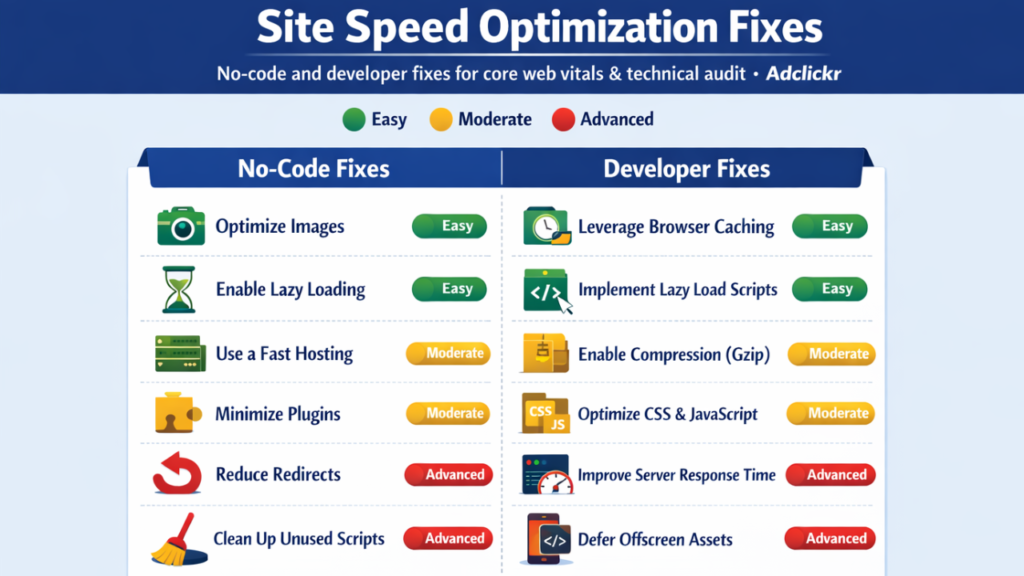
These fixes require development involvement but deliver the highest performance gains:
- Add
<link rel="preload">for your LCP image: tells the browser to fetch it before anything else - Eliminate render-blocking CSS and JavaScript: in the
<head>that delays first paint - Improve TTFB (Time to First Byte) to under 200ms: consider upgrading hosting if your server is the bottleneck
- Inline critical CSS: directly in HTML rather than loading it as an external file
- Break up long JavaScript tasks: over 50ms using
set Timeoutorrequest Idle Callback - Set explicit width and height on every image: reserves layout space before images load, eliminating CLS
As a result, proper website development practices from the start prevent most of these issues from emerging retrofitting speed optimization onto a poorly built site always costs more than building it right initially..
How Site Speed Connects to AI Search and Schema Markup
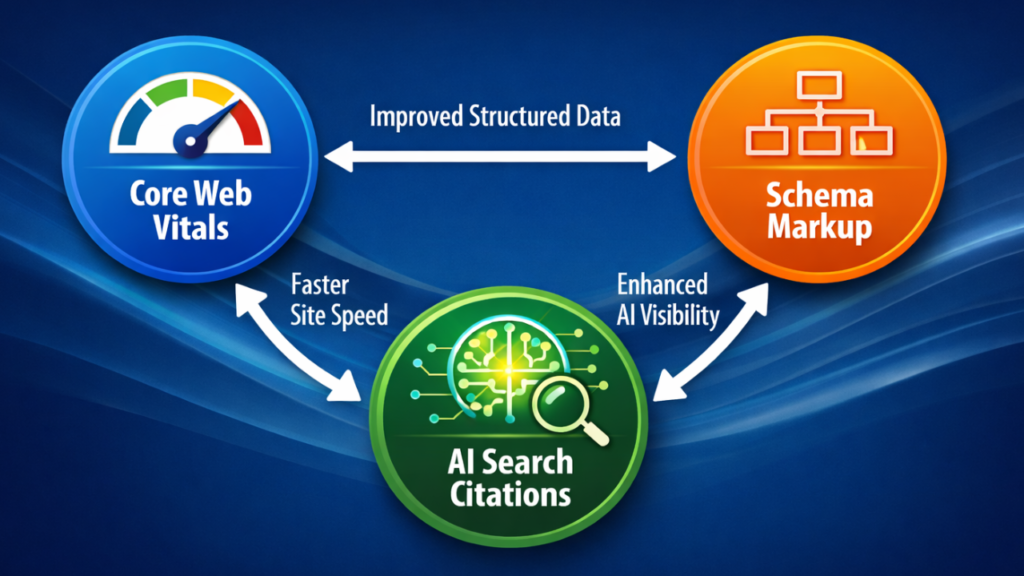
Most site speed guides stop at rankings and conversions. In 2025, there is a third reason to fix your Core Web Vitals AI search visibility.
Pages with poor CLS scores have unstable layouts during load. Google has less confidence parsing structured data from pages that shift during rendering. This directly affects both rich results eligibility and AI search citation frequency. A page failing Core Web Vitals is simultaneously harder to rank, harder for AI platforms to cite, and harder to convert visitors on.
Moreover, schema markup effectiveness depends partly on page stability. A page where structured data renders inconsistently due to layout shifts gives Google weaker signals reducing your chances of appearing in featured snippets, Knowledge Panels, and Google AI Overviews.
Understanding what is SEO service in its complete form means recognizing that technical performance, structured data, and AI visibility are not separate disciplines they are interconnected layers of the same ranking system.
Site Speed Optimization for Mobile: What Local Businesses Must Know
Google measures Core Web Vitals primarily from mobile Chrome user data. Your mobile score carries more ranking weight than your desktop score. For businesses targeting local search visibility, mobile Core Web Vitals directly affect Google Maps rankings and local pack placement.
In addition, local SEO services deliver significantly stronger results when your mobile page experience passes all three Core Web Vitals thresholds. A business appearing in the local pack but serving a slow mobile page loses the click advantage that local visibility provides.
Four mobile-specific quick wins to implement first:
- Reduce JavaScript payload: mobile devices process scripts significantly slower than desktop hardware
- Preload web fonts or switch to system fonts: eliminates font-induced layout shift on slow mobile connections
- Optimize above-the-fold images for mobile specifically: the LCP element on mobile is often different from desktop
- Eliminate mobile pop-ups: that trigger CLS by inserting content above the existing page fold
FAQ Site Speed Optimization Questions Answered
Site speed optimization is the process of improving how quickly your web pages load and respond to user interactions. It covers image compression, code optimisation, server performance, and Core Web Vitals improvements. Faster pages rank higher, convert more visitors, and receive stronger signals in both traditional and AI-driven search.
Google confirmed Core Web Vitals as ranking signals in 2021. Pages that pass all three metrics LCP, INP, and CLS gain a measurable advantage in competitive search results. More importantly, slow pages accumulate negative UX signals over time, compounding ranking disadvantage against faster competitors.
Use Google Page Speed Insights for per-URL analysis, Google Search Console for sitewide Core Web Vitals data, and SEMrush Site Audit for crawl-based detection of specific issues. Run all three tools each surfaces different categories of problems that the others miss.
Image optimisation fixes take one day. JavaScript and render-blocking fixes typically take one to two weeks with developer involvement. A complete Core Web Vitals audit and fix cycle usually runs two to four weeks. Changes take 28 days to show updated field data in Google Search Console.
Yes directly and significantly. A one-second improvement in load time increases conversions by up to 7%. Pages loading under one second convert three times more than pages loading in five seconds. Every speed improvement has a measurable conversion rate impact, particularly on mobile devices.
Every Core Web Vitals failure in Google Search Console is a technical audit item. A complete technical audit includes LCP diagnostics, INP script analysis, CLS layout checks, and TTFB server performance alongside standard crawl issues like broken links, missing meta tags, and redirect chains. To know if your SEO is working, your technical audit must include Core Web Vitals as a primary performance category.
Start Your Site Speed Optimization Today
Site speed optimization sits at the intersection of revenue, rankings, and AI search visibility. Fix your Core Web Vitals and you improve your conversion rate, your organic rankings, your local pack visibility, and your chances of being cited in AI-generated answers simultaneously.
Consequently, every week you delay is a week your competitors gain ground on pages that load faster, convert better, and rank higher than yours.

At Adclickr, we include Core Web Vitals diagnosis, prioritized fixes, and ongoing monitoring in every SEO services in Jaipur engagement. Start with a free report to see exactly where your site stands right now.
Get Your Free Site Speed Report →
Also read: how to identify the right content length · how to know if your SEO is working